
Vandaag of morgen in huis

Kwaliteit gegarandeerd

Welkomstaanbiedingen ontgrendelen: GRATIS bezorging | Tot 80% korting | Gratis 30 dagen JoyPlus-proefperiode
Download de app
A gaming headset with a microphone needs to do more than simply play audio. During a long session, it also matters whether the earcups remain comfortable, the cable stays out of the way and your teammates can hear you clearly. Even so, comparing product pages fairly can be difficult. Terms such as surround sound, noise cancellation and wireless sound appealing, but without the right technical context they do not always tell you enough.
In this guide, you’ll discover what to look for in a gaming headset for PC, PlayStation, Xbox, Nintendo Switch or smartphone. You’ll then find a selection of popular options, matched to different ways of using them.
RGB lighting does not change the audio quality. On some models, such as the ONIKUMA K8, the USB connection is intended solely to power the LED lighting, according to the product description. You use the 3.5 mm connection for audio and the microphone. Always check exactly what a USB port is designed for.
The term surround sound also needs some explanation. On the Razer BlackShark V2 X, 7.1 audio is activated via software, according to the product information. This means you need to check whether the feature is available on your platform and whether installation is required.
A headset for PC will not automatically work fully with every console. Pay attention to the type of connection and how your device supports voice chat. A 3.5 mm gaming headset often works directly through the controller or headphone socket. A USB headset, such as the Logitech PC 960, is primarily intended for a computer with a free USB port.
With a wireless gaming headset, you should also check whether the supplied dongle is suitable for your platform. Bluetooth is convenient for smartphones and tablets, but it does not always offer the same features as a 2.4GHz connection.
A low weight is useful, but it is not everything. The shape of the headband, the pressure on your ears and the material used for the ear cushions all affect how comfortable a headset remains over longer periods. Faux leather can create a good seal, while mesh or fabric may feel more breathable for some users.
Also consider the controls. A mute button on the cable or earcup is useful during voice chat. A flip-to-mute microphone, as found on various Turtle Beach models, makes muting quick, clear and easy.
A wired gaming headset does not have a battery and is ready to use straight away. A 3.5 mm model is convenient for consoles, laptops and mobile devices with a compatible connection. On a desktop PC, check whether you need a splitter if the microphone and audio use separate ports.
A wireless gaming headset gives you greater freedom of movement. Look at:
According to its product specifications, the Razer Barracuda offers up to 40 hours of battery life, Bluetooth 5.2 and a 2.4GHz connection. The HyperX Cloud III S Wireless offers up to 120 hours via 2.4GHz and up to 200 hours in Bluetooth mode. These are stated figures; actual battery life may vary depending on volume, connection and settings.
The diameter of the drivers, such as 40, 50 or 53 mm, is only one part of the overall sound. A larger driver does not automatically mean the headset will suit you better. Also consider the frequency response, impedance and type of audio reproduction.
Stereo is sufficient for many games. A surround sound headset can recreate directional information virtually, but the effect depends on the software, game settings and platform. Treat virtual surround sound as an additional feature, not a guarantee of better performance.
A good gaming headset with a microphone primarily needs to keep your voice clear in a busy environment. Check whether the microphone is adjustable, detachable or foldable. A microphone with a mute function prevents you from accidentally transmitting sounds from around the room.
With a noise-cancelling gaming headset, pay attention to the precise wording. Manufacturers may be referring to noise reduction for the microphone, while other models provide passive sound isolation through the ear cushions. According to the product description, the Razer Barracuda has built-in microphones with noise reduction. The Razer BlackShark V2 X is listed as offering passive sound isolation. These are different applications.

Why it suits this profile: According to the product description, this wired headset uses plug-and-play via 3.5 mm and is suitable for PC, laptop, Mac and phone.
The functions are clearly separated: the 3.5 mm connection is for audio and the microphone; according to the description, USB only powers the LED lighting.
Flexible microphone, volume control and RGB lighting; TPE ear cushions.
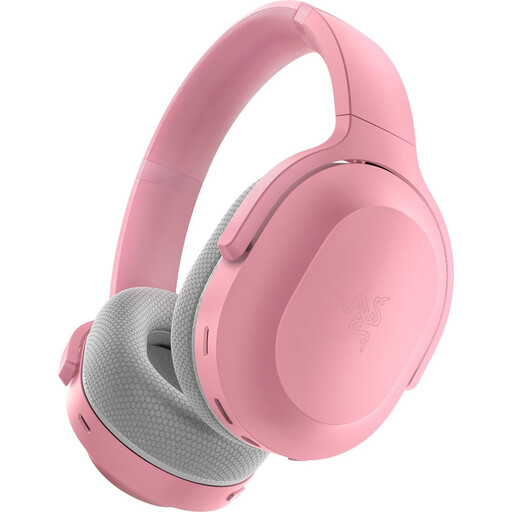
Why it suits this profile: Suitable for anyone who wants to use one headset with PC, PlayStation, Switch and Android using wireless modes.
The product information lists both 2.4GHz and Bluetooth 5.2, so you can choose between gaming and mobile use in advance.
Stated battery life of up to 40 hours, USB-C charging and 50 mm drivers according to the product specifications.

Why it suits this profile: A practical choice for players looking for a lightweight headset with a 3.5 mm connection for PC, PlayStation, Xbox and Nintendo Switch.
The connection and platform compatibility are clearly stated. According to the product information, the 7.1 effect requires software and an activation code.
Weight of 240 grams, 50 mm drivers and a cardioid microphone according to the product details.
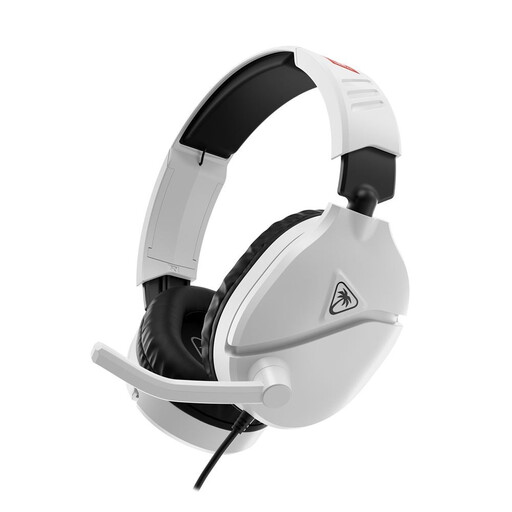
Why it suits this profile: According to the product specifications, this headset is designed for Nintendo Switch, Switch Lite, Switch OLED and Switch 2.
The 3.5 mm connection requires no battery or wireless pairing. The flip-up microphone mutes when you move it upwards.
40 mm speakers, an in-line control and a flip-to-mute microphone according to the product information.
We’ve put together a complete, up-to-date list of products that fully meet these strict selection criteria and the applicable European safety regulations.
Use this quick checklist before ordering:
This depends on the connection and the stated compatibility. A 3.5 mm model often works through the controller or headphone socket. For a USB or wireless headset, you need to check whether the console and supplied dongle are supported.
A wireless model needs charging and contains a battery that may gradually lose capacity over time. There are no battery costs when the headset is charged via USB, but you do depend on the charging cable and the stated battery life. A wired headset does not require this maintenance.
Its lifespan depends on cable strain, storage, cleaning and everyday use. Do not leave a wired headset hanging by the cable, avoid moisture and store it in a dry place. With a wireless model, the battery is an additional component to consider. The statutory guarantee and consumer rights depend on the seller, the product and the applicable EU regulations.
