
Players who get absorbed in the story
You want to follow dialogue, music and ambient sounds, so you’re choosing for the overall listening experience, not just clear audio cues.


Choose a headset that connects to your PC or console and feels comfortable throughout your usual gaming session. For historical adventures, you’ll want to hear dialogue and ambient sounds clearly. If you play in a quiet room shared with others, sound leakage and keeping the volume at a sensible level matter too. Wireless gaming gives you more freedom to move, but check the compatibility of the exact model and remember that it needs charging. A wired headset doesn’t need its battery charging, but you’ll be tethered by a cable.
You want to follow dialogue, music and ambient sounds, so you’re choosing for the overall listening experience, not just clear audio cues.
You pay attention to pressure, ear cushions and heat when playing for extended periods. Tweakers described differences in perceived comfort between the models and materials they tested.
You play when others need peace and quiet, so you consider sound leakage, keeping the volume at a sensible level and whether you need a microphone.
| What to consider | What to look for | Who is this important for? |
|---|---|---|
| Dialogue and atmosphere | If possible, listen to voices and quieter scenes. Check that any audio settings you want to use work on your platform. | If you want to follow conversations and ambient sounds in adventure games, don’t rely on a surround sound label alone. Around 26% of consumers put dialogue and atmosphere first. |
| Comfort during long sessions | Consider clamping pressure, heat and the ear cushion material. If possible, try the headset on with your glasses. | If you play for long stretches, how the headset feels over time matters more than how soft the cushions seem at first. Around 21% of consumers make wearing comfort their top priority. |
| Keeping the peace at home | Check how much sound other people can hear, and keep an eye on both the volume and listening time. | If you play while others need peace and quiet, you’ll want to balance noise isolation with keeping the volume at a sensible level. Around 21% of consumers put peace and quiet in shared spaces first. The WHO gives 80 dB for up to 40 hours a week as an example; at higher sound levels, safe listening time decreases. |
| Connection and platform | Check the available connection, such as 3.5 mm or USB, and the full model and platform details. | If you want to be sure the headset works with your console or PC, compare the exact model before choosing. Around 21% of consumers consider platform compatibility the most important factor. |
| Wired or wireless | Decide whether you need the freedom of wireless gaming and check which connections your device supports. | If you usually play in one place, a cable may be more practical than features you won’t use. Wireless gaming also means charging the headset. Around 11% of consumers put simplicity and ease of use first. |
Compatibility can vary by model. SteelSeries specifically lists the Nova 5X for Xbox, while the range name alone doesn’t tell you which version you need.
Before choosing, compare the full model and platform details with your console.
The wired Cloud III is an option if you’re looking for a choice of connections and soft ear cushions.
The Arctis Nova 5 range could suit you if you want wireless gaming and the option to customise sound profiles.
The PULSE 3D is designed for use with PS5 3D audio.
The Stealth 600 Gen 3 is designed for wireless use with 2.4 GHz and Bluetooth.
The BlackShark V2 X is a wired option with a 3.5 mm connection and closed-back ear cups.
This selection includes wired and wireless gaming headsets for a range of gaming platforms. Check that the connection on each version is right for your device.
 No image available
A wireless option for gaming on PlayStation if you want to adjust the sound settings.
The product listing mentions 2.4 GHz, Bluetooth, interchangeable batteries and a USB base station. Wireless use means you’ll need to charge it.
 No image available
A wired option for PC gaming with voice chat.
The product listing mentions a USB connection, 40 mm drivers and a cardioid microphone. According to the product description, the stated 7.1 surround sound feature is only available on Windows.
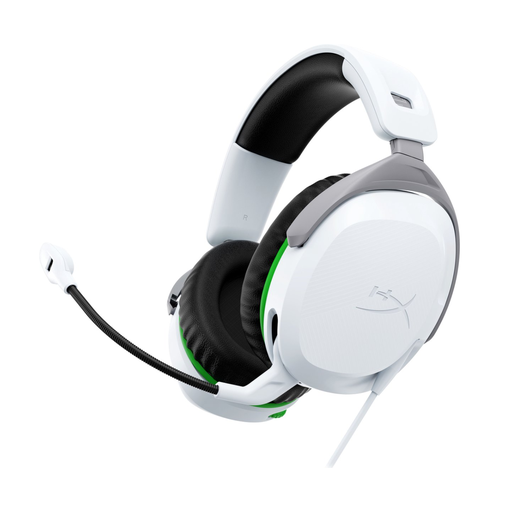 No image available
A wired option for Xbox if you’re looking for a 3.5 mm connection and memory foam ear cushions.
The product listing mentions 50 mm drivers, a swivel-to-mute microphone and rotating ear cups. This is the wired Xbox version.
 No image available
A wired option for PS5 or PS4 if you want to use a 3.5 mm connection.
The product listing mentions 50 mm drivers, memory foam ear cushions and rotating ear cups. This is the PlayStation version.
 No image available
A wired option if you want to use voice chat and choose between a 3.5 mm connection and USB DAC.
The product listing mentions 50 mm drivers and a flip-to-mute microphone. According to the listing, the Logitech G HUB software is required for the stated 7.1 surround sound feature.
No, you don’t need a dedicated headset such as the PULSE 3D to use the PS5’s 3D audio settings. PlayStation does describe the PULSE 3D as designed for that audio, but you should also check that your chosen headset’s connection works with your device.
Check which connection is available on each device. HyperX lists 3.5 mm, USB-C and USB-A for the wired Cloud III, and names PC, PS5 and Xbox among its compatible platforms. Don’t assume the Wireless version has the same connections.
Keep an eye on both the volume and listening time. The WHO gives an average of 80 dB for up to 40 hours a week as an example; at higher sound levels, safe listening time decreases.
No, check compatibility for the exact version before choosing. For example, SteelSeries specifically lists the Nova 5X for Xbox, while Turtle Beach recommends checking compatibility for each Stealth 600 model.