
Players with long sessions
You play match after match and want the headband and ear cushions to stay comfortable. A stated weight or soft padding is no substitute for trying the fit for yourself.


Start with a headset that connects to your PC or console, then choose one that suits you in terms of fit and microphone controls for long matches. Wired gaming means no charging, but limits your freedom to move; with a wireless headset, you’ll need to consider battery life and platform compatibility. Manufacturer specifications won’t tell you how comfortable a headset feels or how clearly your teammates can hear you.
You play match after match and want the headband and ear cushions to stay comfortable. A stated weight or soft padding is no substitute for trying the fit for yourself.
You give your teammates directions during matches and want a practical microphone and an easy-to-reach mute button. Described features aren’t an independent measure of how clearly you’ll be heard.
You play on more than one device or want to listen to mobile audio while gaming. The connection and support offered by the specific version are key.
| What to consider | What to look for | Who is this important for? |
|---|---|---|
| Fit and listening comfort | Check whether the headband is adjustable and what the ear cushions are made from; try the fit yourself if possible. Keep the volume down and take listening breaks. | During long matches, I want to avoid pressure or heat becoming a distraction; a stated weight doesn’t prove how a headset will feel on me. Around 31% of consumers prioritise fit and listening comfort. |
| Team chat | Look at the microphone position, an easy-to-reach mute button and support for your platform; test how your voice sounds yourself if you can. | When giving directions during a match, I want to be able to control the microphone easily and check how my voice sounds. Around 25% of consumers put team chat first. |
| Platform and connection | Compare your device’s ports with the connection, cable or dongle supplied, and any platform-specific features. | I want the headset to work with the device I play on, without relying on a feature that only works on another platform. Around 25% of consumers give compatibility top priority. |
| Wireless or wired | Check that your platform supports the connection and see what battery life the manufacturer states for the specific version. | Playing without a cable gives me more freedom to move, but I want to know how charging and connectivity will fit into the way I use it. Around 19% of consumers choose freedom of movement as their main consideration. |
Razer states that the advertised 7.1 feature on the BlackShark V2 X is only available on Windows 11.
Check the platform requirements for sound features separately from the headset’s general compatibility.
Weight and materials don’t tell you exactly how the headband and ear cushions will feel after hours of wear.
Use product specifications to compare models, then judge the fit for yourself, subject to the applicable returns policy.
According to ACM ConsuWijzer, your statutory rights exist alongside a manufacturer’s or retailer’s warranty and depend on what you could reasonably expect from the product.
Keep your proof of purchase and report any fault that develops during normal use to the retailer.
The wired Cloud III is worth considering if you want a choice of connections and controls on the ear cup.
The wired BlackShark V2 X is an option if you’re looking for a 3.5 mm connection and an adjustable microphone.
The Arctis Nova 7 Wireless Gen 2 is worth considering if you want to combine wireless game audio with Bluetooth audio from a mobile device.
The PRO X 2 LIGHTSPEED is a wireless option if battery life and a choice of ear cushion materials are important to you.
This selection includes wired and wireless gaming headsets for long gaming sessions and team chat. Check that each model’s connection and platform support are right for your device.
 Image unavailable
A wired option if you want to control team chat with a flip-up microphone that mutes when raised.
It has a 3.5 mm connection. JBL QuantumSURROUND is listed for PC only; the product information also mentions memory foam.
 Image unavailable
A wireless option if you want to combine gaming and team chat with a flip-up microphone that mutes when raised.
The product information lists a 2.4 GHz dongle, Bluetooth 5.2 and memory foam ear cushions. The product name lists Xbox Series X|S, Xbox One, PC, Switch 2 and mobile; check which connection is right for your device.
 Image unavailable
A wired option if you’re looking for a headset with a flip-up mute microphone for gaming and team chat.
It has a 3.5 mm connection. The product information lists mesh ear cushions and on-ear volume controls; the product name lists Nintendo Switch, Switch Lite, Switch OLED, PC and mobile.
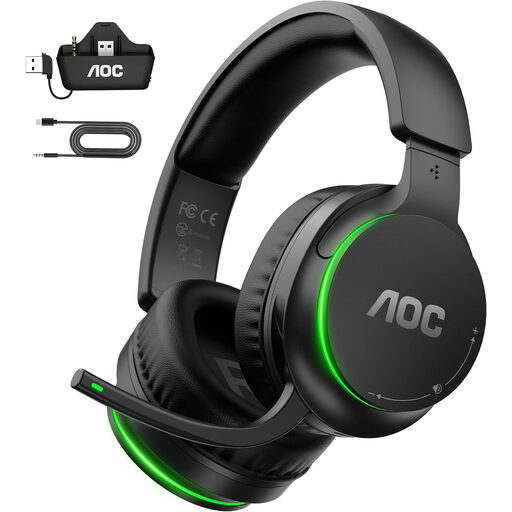 Image unavailable
A wireless option if you want to use team chat during long gaming sessions and flip up the microphone to mute it.
The product information lists a 2.4 GHz transmitter and memory foam ear cushions. The product name lists Xbox Series X|S, Xbox One, PS5, PC and Switch; check the connection for your device.
 Image unavailable
A wired option if you’re looking for an adjustable headband and a microphone with a mute function for long gaming sessions and team chat.
It has a 3.5 mm connection. The product information lists soft, breathable ear cushions and a flexible microphone; the product name lists PS5, Xbox Series X|S, Xbox One and PC.
First, compare your device’s connection with that of the specific headset version. HyperX says the wired Cloud III supports 3.5 mm, USB-C and USB-A. Then check that the right microphone is selected in your device or game and that it isn’t muted.
The World Health Organization recommends keeping the volume low and taking regular listening breaks. As an example, it suggests a maximum of 40 hours per week at an average of 80 dB and four hours per week at 90 dB. These aren’t measured sound levels for the headsets mentioned here.
According to ACM ConsuWijzer, you have statutory rights in the Netherlands if a product doesn’t meet what you could reasonably expect. The retailer must put any applicable fault right; a stated manufacturer’s warranty doesn’t replace your statutory rights.
ACM ConsuWijzer says you generally have a statutory 14-day cooling-off period after delivery for online purchases. Before trying the headset extensively, check the applicable exceptions and packaging rules. Any longer returns period offered by a retailer is a separate store policy.