
Vandaag of morgen in huis

Kwaliteit gegarandeerd

Welkomstaanbiedingen ontgrendelen: GRATIS bezorging | Tot 80% korting | Gratis 30 dagen JoyPlus-proefperiode
Download de app
A gaming headset needs to do more than play game audio. During a long session, you want to stay comfortable, hear your teammates clearly and connect to your PC, console or smartphone without any hassle. Yet buyers regularly pay for features that prove less important in practice than expected.
The main pitfalls are:
A wired gaming headset with a 3.5 mm connection is usually easy to connect to a controller, laptop, PC or mobile phone. It does not require a battery, and the connection remains active as long as the cable is properly connected. With a desktop PC, check whether you have a single combined socket or need a splitter.
A wireless gaming headset usually works via Bluetooth, a 2.4GHz USB receiver or both. 2.4GHz is primarily intended for gaming with low latency. Bluetooth is convenient for a phone or tablet, but it cannot be used directly with every PlayStation or Xbox model. Always check the compatibility list.
For a headset for PC and multiple consoles, a 3.5 mm model can be practical. If you mainly play on PS5, check whether the microphone and volume controls are supported through the controller. With Nintendo Switch, the connection to the console or controller is equally important.
A gaming headset with microphone is useful for online chat, but pay attention to the controls. A flip-to-mute microphone is muted as soon as you flip it upwards. Other models have a button or volume control on the earcup or cable.
A detachable microphone is useful if you also use the headset for music or video. You can position a flexible microphone closer to your mouth. Also check whether the microphone is fixed, flip-up or detachable; these terms describe different designs.
An over-ear gaming headset completely surrounds the ears. This can help reduce ambient noise passively, but it may also feel warmer. Look at the material used for the ear cushions and check whether the headband is adjustable.
The size of the drivers, such as 40 mm or 50 mm, provides information about the speakers, but does not by itself predict sound quality. A frequency range such as 20 Hz–20 kHz describes the stated range; it does not tell you how balanced the headset sounds.
With a surround sound headset, check whether the surround sound is virtual and requires software. For example, the Razer BlackShark V2 X states that it offers 7.1 surround sound via software. According to the product information, the Trust GXT 415 Zirox uses stereo and has no virtual 7.1 function. This difference matters if you are mainly looking for a simple plug-and-play experience.

Why it suits this profile: This wired headset is suitable for gamers who want to play on PC, laptop, PlayStation, Xbox and Nintendo Switch without having to recharge it.
The fixed 3.5 mm connection eliminates the need to manage battery life and, according to the product information, works across multiple platforms. Surround sound and wireless freedom are deliberately not part of the package.
244 grams, 50 mm drivers, soft over-ear ear cushions, a 2-metre cable and a flip-up microphone.

Why it suits this profile: The Fayzo combines wireless gaming with a wired option and is designed for users who want to switch between PC, console and smartphone.
The specifications distinguish between 2.4GHz, Bluetooth and wired connections. This means you can check in advance which connection is suitable for your device.
Up to 22 hours of stated battery life, virtual 7.1 surround sound, 50 mm drivers and a detachable microphone.
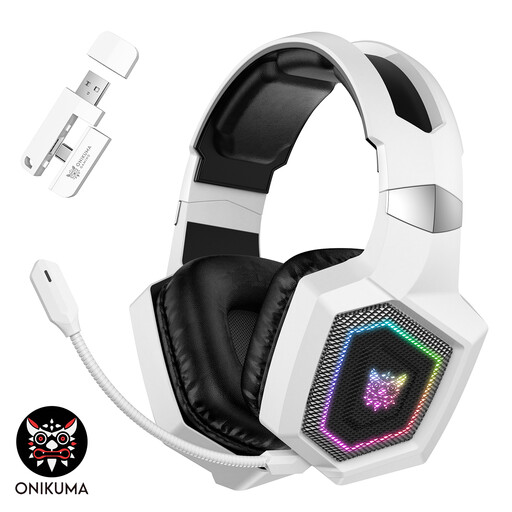
Why it suits this profile: For players who value wireless flexibility, RGB lighting and long gaming sessions, this model offers three connection modes.
The product information lists 2.4GHz, Bluetooth and USB-C cable use separately. It also states that RGB lighting drains the battery faster.
Stated battery life of up to 40 hours via 2.4GHz for gaming, 50 mm drivers, detachable microphone and RGB lighting.
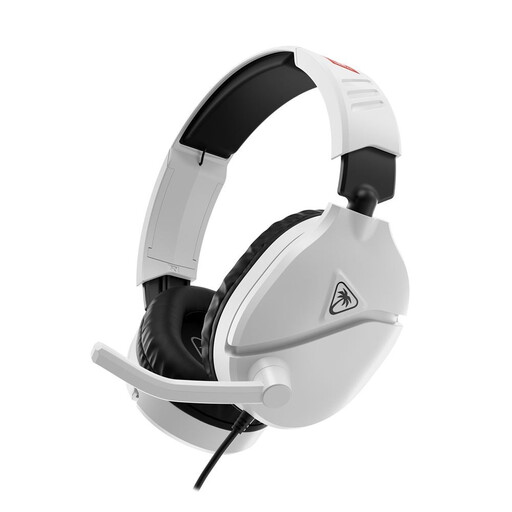
Why it suits this profile: This model is designed for Switch, Switch Lite, Switch OLED and Switch 2 and uses a direct 3.5 mm connection.
You do not need a wireless receiver or a separate battery. The flip-to-mute microphone and volume control are available directly.
40 mm speakers, 3.5 mm connection, flip-up mute microphone and a stated weight of 232 grams.
That depends on the connection. A 3.5 mm gaming headset often works with PC, laptop, PS5, Xbox and Nintendo Switch, but check whether your PC requires a combined audio socket or splitter. With wireless models, you need to check specifically whether they support Bluetooth or the supplied USB receiver.
Its lifespan depends on cable use, hinges, ear cushions and battery care. Keep the headset dry, do not pull on the cable and do not fold the microphone beyond its stated range of movement. With wireless models, the usage time per charge decreases over time. A wired model does not require this type of battery maintenance.
A wireless headset needs to be recharged regularly. RGB lighting can reduce battery life. A wired headset does not require separate charging power, although some models may use USB power for lighting. Do not keep the volume high for long periods and take breaks during extended sessions.
We have put together a complete, up-to-date list of products that fully meet these strict selection criteria and the applicable European safety regulations.
