
Vandaag of morgen in huis

Kwaliteit gegarandeerd

Welkomstaanbiedingen ontgrendelen: GRATIS bezorging | Tot 80% korting | Gratis 30 dagen JoyPlus-proefperiode
Download de app
A gaming headset with a microphone might seem easy to choose, until you discover that not every connection works with every console. Marketing terms such as “surround sound”, “spatial audio” and “noise cancelling” don’t always tell you what to expect in practice, either. Choose the wrong one and you could end up with a cable that won’t fit, a microphone that isn’t recognised or ear cushions that become uncomfortable after a short time.
In this buying guide, you’ll find out what to look for in a wired gaming headset, wireless gaming headset or over-ear gaming headset. Then you’ll find recommendations for different uses.
A headset’s product name might suggest that it works with several platforms, but always check the exact connection. A 3.5 mm gaming headset will usually connect directly to a controller, laptop, phone or Nintendo Switch with a compatible port. However, if your PC has separate ports for audio and microphone, you may need a splitter or extension cable.
A USB gaming headset uses a digital connection. This can be useful for PC software and virtual audio features, but not every console controller has a USB port that supports audio. So check:
Many models use virtual surround sound. This is where stereo audio is processed by software to make direction and distance sound more spacious. It’s different from physical 7.1 speaker channels.
According to its product description, the Logitech G G432 offers DTS Headphone:X and 7.1 audio via the USB DAC and Logitech G HUB software. The Trust GXT 415 Zirox models, on the other hand, deliver stereo 2.0. Both can be suitable for gaming, but they’re designed for different uses. So don’t just look for “surround” on the packaging. Check:
A lighter headset can help, but comfort also depends on the headband, clamping force, ear cushions and ventilation. An over-ear gaming headset should fully cover your ears without pressing hard against your temples. Look at materials such as memory foam, nylon, faux leather or breathable fabric. Faux leather can block out more external sound, while fabric cushions may feel less warm for some users.
A wired gaming headset doesn’t need a battery and is ready to use straight away. The cable can get in the way, though, especially if you’re sitting some distance from your PC or console. So check the cable length: models in the range, for example, vary from 1.2 to 2 metres.
A wireless gaming headset gives you more freedom to move, but needs charging. Check the connection: 2.4 GHz via a dongle is different from Bluetooth. Also make sure your console, PC and mobile device are supported. For example, the HyperX Cloud III S lists 2.4 GHz and Bluetooth 5.3, with a claimed battery life of up to 120 hours via 2.4 GHz and up to 200 hours via Bluetooth, according to the manufacturer.
A gaming headset with a microphone should have a practical mute option. This could be a button, a control on the cable or a microphone that flips up. A detachable microphone is useful if you also use the headset for music or films.
Look out for the difference between:
Larger drivers, such as 40, 50 or 53 mm, tell you about the speaker unit, but don’t by themselves indicate how the headset will sound to you. Also check the type of audio, impedance and available software.
For longer sessions, models weighing around 240 to 310 grams are often practical, although fit is a personal matter. Use your headset at a moderate volume and take regular breaks.

Why it suits this profile: This wired gaming headset uses a 3.5 mm connection and, according to the product description, works with PC, laptop, PlayStation, Xbox and Nintendo Switch. That makes it a good choice for households with several devices.
The product information clearly states stereo 2.0 rather than virtual 7.1 surround. So you won’t be paying for a feature this model doesn’t have.
50 mm drivers, a 2-metre cable, a flip-up microphone and a weight of 244 grams.

Why it suits this profile: This model combines memory foam in the headband and ear cushions with USB-C, USB-A and 3.5 mm connections. It’s designed for players who value comfort and broad compatibility.
The product details list both the available connections and DTS Headphone:X 2.0. This makes it clear that the spatial audio is virtual and doesn’t work the same way on every platform.
53 mm drivers, a detachable microphone with mute indicator, and support for PC, PS5, Xbox, Switch, Mac and mobile.
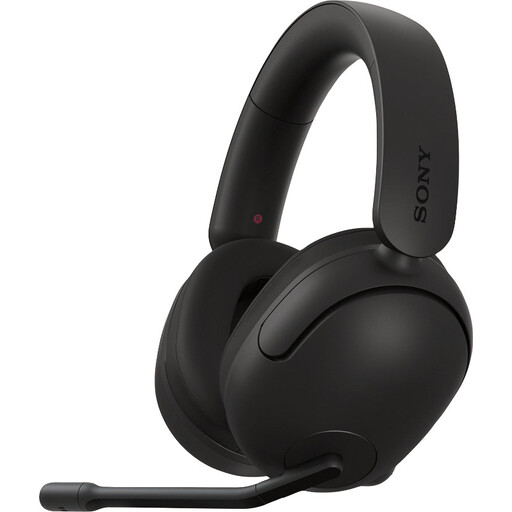
Why it suits this profile: The Sony INZONE H3 is designed specifically for Windows and PlayStation 5. The USB audio box gives you access to software features on PC, while a 3.5 mm cable is also available.
Compatibility isn’t universal: the product details list PC, PS4 and PS5. This helps you avoid buying it for Xbox or Switch without checking first.
Virtual 7.1 feature via INZONE Hub, a flip-up microphone and nylon ear cushions; the stated weight is 299 grams.
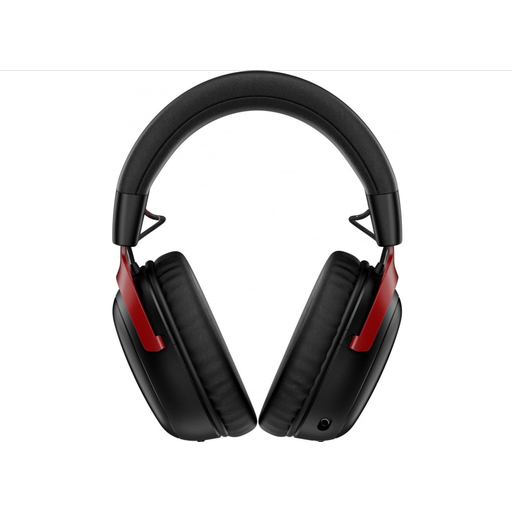
Why it suits this profile: This wireless gaming headset supports 2.4 GHz and Bluetooth 5.3. It’s a good fit if you switch between a PC, Xbox Series, mobile and other Bluetooth devices.
The different connection types are listed separately. Check in advance that your device supports the mode you want, and remember that the headset needs charging.
Claimed battery life of up to 120 hours via 2.4 GHz, a detachable microphone, 53 mm drivers, and included USB-A and USB-C connections.
We’ve put together a complete, up-to-date list of products that meet these strict selection criteria and the applicable European safety regulations.
A model with a 3.5 mm connection is often the most versatile, as you can plug it directly into a compatible controller, laptop or console. If your PC has separate audio and microphone ports, check whether a splitter is included. The Trust GXT 415 Zirox, Logitech G G335 and several Turtle Beach models list support for multiple platforms.
A wireless model doesn’t need a cable replaced, but you will need to charge the headset. Running costs are mainly the electricity used for charging and, potentially, replacing the battery over time. A wired gaming headset works straight away without charging, but you’ll need to take care of the cable and 3.5 mm port.
Its lifespan depends on strain on the cable, hinges, ear cushions, moisture and daily use. Store your headset somewhere dry, don’t pull on the cable and don’t bend the microphone further than intended. According to the product information provided and EU consumer rules, the products listed come with a legal guarantee of at least two years. However, the guarantee period doesn’t mean every component will last indefinitely.
