
Vandaag of morgen in huis

Kwaliteit gegarandeerd

Welkomstaanbiedingen ontgrendelen: GRATIS bezorging | Tot 80% korting | Gratis 30 dagen JoyPlus-proefperiode
Download de app
A gaming headset needs to do more than simply play sound. You want to follow in-game audio clearly, speak intelligibly with your teammates and wear the headset for hours without discomfort. However, it is easy to pay too much for features you will not use, or choose a model that is not fully compatible with your console.
The most common pitfalls are clear:
A wired gaming headset with a 3.5mm connection is usually easy to connect to a controller, PC, laptop or Nintendo Switch. There is no need to charge it or pair it wirelessly. Do check the cable length and your PC’s connections. Some computers require a splitter or extension cable.
A wireless gaming headset often uses a USB receiver for a 2.4GHz connection. This is generally designed for low-latency gaming. Bluetooth is useful for a phone or tablet, but check beforehand whether your console supports Bluetooth audio directly. A headset with both 2.4GHz and Bluetooth offers greater flexibility, but usually comes at a higher price.
The term 50mm drivers refers to the diameter of the speaker elements, not automatically to the sound quality. Larger drivers can produce spacious, powerful sound, but tuning, the enclosure and software also play a role.
Pay attention to the difference between:
According to the product description, the Trust GXT 490W Fayzo offers virtual 7.1 surround sound via USB on PC. On consoles, the description states that audio may be in stereo. The Trust GXT 498P Forta delivers stereo sound and supports 3D audio on PS5 when enabled in the console settings. So do not just check the marketing label: also check which device and connection a feature works with.
A gaming headset with microphone is suitable for team chat, streaming and online multiplayer. A detachable microphone is practical if you also want to use the headset without one. A flip-up microphone is quicker to operate and may mute automatically, depending on the model.
For long sessions, you can check the following points:
Also consider the material. Faux-leather cushions often provide a good seal, but may feel warmer. Breathable fabric can be more comfortable during extended use. No single fit works for every head, so check the dimensions and returns policy before ordering.

Why it suits this profile: This wired gaming headset connects via 3.5mm to a PC, laptop, PlayStation, Xbox or Nintendo Switch. That makes it suitable for anyone who wants to get started without a complicated setup.
You do not need a battery or wireless receiver. The product description specifies stereo audio, so no 7.1 mode is presented as a full surround experience.
50mm drivers, a weight of 244 grams, over-ear ear cushions, a 2-metre cable and a flip-up microphone.

Why it suits this profile: This model combines wireless gaming with a 2.4GHz USB receiver and Bluetooth. According to the product information, it offers up to 22 hours of play time and can also be used wired.
The different connection options make it clear what you can use the headset for. Do check compatibility beforehand, as the stated support covers PS5, PS4 and Windows.
50mm drivers, virtual 7.1 surround sound, detachable microphone, Bluetooth, 2.4GHz and a rechargeable battery.
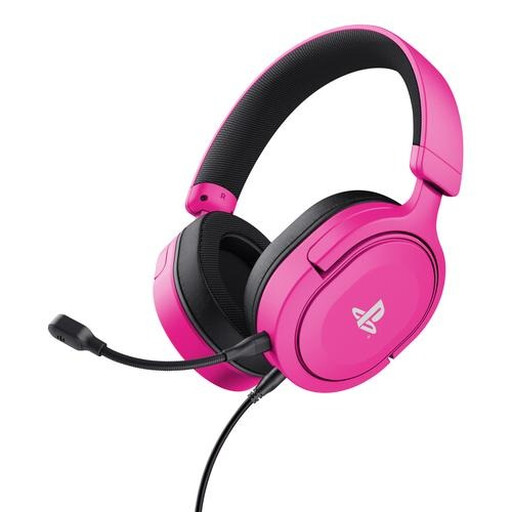
Why it suits this profile: This PS5 headset is designed for players looking for a lightweight, wired solution for PS5 and PS4. The official licence and 3.5mm cable make connecting via the controller straightforward.
The headset does not rely on a battery. The product information specifies stereo audio with 3D audio on PS5, rather than true surround sound.
253 grams, 50mm drivers, detachable microphone, rotating earcups and controls for volume and muting.
We have put together a complete, up-to-date list of products that fully meet these strict selection criteria and the applicable European safety regulations.
This mainly depends on the connection. A model with a 3.5mm jack will often work via the controller or console connection across multiple platforms. For Xbox, check that the controller has a suitable headset connection. USB models may vary between consoles. Always check the product’s official compatibility list.
A wired gaming headset is convenient if you do not want to charge a battery and value a simple connection. A wireless gaming headset gives you greater freedom of movement, but requires you to consider battery life, pairing and the supplied receiver. For PC gaming, 2.4GHz can be practical; Bluetooth is mainly useful for mobile devices and everyday use.
Its lifespan depends on usage, storage and the components most vulnerable to wear. Cables, ear cushions and microphone arms often take the most strain. A detachable cable or microphone can make maintenance and replacement easier. Store the headset in a dry place, do not pull on the cable and avoid using excessively high volume for long periods. Take regular breaks to avoid putting unnecessary strain on your hearing.
