
Vandaag of morgen in huis

Kwaliteit gegarandeerd

Welkomstaanbiedingen ontgrendelen: GRATIS bezorging | Tot 80% korting | Gratis 30 dagen JoyPlus-proefperiode
Download de app
Buying a gaming headset sounds straightforward, until you discover that not every headset works with your console, that a microphone does not always sound clear and that “surround sound” is sometimes only available through specific software. Comfort is also often underestimated: a headset that feels comfortable after a short session can still feel heavy or warm during a long multiplayer evening.
In this buying guide, we compare the key features of a wired gaming headset, explain technical terms in practical terms and match different models to recognisable user profiles.
A headset with a 3.5 mm jack usually works directly through the connection on a controller, laptop or PC. However, there can be differences:
So check the connection and the listed platforms before buying. “Multi-platform” does not automatically mean that every function is available on every device.
A headset with surround sound may use virtual spatial audio. According to Razer’s product information, the BlackShark V2 X’s 7.1 function is activated using software and a code. With the JBL Quantum 300, JBL QuantumSURROUND is linked to the JBL QuantumENGINE software on PC, according to the manufacturer.
In practical terms, this means the sound may work differently on a console than on a PC. A model with standard stereo may also be perfectly adequate for chatting and casual gaming. So do not just look for the term “7.1”; check the required software and platform as well.
For longer sessions, over-ear ear cushions, an adjustable headband and a suitable weight are important. A heavy model can create pressure, while synthetic leather may feel warmer than mesh. In-ear earbuds are lightweight and compact, but they do not provide a comfortable seal for everyone.
Also pay attention to the microphone. A flip-to-mute microphone can be muted quickly, while a detachable microphone is useful if you also want to use the headset for music or films.
A headset with a 3.5 mm jack is generally easy to connect and does not require a battery. This makes a wired gaming headset suitable for PC, PS5, Xbox and Nintendo Switch, as long as the correct port is available.
USB-C can carry a digital audio signal and may use a built-in DAC. According to the product description, the Samsung EO-IC100 has a USB-C connection and built-in DAC, but it is an in-ear headset for calls and music. So check whether your device supports USB audio.
Wireless models offer greater freedom of movement, but they need charging and may require additional configuration. With every model, you should check whether the supplied connection works with your device.
For online multiplayer, a gaming headset with microphone is more practical than standard headphones. Check the following:
According to the product information, the Turtle Beach Recon 70 mutes the microphone when you flip it upwards. The Trust GXT 415 Zirox has a foldable microphone and controls on the ear cup.
Drivers measuring 40 mm or 50 mm indicate the size of the speaker elements, but they do not determine the final sound quality on their own. A larger size is no guarantee of a better experience. Also consider comfort, tuning, microphone and connection.
A frequency range such as 20 Hz to 20 kHz is a common technical specification. It does not automatically indicate how powerful the bass will be or how clearly voices will sound. Use this figure mainly to compare models technically, rather than as a standalone quality claim.

Why it suits this profile: This wired model connects via 3.5 mm to PC, laptop, PlayStation, Xbox and Nintendo Switch. The fixed connection means there is no need for charging or wireless configuration.
The compatibility, 3.5 mm connection and stereo configuration are clearly specified. No virtual 7.1 function is included as standard.
244 grams, over-ear ear cushions, 50 mm drivers, foldable microphone and controls on the ear cup.
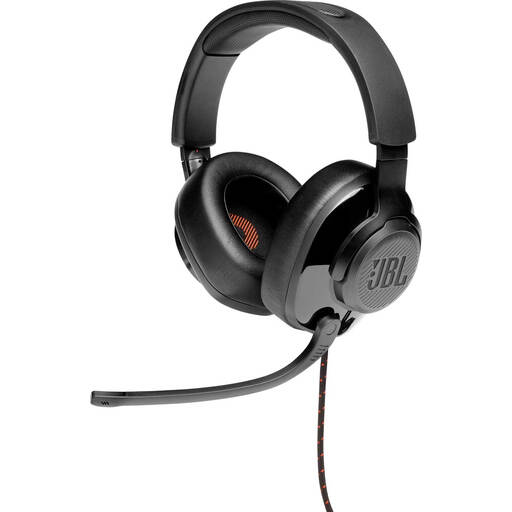
Why it suits this profile: Suitable for gamers who want to combine PC software, spatial audio and advanced microphone functionality with console compatibility.
The product information states that JBL QuantumSURROUND is available on PC through QuantumENGINE. This means you know in advance that the function does not work identically on every platform.
50 mm drivers, flip-up directional microphone, memory foam ear cushions and supplied USB audio adapter.

Why it suits this profile: A logical choice for players who communicate online frequently and want a wired headset for multiple platforms.
The 3.5 mm connection, compatible platforms and splitter required for certain PC connections are specified. The 7.1 function requires software activation.
240 grams, 50 mm TriForce drivers, cardioid microphone and memory foam ear cushions, according to Razer’s product information.
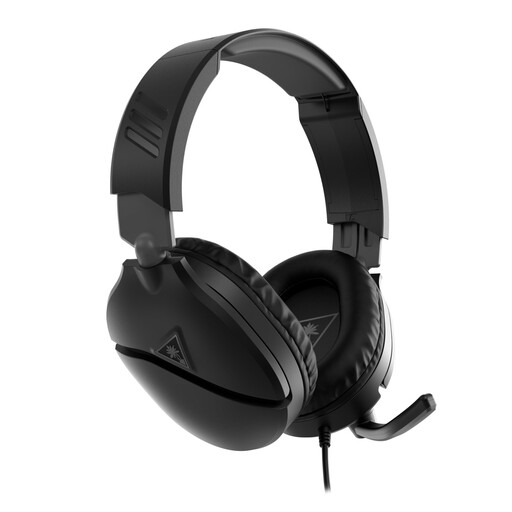
Why it suits this profile: This model is suitable for anyone who wants to use one headset with Xbox, PlayStation, Nintendo Switch, PC and mobile devices via 3.5 mm.
The fixed cable prevents charging issues, while the flip-to-mute microphone allows you to mute quickly. The product information also mentions support for spatial audio technologies.
40 mm speakers, over-ear ear cushions, volume wheel and a microphone that flips upwards to mute.
We have compiled a complete, up-to-date list of products that fully meet these strict selection criteria and the applicable European safety regulations.
Models with a 3.5 mm jack often work with multiple platforms through the controller or console port. However, check whether the product page lists your specific device and whether PC use requires a splitter. So a gaming headset for PS5 is not automatically suitable for Xbox if it uses a specific wireless connection.
A wired headset does not have a battery and can offer a direct plug-and-play connection. A wireless model provides greater freedom of movement, but needs to be charged and may require an adapter or pairing. For long sessions without interruption, wired is practical; for use at a distance, wireless may be more convenient.
Lifespan depends mainly on strain on the cable, hinges, ear cushions and exposure to moisture. When disconnecting the headset, pull the plug rather than the cable, store it somewhere dry and do not bend the microphone beyond its intended range. Keep the volume moderate and take regular breaks, as recommended in the safety information provided by several manufacturers.
