
Vandaag of morgen in huis

Kwaliteit gegarandeerd

Welkomstaanbiedingen ontgrendelen: GRATIS bezorging | Tot 80% korting | Gratis 30 dagen JoyPlus-proefperiode
Download de app
A gaming headset needs to do more than simply play game audio. You want to hear footsteps and warnings clearly, communicate with your teammates effectively and wear the headset comfortably for longer periods. However, there are several pitfalls that can make a model less suitable in practice than its product page suggests.
When comparing products, therefore, do not focus only on terms such as “surround sound” or “professional microphone”. Pay particular attention to the connection, weight, microphone controls and platform support. Below, you can find out what to look for in a wired gaming headset, wireless gaming headset or gaming headset with microphone.
A surround sound headset often uses virtual processing to simulate spatial audio. This may work through software, the console or a USB sound card. Therefore, check:
With the Razer BlackShark V2 X, 7.1 surround is linked to software and an activation code according to the product description. You can also use the headset without this software via the 3.5 mm connection, but you will need to take your device’s audio settings into account.
A 3.5 mm gaming headset often works with multiple devices, but the available functions may vary. For example, a microphone may work differently through a controller than through a PC with separate audio and microphone ports. Therefore, check whether you need:
A gaming headset for PS5, gaming headset for Xbox and gaming headset for Nintendo Switch may therefore use the same plug, but not necessarily offer the same settings or chat functions.
A lightweight headset is comfortable during long sessions, but the fit also depends on the headband, ear cushions and clamping force. An over-ear gaming headset should surround your ears sufficiently without feeling too tight. Check the stated weight, the cushion material and whether the headband is adjustable.
A wired gaming headset does not require a battery and is ready to use straight away. A 3.5 mm model is also convenient when switching between a PC, console and mobile devices. The downside is the cable, which can get in the way on a desk or when using a controller.
A wireless gaming headset gives you greater freedom of movement, but requires charging and checking the connection. Do not look only at the stated battery life; also consider the type of connection used. Bluetooth is not automatically suitable for every console or for games where low latency is important.
A 3.5 mm gaming headset is usually the simplest choice for controllers. Check the information for the specific model for use with PS5, Xbox Series X|S, Nintendo Switch, PC and mobile devices. A splitter may be required for PCs with separate ports.
A USB headset or headset with a USB audio box may provide additional software functions. According to the product information, the Sony INZONE H3 uses a USB audio box for PC settings and spatial functions, while the headset can also be connected via 3.5 mm to suitable devices.
A gaming headset with microphone is suitable for voice chat, but the type of microphone determines how practical it is to use. A flip-up microphone may mute automatically, while a detachable microphone is useful if you also want to use the headset for music or films.
Also check:

Why it suits this profile: According to the product information, this wired model uses a 3.5 mm connection and is suitable for PC, laptop, PlayStation, Xbox and Nintendo Switch.
The fixed cable means there is no need to charge the headset, and the product information clearly states that the model uses stereo sound rather than virtual surround sound.
50 mm drivers, a weight of 244 grams, over-ear ear cushions and a fixed 2-metre cable.

Why it suits this profile: The combination of 50 mm TriForce drivers, a cardioid microphone and support for multiple platforms is ideal for gamers who place great importance on audio settings and voice chat.
The product information makes it clear that 7.1 surround is activated via Razer software. The headset uses a 3.5 mm connection and weighs 240 grams.
50 mm drivers, memory foam ear cushions, volume control on the earcup and support for PC, Mac, PlayStation, Xbox and Switch.
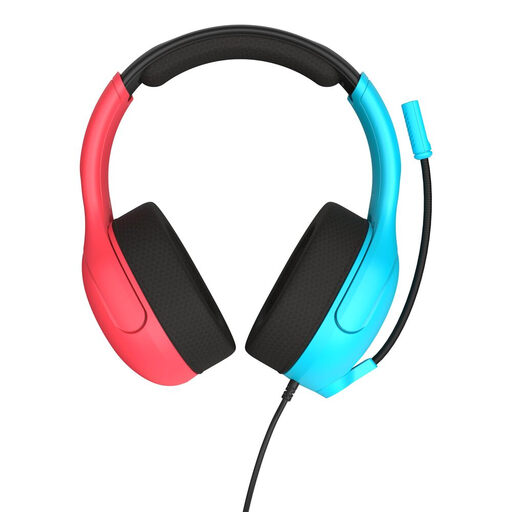
Why it suits this profile: This model is designed for Nintendo Switch, Switch Lite and Switch OLED, but according to the specifications it also works with PCs and mobile devices via 3.5 mm.
The flip-to-mute microphone and volume wheel are within easy reach. There is no need for separate software or a battery.
40 mm speakers, a weight of 228 grams, mesh ear cushions and official compatibility with Nintendo Switch models.
We have compiled a complete, up-to-date list of products that fully meet these strict selection criteria and the applicable European safety regulations.
That depends on the connection and the model. A headset with a 3.5 mm plug can usually be connected directly to the controller. However, check whether the product information mentions your console version and whether the microphone function is supported.
Its lifespan depends on cable use, hinges, ear cushions and storage. A wired model does not have a battery that loses capacity, but the cable can wear out. With wireless models, the battery is an additional point to consider. Store the headset in a dry place, do not pull on the cable and keep the volume at a comfortable level.
Yes, if your PC uses separate connections for audio and the microphone. If it has a single combined 3.5 mm port, a splitter is usually not required. A USB model can avoid this issue, but make sure to check software and platform support beforehand.
