
Vandaag of morgen in huis

Kwaliteit gegarandeerd

Welkomstaanbiedingen ontgrendelen: GRATIS bezorging | Tot 80% korting | Gratis 30 dagen JoyPlus-proefperiode
Download de app
A gaming headset needs to do more than simply play sound. During an online match, you want to hear your teammates clearly, pinpoint in-game signals and wear the headset for extended periods without irritation. Yet many product pages focus mainly on terms such as “surround”, “noise cancelling” and “professional microphone”. These words do not always tell you enough about how the headset performs in practice.
The three most common pitfalls are:
A wired gaming headset with a 3.5mm connection is usually easy to connect to a controller, laptop, PC or Nintendo Switch. With a desktop PC, check whether you need a splitter if the microphone and audio use separate connections. A fixed cable means there is no battery to charge, but you do have less freedom of movement.
A wireless gaming headset often uses a 2.4GHz USB receiver, Bluetooth or both. 2.4GHz is mainly intended for low-latency gaming, while Bluetooth is useful for a phone or tablet. Watch out for exceptions. With some models, for example, Bluetooth does not work directly with PS4 or PS5, while the USB receiver is compatible.
For a multi-platform gaming headset, check the following for each device:
A 7.1 surround sound headset can provide virtual spatial audio through software. This is different from having seven physical speakers in each earcup. According to Razer’s product information, 7.1 on the BlackShark V2 X is activated using software and a code. With the Logitech G432, DTS Headphone:X is linked to Logitech G HUB. The function may therefore depend on PC software and is not automatically available on every console.
Sony also states that the INZONE H3 offers virtual 360 Spatial Sound through the INZONE Hub software. With a simple 3.5mm connection, certain spatial features may remain limited. So do not just check whether “surround” is mentioned; also check where and how the function works.
A gaming headset with microphone is suitable for online multiplayer, but the microphone design makes a difference. You can position a flexible boom microphone closer to your mouth. A flip-to-mute microphone is useful when you want to mute yourself quickly. A detachable microphone is practical if you also use the headset for music or while out and about.
“Noise cancelling” can mean two things:
The supplied product specifications mention passive isolation for several models. Do not therefore automatically assume that this means active noise cancellation. According to the product description, the Razer BlackShark V2 X has passive sound isolation; the Trust GXT 491 Fayzo also mentions passive noise cancelling. This helps with concentration, but it will not make the room completely silent.
A comfortable gaming headset has an adjustable headband, ear cushions that fit around your ears and a weight suited to the way you use it. For comparison, the Razer BlackShark V2 X weighs 240 grams according to the product specifications, the Logitech G432 weighs 259 grams and the Trust GXT 491 Fayzo weighs 290 grams. Weight alone does not determine comfort, but it is a useful point of comparison.
Also consider the material. Faux leather can block out sound effectively, but may feel warmer. Fabric or nylon ear cushions can feel more breathable. Check whether the earcups swivel, whether the microphone can be folded away and whether the cable is long enough for your setup.
Use a headset at a safe volume and take breaks during long sessions. Listening at high volume for extended periods can cause hearing damage. Also keep cables out of walkways and do not leave a wireless model on charge for long periods when this is not necessary.

Why it suits this profile: According to the product specifications, the wired 3.5mm connection works with PC, laptop, PlayStation, Xbox and Nintendo Switch. This makes it a straightforward choice without a battery or wireless pairing.
The specifications clearly state stereo audio and no virtual 7.1 function. You therefore do not pay for a surround feature you do not need.
50mm drivers, a weight of 244 grams, over-ear ear cushions and a 2-metre cable.
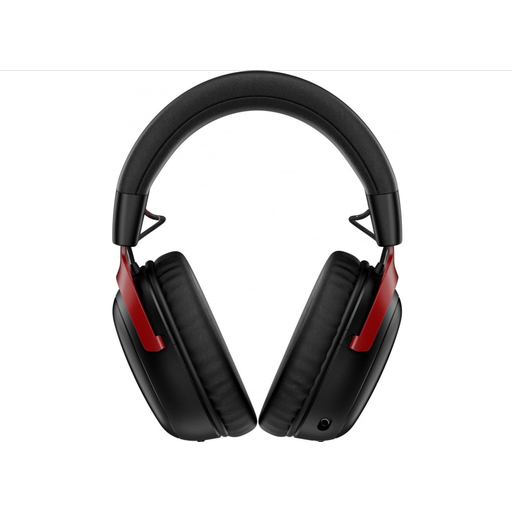
Why it suits this profile: If wireless freedom and long battery life are important to you, HyperX states that you get up to 120 hours via 2.4GHz and up to 200 hours via Bluetooth.
The connection types and platforms are listed separately. This allows you to compare 2.4GHz, Bluetooth and compatible devices directly.
53mm drivers, Bluetooth 5.3, a detachable microphone and DTS Spatial Audio for PC according to the product information.

Why it suits this profile: According to Trust, this model combines 2.4GHz, Bluetooth and a wired connection. The battery provides up to 22 hours of use according to the product specifications.
The headset does not rely exclusively on a single wireless method. You can choose the connection option to suit your PC, console or phone.
50mm drivers, virtual 7.1 according to the product description, an adjustable headband and a detachable microphone.
We have put together a complete, up-to-date list of products that fully meet these strict selection criteria and the applicable European safety regulations.
That depends on the connection. A headset with a 3.5mm jack will generally work through the controller or console connection, but check the product listing for each platform. USB and wireless models may require a specific receiver or software. With Xbox, the controller connection may also be a deciding factor.
A wired gaming headset does not need to be charged and has no battery that loses capacity over time. A wireless model offers greater freedom of movement, but needs charging and may depend on a USB receiver or Bluetooth. Consider your gaming setup and how often you use it, rather than just the purchase price.
Its lifespan depends on cable use, hinges, the microphone arm, ear cushions and storage. Keep the headset dry, do not pull on the cable and clean the ear cushions with a soft, dry cloth. In the European Union, consumers are entitled to a legal guarantee of at least two years; additional rights may depend on the circumstances and national legislation.
