
Vandaag of morgen in huis

Kwaliteit gegarandeerd

Welkomstaanbiedingen ontgrendelen: GRATIS bezorging | Tot 80% korting | Gratis 30 dagen JoyPlus-proefperiode
Download de app
A gaming headset needs to do more than just play game audio. You want to hear your teammates clearly, come across well yourself, and be able to play for hours in comfort. Yet product pages aren't always straightforward. A high frequency range number or the term "surround" doesn't automatically tell you how a headset will perform in your situation.
In this buying guide, I'll cover the most common pitfalls, technical specifications and popular choices for PC, PlayStation, Xbox and Nintendo Switch. The recommendations are based on verifiable product data such as connection type, weight, driver diameter and microphone type.
A surround sound gaming headset can use virtual or genuine channel separation. On some models, spatial audio is only activated via software on PC. The Trust GXT 498P Forta, for example, works as a stereo model, with 3D audio on PS5. The Logitech G432 advertises 7.1 surround and uses a USB DAC and Logitech software to achieve this.
So check:
A marketing term on the box is no substitute for the full compatibility list.
A wireless gaming headset keeps cables off your desk, but requires a battery, dongle or Bluetooth connection. Pay attention to the difference between:
According to the product specifications for the ONIKUMA GT806, Bluetooth doesn't work directly with PS5 and PS4. That's what the 2.4GHz connection with USB dongle is for. So always check which connection works with your device when buying a wireless gaming headset.
An RGB gaming headset might look great with your setup, but lighting has no direct relationship with microphone quality, comfort or sound reproduction. On some models, RGB also uses extra power. The ONIKUMA GT806, for example, lists a longer battery life without lighting than with it.
So choose RGB as a style choice, not as a key technical criterion.
A USB headset is mainly practical for PC and Mac. The Corsair HS80 RGB USB uses a wired USB connection and lists Dolby Audio 7.1 True Surround Sound for PC. For PS5, Xbox or Switch, USB isn't always universally compatible.
A 3.5mm connection is often more flexible. The wired gaming headset Logitech G G335 works with PC, PlayStation, Xbox and Nintendo Switch according to the product specifications. The Razer BlackShark V2 X also uses a 3.5mm connection and is designed for multiple platforms.
Check before you checkout:
For a comfortable gaming headset, weight and pressure distribution are more important than just the presence of memory foam. A model weighing 240 to 260 grams can feel more comfortable than a heavier one, but the fit varies from person to person.
Look for:
The Logitech G335 weighs 240 grams and uses an elastic suspension band with memory foam cushions. The Trust GXT 415 Zirox weighs 244 grams and has an over-ear design. These figures give a useful indication, but comfort remains personal.
With a gaming headset with microphone, don't just look at "noise cancelling". Check whether the microphone is foldable, removable or flexible, and how you mute it.
Useful features include:
According to the product specifications, the HyperX Cloud III has a removable 10mm microphone with mute indicator. The Trust GXT 498P Forta has a removable, flexible microphone and is officially licensed for PS5. This information tells you about the features, but it's no guarantee that every user will experience the same voice quality.

Why this fits: A practical choice for gamers who want to play on PC, laptop, PlayStation, Xbox or Switch without needing to charge.
The 3.5mm connection removes any reliance on a battery. This model is stereo and doesn't have a virtual 7.1 function.
244 grams, 50mm drivers, over-ear cushions and a foldable microphone.
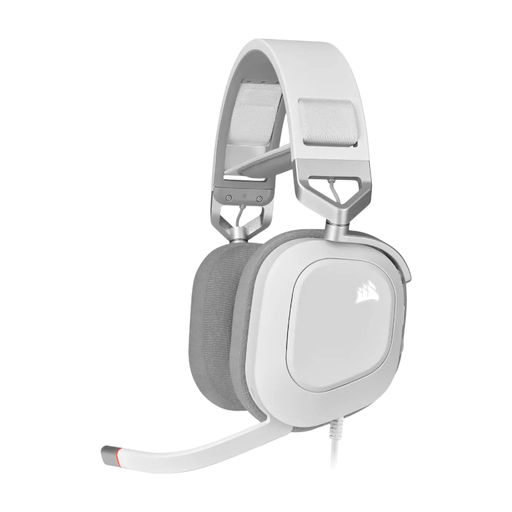
Why this fits: Suitable for PC gamers who want USB audio, on-headset controls and RGB lighting.
The product information clearly states this is a wired USB model for Windows. That means it's not a universal console headset.
50mm neodymium drivers, 20Hz–40kHz, flip-to-mute microphone and Dolby Audio 7.1 for PC according to the product specifications.
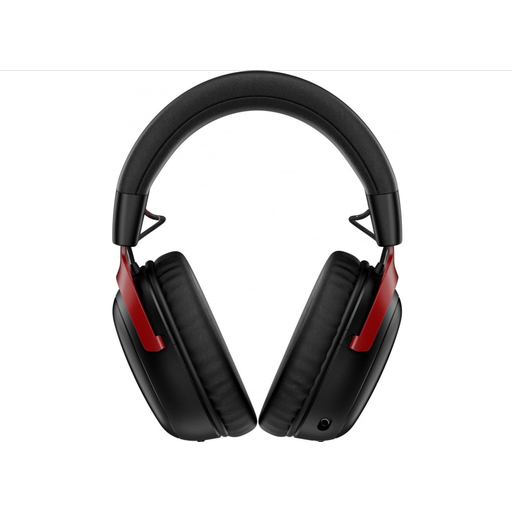
Why this fits: For those who value wireless freedom, long sessions and multiple connection options.
The product specifications list both 2.4GHz and Bluetooth 5.3. Do check in advance whether your console and preferred mode are supported.
Up to 120 hours battery life via 2.4GHz according to the product information, 53mm drivers and a removable microphone.
For a PS5 gaming headset, a 3.5mm model connected via the controller is straightforward, while an officially licensed model can offer extra reassurance about console use. The Trust GXT 498P and GXT 498W are designed for this and support PS5 and PS4 according to the product information.
For a PC gaming headset, USB models with software are interesting if you want to adjust an equaliser, virtual surround sound or RGB. A wired 3.5mm headset remains more practical if you also play on Xbox or Switch.
With an Xbox gaming headset, the main thing to check is whether the microphone works via the controller. A 3.5mm connection is often the simplest route. The same applies to Nintendo Switch, although voice chat can work differently depending on the game and system.
The lifespan depends on cable strain, hinges, ear cushions and daily use. A metal frame can offer extra durability, but never pull on the cable and store a wireless model in a dry place. With heavy use, replaceable ear cushions and a detachable cable are practical bonuses.
Beyond the purchase price, you use electricity for charging. The cost per charge is usually minimal, but a battery has a finite lifespan. A wired gaming headset has no charging costs and remains usable as long as the connection and cable are working properly.
Not automatically. Over-ear cups can enclose the ears, but the fit, clamping force, ventilation and weight determine wearing comfort. So check the dimensions and weight, and choose a model with an adjustable headband.
Browse a current selection of models that match these practical selection criteria and comply with applicable EU safety regulations.
