
Vandaag of morgen in huis

Kwaliteit gegarandeerd

Welkomstaanbiedingen ontgrendelen: GRATIS bezorging | Tot 80% korting | Gratis 30 dagen JoyPlus-proefperiode
Download de app
A gaming headset may seem simple: plug it in, set up the sound and start playing. Yet many people buy a model that is not well suited to their equipment or needs. A wireless gaming headset can be convenient, for example, but it has a battery and may experience connection issues. A wired gaming headset often works straight away, but the cable can get in the way.
Terms such as “surround sound”, “noise cancellation” and “long battery life” only really mean something once you check the technical details. Below, you’ll find what to look out for before buying a headset with a microphone, gaming earbuds or Bluetooth headphones.
Not every headset works in the same way with every console. So, check whether the product is suitable for your device:
A headset may be described as “wireless” in the product title, while low latency is only available through the supplied 2.4GHz dongle. Bluetooth is practical for music and phone calls, but can introduce more delay when gaming.
For wireless models, battery life is usually measured under specific conditions. Playback time can vary between Bluetooth, 2.4GHz, active noise cancellation and other features. So, don’t just compare the largest number in the advert. Check:
A lightweight headset is not automatically comfortable. Also consider its weight, the pressure from the earcups, the shape of the headband and the cushion material. During gaming sessions lasting several hours, firm ear cushions, a tight fit or a poorly adjustable headband can quickly become irritating.
With in-ear headphones, having several sizes of ear tips is important. A good fit helps keep the earbuds securely in place, but comfort remains a personal matter.
A 3.5mm jack is a simple plug-and-play option. It requires no battery or software, and works with many PCs, controllers, tablets and laptops. The Logitech G G335, for example, uses a wired 3.5mm connection and has a 1.8-metre cable.
A wireless model with a 2.4GHz radio connection is primarily designed for low latency while gaming. Bluetooth 5.x is useful for phones, music and flexible everyday use. However, check whether the headset supports both options and which accessories are included.
A headset with a microphone should not only play sound, but also provide clear communication. Look at:
The Logitech G G335 has a flip-to-mute microphone. The HyperX Cloud III S has a detachable boom microphone with a mute indicator. According to HyperX’s product description, it is designed for voice chat and calls; the final quality also depends on the settings, surroundings and connection used.
The driver diameter only tells you part of the story. The Logitech G G335 has 40mm drivers and a stated frequency range of 20 Hz to 20 kHz. The HyperX Cloud III S uses 53mm drivers and lists a range of 10 Hz to 21 kHz. A wider range does not automatically mean you’ll clearly hear every difference.
Distinguish between:
According to Sony’s own product information, the PULSE Explore features AI-assisted noise reduction for its microphones. This is a brand claim, so also consider the microphone position, fit and ambient noise in your own situation.
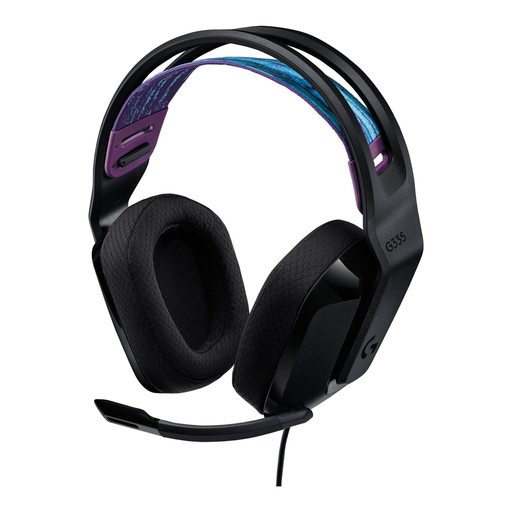
Why it suits this profile: This wired gaming headset is designed for straightforward use via 3.5mm and weighs 240 grams according to the product specifications. It is well suited to beginners who want to play on multiple platforms without having to manage charging.
No battery, dongle or Bluetooth pairing required. However, check beforehand that your device has a suitable 3.5mm connection.
240 grams, memory foam ear cushions, volume control on the earcup and flip-to-mute microphone.
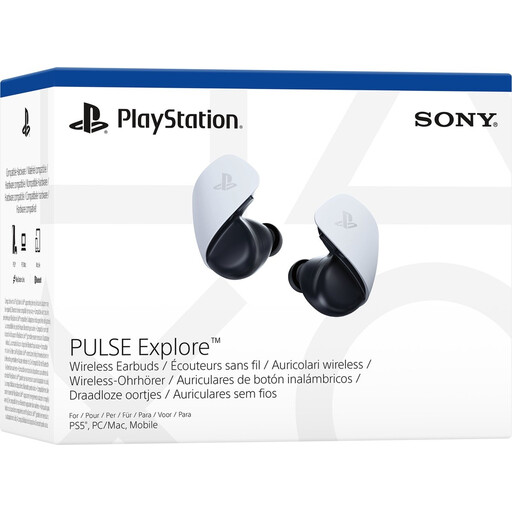
Why it suits this profile: These wireless earbuds are designed for PS5 users who also want to connect to a PC, Mac, PlayStation Portal and mobile devices.
The combination of PlayStation Link and Bluetooth means you are not limited to just one type of device. According to the product information, the battery lasts for up to 5 hours per charge.
Planar-magnetic drivers, charging case, Bluetooth and support for 3D audio in supported PS5 games.

Why it suits this profile: This model is designed for users who regularly switch between gaming, calls and mobile use and need several connection options.
The stated battery life varies by mode: up to 120 hours via 2.4GHz and up to 200 hours via Bluetooth. This makes it easier to relate the claim to your own usage.
2.4GHz and Bluetooth 5.3, detachable microphone, memory foam ear cushions and USB-A and USB-C accessories.
We have put together a complete, up-to-date list of products that fully meet these strict selection criteria and the applicable European safety regulations.
That depends on the connection and product support. A headset with a 3.5mm jack will often work via the controller or audio connection. Wireless models may use a USB dongle, PlayStation Link or Bluetooth. Always check the listed platforms and included accessories before placing your order.
It depends on your priorities. Wireless models offer greater freedom of movement, but require charging and may have several connection modes. Wired models are ready to use straight away and have no battery. A wired gaming headset may be sufficient for a fixed PC setup, while wireless can be more practical if you use several devices.
Its lifespan depends on the materials, cable strain, battery and maintenance. With a wired model, it is best not to bend the cable sharply or lay it across a walkway. Store wireless earbuds in their charging case and charge them according to the instructions. With any model, use a moderate volume and take regular breaks during long listening sessions.
