
Vandaag of morgen in huis

Kwaliteit gegarandeerd

Welkomstaanbiedingen ontgrendelen: GRATIS bezorging | Tot 80% korting | Gratis 30 dagen JoyPlus-proefperiode
Download de app
A gaming headset with a microphone needs to do more than simply play sound. You want to hear your teammates clearly, pinpoint footsteps and play through a long session without pressure on your ears. However, an appealing product label can be misleading. Terms such as “7.1 surround sound”, “noise cancelling” and “wireless” only mean something when you also check the connection, software and wearing design.
In this guide, you’ll find out what to look for in a gaming headset for PS5, PC, Xbox or Nintendo Switch. We’ll then share our recommendations for different types of user.
Many models use virtual 7.1 audio. The headset uses software to simulate the direction and distance of sounds. This can be useful in games, but the effect depends on the game, platform and settings. In some situations, a wired gaming headset with stereo only may sound more natural.
So check:
A wireless gaming headset may work via 2.4 GHz, Bluetooth or both. Bluetooth is useful for a phone, but not every model supports Bluetooth directly with a PS5 or Xbox. A 2.4GHz receiver is generally intended for low-latency gaming, but always check which devices are supported.
Pay particular attention to:
An over-ear gaming headset may look comfortable, but fit varies from person to person. Consider the weight, the shape of the ear cushions, the material and how adjustable the headband is. Faux leather can partly block out external noise, while nylon or fabric cushions may feel less warm.
For long sessions, low weight, soft cushions and a headband that distributes pressure evenly are more important than RGB lighting.
For a PS5 gaming headset, a 3.5mm connection on the controller is often the simplest solution. The same applies to many Xbox and Nintendo Switch models. When using a PC, check whether you have one combined headset port or separate ports for audio and the microphone. Some headsets require a splitter or USB audio box in this case.
A wired gaming headset doesn’t need a battery and can’t interrupt your session for charging. A wireless gaming headset gives you greater freedom of movement, but involves battery management and possible connection limitations.
With a gaming headset featuring a microphone, its positioning and controls are particularly important. A flip-to-mute microphone can mute automatically, while a detachable microphone is useful if you also want to use the headset for music. “Noise cancelling” in a product description may refer to microphone noise reduction or passive sound isolation. This isn’t the same as active noise cancellation.
Check whether the microphone is unidirectional, flip-up, detachable or fixed. Also check whether there’s a mute button or volume control on the ear cup.
40, 50 or 53 mm drivers indicate the size of the speaker units, but they don’t predict sound quality on their own. A larger size doesn’t guarantee a better listening experience. Frequency ranges such as 20 Hz to 20 kHz describe the stated range, not how evenly the headset reproduces it.
Weight is easier to compare. Models weighing around 240 to 300 grams may feel comfortable for many users, but the cushions and headband also determine how heavy the headset feels.

Why it suits this profile: This wired gaming headset uses a 3.5mm connection and, according to the product information, works with PC, laptop, PlayStation, Xbox and Nintendo Switch. That makes it suitable for anyone who wants to get started without a battery or complicated installation.
The specifications clearly state stereo audio and no virtual 7.1 feature. You therefore don’t pay for a surround feature you may not use.
244 grams, over-ear ear cushions, 50mm drivers, a fixed microphone and a 2-metre cable.

Why it suits this profile: This headset combines memory foam in the headband and ear cushions with USB-C, USB-A and 3.5mm connections. That’s ideal for players who game on several systems and value comfort.
The product information distinguishes between the wired connection, virtual DTS Headphone:X audio and the connectors supplied. However, check which features are available on each platform.
53mm drivers, detachable microphone, noise reduction according to the product description, and compatibility with PC, PS5, Xbox and Switch.
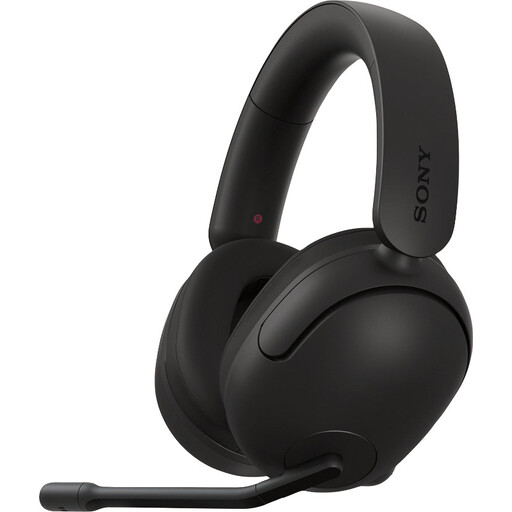
Why it suits this profile: This model is designed for PC and PS5 players who want to use a dedicated USB solution and adjustable spatial audio during longer sessions.
According to the product information, the 360 Spatial Sound feature is configured via INZONE Hub on Windows. This makes it clear that the full software feature isn’t the same as plug-and-play on every platform.
299 grams, nylon ear cushions, 40mm drivers, USB audio box and a flip-up microphone with mute function.

Why it suits this profile: According to the product specifications, this headset offers 2.4GHz radio, Bluetooth and a wired option. That’s practical for gamers who switch between PC, console and smartphone.
The connection options and stated battery life of up to 22 hours are listed separately. Before buying, check that your console appears on the compatibility list.
50mm drivers, virtual 7.1 feature according to the product information, detachable microphone and a design made with 85% recycled plastic according to Trust.
We’ve put together a complete, up-to-date list of products that fully meet these strict selection criteria and the applicable European safety regulations.
That depends on the connection. A model with a 3.5mm jack will often work through the controller or the PC connection. USB headsets and wireless models sometimes use a specific receiver or software. So check the platform list and included adapters before placing your order.
There are few ongoing costs beyond the purchase price. You do need to charge the battery and allow for wear and tear after prolonged use. A wired gaming headset has no battery, which can make it simpler for everyday use. With a wireless model, battery life and whether the battery can be replaced are important considerations.
Its lifespan depends on cable use, hinges, ear cushions and storage. Don’t place the headset under heavy objects, pull on the cable or store it somewhere damp. Avoid keeping the volume high for long periods and take breaks during extended sessions to protect your hearing. Also check the statutory guarantee and product terms before buying.
