
Vandaag of morgen in huis

Kwaliteit gegarandeerd

Welkomstaanbiedingen ontgrendelen: GRATIS bezorging | Tot 80% korting | Gratis 30 dagen JoyPlus-proefperiode
Download de app
A gaming headset needs to do more than play game audio. You want to hear your teammates, communicate clearly and stay comfortable during long gaming sessions. However, attention-grabbing features such as RGB lighting, “7.1 surround sound” and wireless freedom do not automatically make a headset the right choice.
The key question is therefore not which headset has the most marketing jargon, but which features suit your platform, playing style and everyday use.
A 7.1 surround sound headset often uses virtual processing rather than several physical speakers. The result can depend on the software, game settings and device you play on. With some models, the surround function only works via a USB dongle or PC software.
So check:
A wireless gaming headset can work via 2.4 GHz, Bluetooth or both. A USB transmitter is often required for consoles. Bluetooth does not work directly with every platform; with some PlayStation models, a suitable transmitter is essential.
Pay attention to the difference between:
A lightweight headset is not automatically comfortable. The shape of the headband, the pressure around your ears and the material used for the ear cushions are just as important. An over-ear gaming headset should fully surround your ears without clamping too tightly.
As well as weight, look for:
A wired gaming headset with a 3.5mm connection usually works straight away with a PC, laptop, controller, PlayStation, Xbox or Nintendo Switch. You do not need to charge it, and no wireless connection is required. With a desktop PC, however, check whether you have a single combined socket or need a splitter.
Wireless models give you greater freedom of movement. A gaming headset with long battery life is particularly practical if you often play for several hours or also use the headset for music and calls. Check the stated usage mode: battery life via Bluetooth may differ from battery life via 2.4 GHz.
With a gaming headset with microphone, positioning and controls matter more than simply having an impressive specification. You can move a flexible microphone closer to your mouth. A flip-to-mute or swivel function makes it easier to mute yourself quickly.
A detachable microphone is useful when you also want to use the headset away from gaming. Also check whether the microphone only works with a particular connection and whether there is a mute indicator.
Larger drivers, such as 40 mm, 50 mm or 53 mm, indicate the size of the speaker components, but do not tell you on their own how the sound will actually feel. Also look at the type of audio: stereo, virtual surround sound or spatial audio via software.
With a headset with noise cancellation, you need to distinguish between active noise cancellation and passive sound isolation. Many gaming headsets mainly use ear cushions that partially block out ambient noise. This is different from active noise cancellation using electronic components.

Why it suits this profile: This wired headset uses a 3.5mm connection and is suitable for PC, laptop, PlayStation, Xbox and Nintendo Switch. That makes it a practical choice if you want to start gaming without charging.
The product description clearly states that this is a stereo headset without a virtual 7.1 function. You therefore do not pay for a surround feature you do not need.
244 grams, 50mm drivers, over-ear ear cushions, a fixed 2-metre cable and a folding microphone.

Why it suits this profile: For players who want to combine wireless flexibility, long battery life and a detachable microphone with PC and console use.
The connection options are listed separately: 2.4 GHz via USB and Bluetooth 5.3. This makes it clear which connection to use with each device.
Up to 120 hours via 2.4 GHz, up to 200 hours via Bluetooth, 53mm drivers, memory foam ear cushions and a detachable microphone.

Why it suits this profile: This headset is designed for users who want to play wirelessly via 2.4 GHz or Bluetooth while retaining the option of a wired connection.
The specifications list both wireless modes and the 3.5mm connection. Battery life of up to 22 hours is also stated separately.
2.4 GHz and Bluetooth, up to 22 hours of battery life, virtual 7.1 sound, detachable microphone and 50mm drivers.
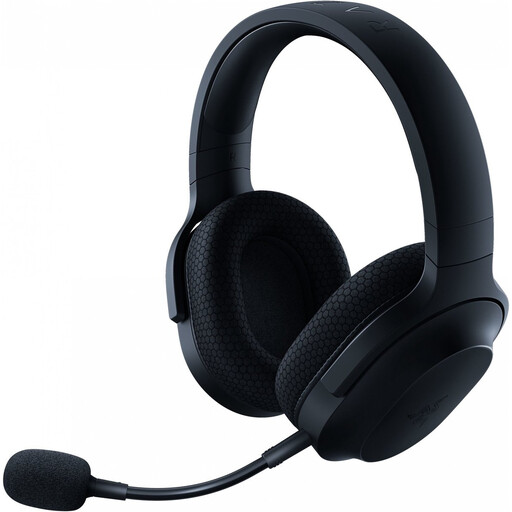
Why it suits this profile: Ideal if you are looking for a headset for PC, PlayStation, Nintendo Switch and mobile devices, and want to switch between multiple connections.
The 2.4 GHz dongle, Bluetooth 5.2 and 3.5mm connection are specified separately. This lets you check in advance which mode is suitable for your device.
Up to 50 hours of battery life, approximately 250 grams, detachable microphone and three connection options.
We have put together a complete, up-to-date list of products that fully meet these strict selection criteria and the applicable European safety regulations.
That depends on the connection. A model with a 3.5mm jack usually works via the controller or headphone socket, but check whether a splitter is required for PCs. Wireless models can vary by platform. Look specifically for USB dongle support and Bluetooth compatibility.
There are no recurring costs for normal use, but you do need to allow for charging and battery wear. A model with a 3.5mm connection does not require a battery. With wireless headsets, it is advisable to use the supplied or a suitable USB-C cable and store the headset in a dry place.
Its lifespan depends on usage, storage and how you handle the cable, microphone and headband. A detachable cable or microphone can be practical if a component needs to be replaced or stored away. Clean the ear cushions with a soft, dry cloth, avoid moisture and do not listen at high volume for prolonged periods. The statutory guarantee in the EU is at least two years for many of the models mentioned; always check the product page and your statutory rights.
