
Players who want to immerse themselves in the story
You want to hear the music, dialogue and ambient sounds clearly. First, check which audio settings work with your game and platform.


First, choose a headset that works with your PC or console, then check which audio features are supported. Wired headsets mean no charging, while wireless models give you more freedom to move. Connectivity, battery life and spatial audio vary by model and platform. A 3D audio listing doesn’t necessarily mean the feature is available in every game.
You want to hear the music, dialogue and ambient sounds clearly. First, check which audio settings work with your game and platform.
You might switch between a PC and a console, for example. The connection, receiver and exact model variant determine which features you can use.
You want to know whether the headset stays comfortable and whether the freedom of wireless use is worth having to charge it. Fit is personal, and stated battery life figures are manufacturer claims.
| What to consider | What should you check? | Who is this important for? |
|---|---|---|
| Audio on your platform | Check which audio modes work on your platform and in the games you play for each model. | I want to follow dialogue, music and ambient sounds clearly, and rely only on features that work in my game. Around 36% of consumers prioritise cinematic sound that works as intended. |
| Connection and compatibility | Compare the connection with your device. For wireless models, check the full variant name and receiver. | If I switch between a PC and console, I want to be sure the connection and model variant are right for my devices. Around 29% of consumers give compatibility top priority. |
| Comfort during long sessions | Judge the fit for yourself and, where possible, try the headset for a realistic length of time. | I play for extended periods and want to know whether the ear cushions and headband feel comfortable. Around 21% of consumers put wearing comfort ahead of other considerations. |
| Cable or battery | Decide whether you’re happy to use a cable. For wireless use, compare the right connection and stated battery life. | If I want to get up while playing, wireless appeals to me; if I don’t want to charge my headset, a cable may suit my routine better. Around 14% of consumers prioritise freedom of movement or ease of charging. |
For the Logitech G432, Logitech says DTS Headphone:X 2.0 and EQ are only available on Windows with G HUB. A headset working with a console doesn’t automatically mean these features are available on it.
Check which audio modes work on your device before factoring them into your decision.
SteelSeries specifically lists the Nova 5X for Xbox. So the general name Arctis Nova 5 isn’t enough to confirm that the variant on offer is suitable for Xbox.
Check the full model name and the receiver included.
According to the Dutch government, there is no fixed statutory warranty period in the Netherlands. If a product is faulty, the retailer is your point of contact. Extra cover is only worthwhile if it offers more than you already have.
Read what additional cover the package provides before choosing it.
The features mentioned apply to the specific product lines and models below; they are not an assessment of the brand as a whole.
Worth considering if you want to compare PS5 features and the PlayStation Link connection.
The Arctis Nova 5 is worth considering for wireless gaming and presets; for Xbox, the Nova 5X variant is the one to look at.
The wired Cloud III is an option to consider if you’re weighing up different connection options and gaming without a headset battery.
The G432 is worth considering if you’re comparing wired headsets with a 3.5 mm connection.
The Quantum 360P Console Wireless is a wireless option to compare for PS5 use.
These Joybuy products are gaming headsets you can compare for connection options, wireless use and features for PC or console.
 No image available
The PlayStation version lets you weigh up wireless use with PlayStation against use with your other devices. Check that the stated compatibility and connection work with your equipment.
 No image available
This Xbox version is an option to consider if you’re weighing up wireless gaming and in-game controls. Before buying, check that the variant listed is right for your device; the product title mentions a Flip-to-Mute microphone.
 No image available
The product description says DTS Spatial Audio is for PC use. Before relying on spatial audio, check that the feature and compatibility listed are right for your devices.
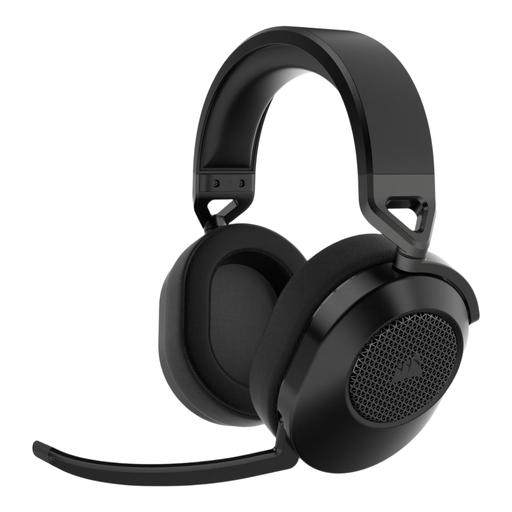 No image available
The surround features listed vary by platform: the product description mentions Dolby Audio 7.1 for PC and Mac, and Tempest 3D Audio for PS5. Check which feature works with your device.
 No image available
The description says 360 Spatial Sound for Gaming is available on PC through INZONE Hub; these spatial audio features aren’t available via 3.5 mm. Check that this limitation suits the way you plan to use it.
No. PlayStation describes Tempest 3D AudioTech as available with compatible headphones in games that support the feature. Also check the connection and requirements for the specific headset and game.
First, check your device’s audio output, then try the available EQ settings with the same scene in a game. PlayStation lists EQ settings on PS5 and PC for PULSE devices; Logitech limits the G432’s EQ to Windows with G HUB.
Keep the volume low and take regular breaks. The World Health Organization explains that both sound level and duration of exposure matter. 80 dB for up to 40 hours a week is an example from the WHO, not a guaranteed safe setting for every headset.
For distance purchases from a business, the Dutch government says you’ll often have a 14-day cooling-off period; check which exceptions apply. You’re also entitled to a product that is fit for purpose. The Dutch government says there is no fixed statutory warranty period in the Netherlands; if a product is faulty, the retailer is your point of contact, even if the manufacturer’s warranty has expired.