
Vandaag of morgen in huis

Kwaliteit gegarandeerd

Welkomstaanbiedingen ontgrendelen: GRATIS bezorging | Tot 80% korting | Gratis 30 dagen JoyPlus-proefperiode
Download de app
Buying new gaming hardware might seem straightforward. But it’s easy to end up paying for features you don’t use, choosing a graphics card that won’t fit inside your PC case or buying a headset that becomes uncomfortable after a long gaming session. Marketing terms such as “ultra”, “pro” and “surround” don’t tell you much on their own. It’s the connections, dimensions and actual compatibility that determine whether a product is right for your setup.
This buying guide helps gamers, PC builders, streamers and esports fans compare their options and choose with confidence.
An RTX 5080 graphics card won’t automatically suit every PC. Check its length, height, number of slots and power requirements, too. For example, the GIGABYTE GeForce RTX 5080 WINDFORCE OC SFF 16G is 304 mm long, 126 mm wide and takes up three slots. The AORUS Master Ice version is considerably larger, at 360 mm long and four slots wide.
The same goes for a Radeon RX 9070: dimensions and design vary between versions. The ASUS Prime version is 312 mm long, takes up three slots and has two 8-pin connectors.
A 7.1 surround sound headset often uses virtual surround technology. This can help with positional audio, but how well it works depends on the software, game settings and connected device. A wired gaming headset with a 3.5 mm connection usually works with a wide range of consoles, but may not offer the same software features as a USB model.
So check the difference between stereo, virtual surround, USB audio and analogue 3.5 mm audio.
An RGB gaming mouse mat can look great with an illuminated setup, but check the surface, dimensions and cable, too. The Razer Firefly V2 Pro measures 360 × 278 mm and is 4.6 mm thick. It’s suitable for a compact desk, but may be too small if you play with low mouse sensitivity.
When choosing a gaming graphics card, these points are particularly important:
The RTX 5060 Ti graphics card is a sensible choice for a more energy-efficient system. For demanding 4K gaming, video editing or 3D applications, an RTX 5080 or Radeon RX 9070 may be a better fit, provided the rest of your PC can support it.
A wired gaming headset doesn’t need a battery and usually has no latency. The Razer BlackShark V2 X uses a 3.5 mm connection and is compatible with PC, Mac, PlayStation, Xbox and Nintendo Switch. The Trust GXT 489W Fayzo also uses 3.5 mm and has a detachable microphone.
A wireless gaming headset gives you more freedom to move around, but needs charging and may be susceptible to interference. The HyperX Cloud III S lists 2.4 GHz and Bluetooth connectivity, with a stated battery life of up to 120 hours via 2.4 GHz and up to 200 hours via Bluetooth. These figures come from HyperX product information and may vary depending on use and settings.
Also check:
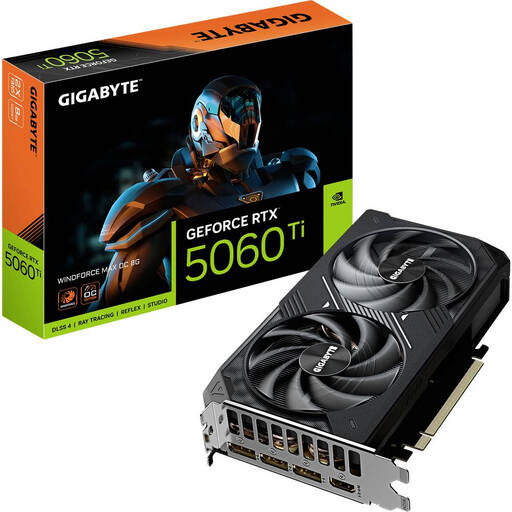
Why it suits this profile: A relatively compact card with 8 GB GDDR7, PCIe 5.0 and stated power consumption of 135 W, for anyone looking to upgrade their PC with a specific goal in mind.
The product specifications list the dimensions, power connector and recommended power supply, so you can check compatibility with your PC in advance.
8 GB GDDR7, three DisplayPort 2.1b connections and a 281 mm-long design.
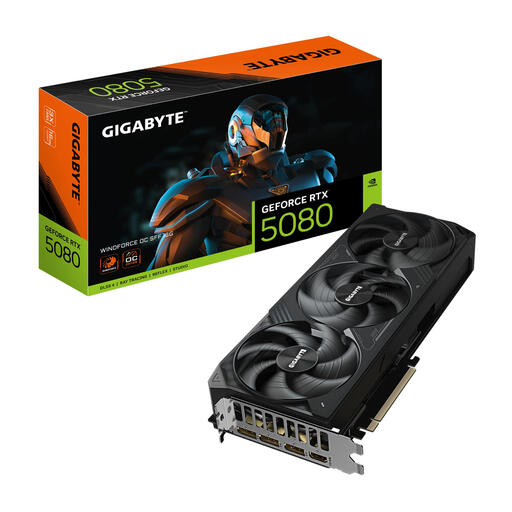
Why it suits this profile: Designed for demanding PC gamers, content creators and multi-monitor users who need 16 GB GDDR7 and modern video outputs.
The SFF designation indicates a more compact design, but the card is still 304 mm long and three slots wide. Measuring your space is essential.
16 GB GDDR7, 3 × DisplayPort 2.1a, HDMI 2.1b and a stated boost clock of 2670 MHz.
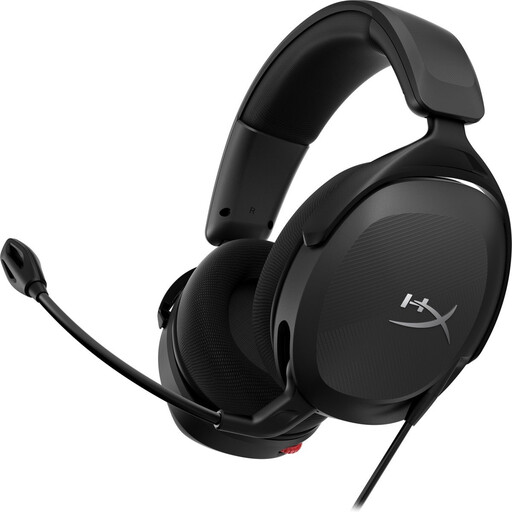
Why it suits this profile: A good choice for players who switch between PC and consoles and value USB-C, USB-A, 3.5 mm, a detachable microphone and virtual DTS audio.
The range of connections makes this headset versatile, but check which cable or adapter you’ll need for each platform.
53 mm drivers, USB and 3.5 mm connectivity, a weight of 308 grams and a detachable microphone.
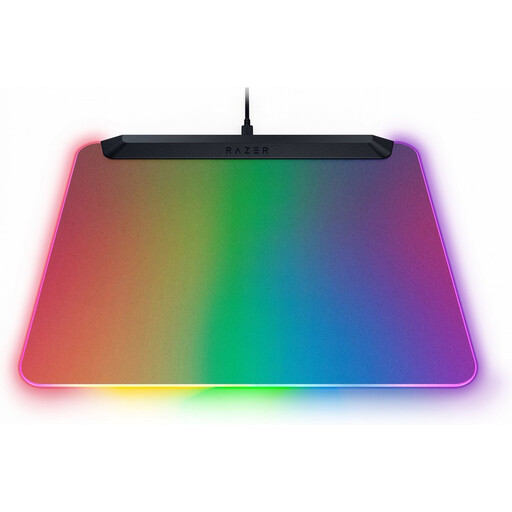
Why it suits this profile: For streamers and PC gamers looking to add lighting and a micro-textured tracking surface to their desk.
The dimensions and USB-C cable are listed, so you can check in advance whether the surface and connection will work with your desk.
15 customisable RGB zones, a non-slip base and a 360 × 278 mm surface.
We’ve put together a complete, up-to-date list of products that meet these strict selection criteria and the applicable European safety regulations.
For PlayStation gaming accessories, Xbox gaming accessories and Nintendo Switch gaming accessories, the connection is often the deciding factor. A 3.5 mm headset will usually connect through the controller or console port. For USB headsets, check whether your console supports the device.
For multiplayer, a clear microphone matters more than a large driver size alone. The flip-to-mute microphone and volume wheel on the Turtle Beach Recon 70 make it easy to use. The Logitech G432 adds a USB DAC and virtual 7.1 audio, but some features may require software.
Start with a graphics card, power supply, processor, motherboard, RAM and storage. Then check case dimensions, cooling and connections. Add accessories such as a gaming headset, mouse and mouse mat afterwards.
It depends on how you use it. Wireless is handy if you often step away from your desk or don’t want a cable across it. A wired gaming headset is simpler, doesn’t need charging and is often more affordable. Compare battery life, connection type and platform support.
Its lifespan depends on workload, ventilation, dust and the image quality you want. Check ventilation regularly, use the appropriate drivers and make sure the card is securely fitted in the PCIe slot. A model with enough video memory may be better suited to future games for longer, but performance still depends on your PC’s overall configuration.
