
Vandaag of morgen in huis

Kwaliteit gegarandeerd

Welkomstaanbiedingen ontgrendelen: GRATIS bezorging | Tot 80% korting | Gratis 30 dagen JoyPlus-proefperiode
Download de app
Buying gaming hardware seems straightforward until you start comparing specifications, connections and marketing claims. A high polling rate, RGB lighting or an RTX graphics card might sound appealing, but they don’t automatically mean a product is right for your games, desk or needs.
As Joybuy Product Recommendation Officer, I start by checking the specifications you can verify. Read on to find out which pitfalls to avoid, which components really make a difference and what hardware suits different types of gamers in the Netherlands.
An RTX gaming PC or gaming laptop with an RTX 5060 may be suitable for different resolutions, but its overall performance also depends on the processor, RAM, cooling and screen. With laptops, the available GPU power matters too.
When looking at a gaming PC with an RTX 5060, don’t focus on the graphics card name alone. Check:
A 4K gaming PC generally needs more graphics power than a system for 1080p. So check your monitor and games first, then look at the product name.
A 144Hz gaming laptop can display smooth motion when its hardware and game settings deliver enough frames. A 144Hz screen won’t make a game run faster by itself. Check the combination of GPU, processor, resolution and connections.
For competitive games such as Valorant, CS2 and Apex Legends, a fast response time and stable frame rate are important. For story-driven games or creative applications, screen resolution, colour reproduction and storage space may matter more.
RGB lighting doesn’t change how the switches work. A gaming keyboard can be mechanical, membrane or magnetic. These types feel different and offer different features.
A Hall Effect keyboard uses magnetic switches. On models with Rapid Trigger, you can adjust a key’s reset point using software. According to Redragon’s product description, the M68 supports adjustable actuation from 0,2 to 4,0 mm and Rapid Trigger. These are product specifications; whether you notice a difference in-game depends on your settings and playing style.
A gaming PC’s performance depends on its CPU and GPU working together. According to the product details, a system with a Ryzen 5 5500, 16 GB DDR4 and an RTX 5060 is aimed at gaming in 1080p and 1440p. It also comes with a 480 GB PCIe 4.0 SSD.
If you also stream, edit videos or use demanding programmes, you may benefit more from 32 GB RAM and a larger SSD. For example, the ASUS ROG G700TF models combine 32 GB DDR5 with a 1 TB SSD. If you plan to upgrade later, check for spare memory slots and additional storage bays too.
When comparing gaming laptops, look beyond the GPU series. Check:
For example, the ASUS V16 has a 16-inch WUXGA screen with a resolution of 1920 × 1200 pixels, a 144Hz refresh rate, a Dutch QWERTY layout and an RTX 5070 Laptop GPU with 8 GB GDDR7. Please note: the product information says that a charger is no longer included as standard with this model. Check before you buy.
A compact gaming keyboard gives you more room for your mouse. A 60% or 65% model usually has no numpad and sometimes no separate arrow keys either. A TKL model keeps the arrow keys but leaves out the number pad.
When checking a mechanical gaming keyboard, look at:
For example, the Trust GXT 833 Thado is a wired TKL keyboard with membrane keys, RGB lighting and anti-ghosting for up to ten simultaneous key presses. That makes it a different choice from a mechanical or magnetic model.
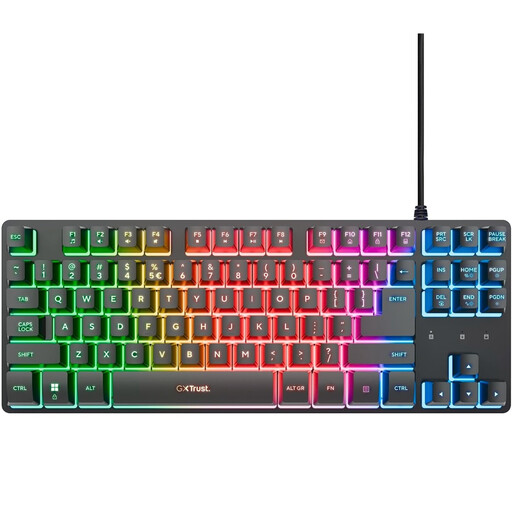
Why it suits this profile: This wired TKL model has a compact design, RGB lighting and a simple USB connection, so you don’t have to opt for magnetic switches straight away.
The product specifications clearly state that this is a membrane keyboard. So you’re not paying for a mechanical claim that doesn’t apply.
TKL size, USB connection, RGB lighting, game mode and anti-ghosting for up to ten simultaneous key presses.
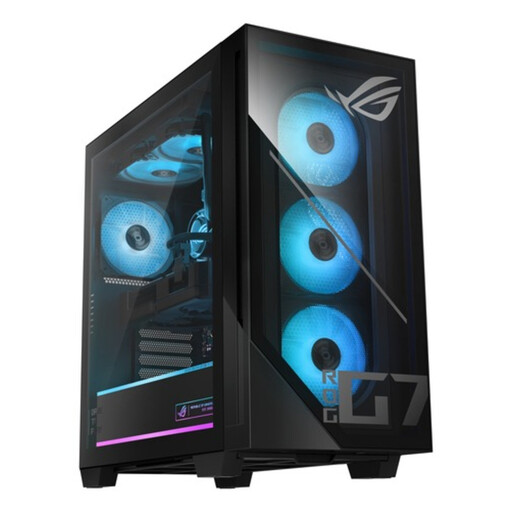
Why it suits this profile: This desktop is aimed at gamers and creators who need plenty of RAM, ample storage and an RTX 5070 for demanding applications.
The configuration lists the Intel Core Ultra 7 265F, 32 GB DDR5, a 1 TB PCIe 4.0 SSD and an RTX 5070 with 12 GB GDDR7 separately.
32 GB DDR5, 1 TB NVMe storage, RTX 5070, liquid cooling, Wi-Fi and an 850W 80+ Gold power supply, according to the product information.
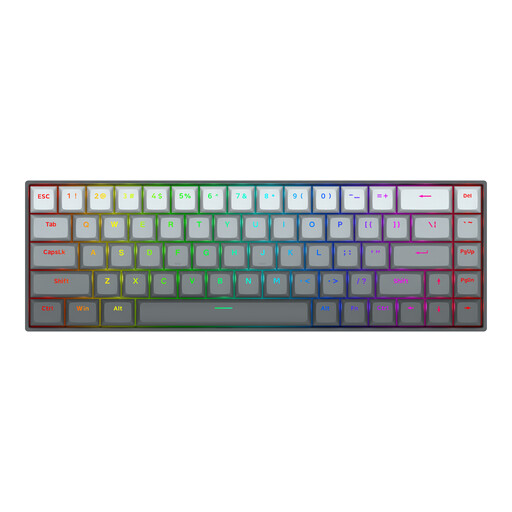
Why it suits this profile: This compact model is designed for players looking for a 65% layout, magnetic switches and software settings for fast-paced games.
The layout, connection and magnetic switches are all clearly specified. This means you can check in advance whether 68 keys and a US layout are right for you.
Hall Effect switches, adjustable actuation according to the product description, Rapid Trigger, an 8000Hz polling rate and a detachable USB-C cable.
We’ve put together a complete, up-to-date list of products that meet these strict selection criteria and the applicable European safety regulations.
It depends on how you use it. A desktop usually offers more scope for upgrades and a wider choice of cooling and power supplies. A gaming laptop combines the screen, keyboard and computer in one device, but upgrade options are often more limited. Choose a laptop if you move around regularly or play in different locations. Choose a desktop if you mainly game at a fixed workstation.
Lifespan depends on usage, dust, temperature and maintenance. Keep ventilation openings clear, don’t place a desktop in a closed cabinet and use a laptop on a hard surface. For keyboards, regular cleaning and careful handling of cables and switches can help. The statutory guarantee and any manufacturer’s warranty are listed for each product; check these details before ordering.
Remember to budget for a monitor, mouse, keyboard, headset, mouse mat and possibly a webcam. For a desktop, it’s also important to check the operating system, Wi-Fi and connections. Laptops already have a screen and keyboard, but a separate mouse and monitor may still be useful. Set a total budget in advance so an attractive PC doesn’t end up costing more than expected because of missing accessories.
