
Vandaag of morgen in huis

Kwaliteit gegarandeerd

Welkomstaanbiedingen ontgrendelen: GRATIS bezorging | Tot 80% korting | Gratis 30 dagen JoyPlus-proefperiode
Download de app
Buying gaming hardware seems straightforward until you start comparing specifications. A high clock speed, lots of RGB lighting or a graphics card with a new model number doesn’t automatically mean a product will suit your games, monitor and needs. If you focus only on marketing terms, you could pay too much for performance you’ll barely notice, or end up with incompatible components.
An RTX 5070, RTX 5080 gaming PC or RTX 5090 graphics card is bound to catch your eye. But your processor, cooling, power supply and monitor resolution also shape the overall experience. For example, a powerful graphics card in a poorly cooled case may not be able to maintain its speed for long. Check the complete configuration, not just the GPU model.
DDR5 6000MHz memory sounds appealing, but how it performs depends on your processor and motherboard. Check that your system supports DDR5 and that the right profile is available. AMD EXPO memory is primarily designed for compatible AMD platforms; Intel XMP RAM uses a profile standard for compatible Intel systems. A memory kit may be physically compatible, but without the right BIOS profile it may run at a lower standard speed.
Buying a gaming laptop gives you portability, but the same GPU name doesn’t mean exactly the same performance as a desktop graphics card. Available space, maximum GPU power, cooling and the screen all play an important part. Also consider the weight, battery capacity, ports and cost of upgrades.
For modern games, 32 GB DDR5 is a practical starting point if you also stream, use several programmes or do light content creation. A 2 x 16 GB kit typically makes use of dual-channel memory. For video editing, large projects and intensive multitasking, 64 GB may make more sense.
Look out for the following:
For example, the Kingston FURY Beast 32GB uses 2 x 16 GB DDR5-6000 with CL30, EXPO and a height of 34,9 mm. The Kingston FURY Beast 64GB consists of 2 x 32 GB DDR5-6000 with CL36. A higher-capacity kit isn’t automatically necessary for everyone; choose one based on your software and multitasking needs.
As well as the GPU, check the video memory, connections, dimensions and recommended power supply. A large card may take up three or more expansion slots, blocking others. Also check that your case is long and wide enough.
According to its product specifications, the GIGABYTE AORUS GeForce RTX 5090 MASTER 32G has 32 GB GDDR7, a PCIe 5.0 interface, a length of 360 mm and a recommended 1000 W power supply. These are details you can verify, and they matter more than the GPU name alone.
A gaming desktop with a fast graphics card needs a processor that can keep up with your chosen resolution and refresh rate. At 1440p and 4K, the graphics card is often the deciding factor, while the CPU also plays a major part in competitive games at high frame rates.
A 1TB NVMe SSD gives you fast loading times, but large game libraries can fill it quickly. Check whether there’s an extra M.2 slot. If you’re buying a gaming laptop, the screen specifications also matter. The MSI Crosshair 17 HX lists a QHD+ resolution of 2560 × 1600 and a refresh rate of 240 Hz. It’s particularly suited to users who value a large, fast screen.

Why it suits this profile: This kit provides 32 GB across 2 x 16 GB DDR5-6000 modules and is suitable for a new desktop with a compatible AMD platform.
The capacity, module layout, speed and EXPO support are clearly listed. Be sure to check motherboard and processor compatibility first.
2 x 16 GB, DDR5-6000, CL30, 1,35 V, black and 34,9 mm high.
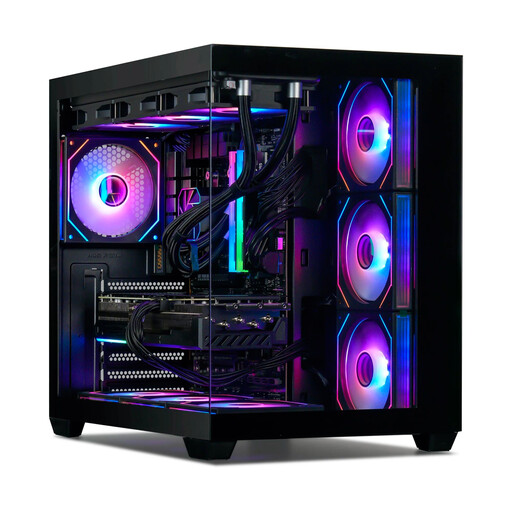
Why it suits this profile: This gaming desktop combines a Ryzen 7 7800X3D, RTX 5080 16GB, 32 GB DDR5-6000 and a 1TB NVMe SSD in one complete configuration.
The power supply, cooling, storage and wireless connectivity are all included in the listed configuration. Still, check that it suits your monitor and storage needs.
RTX 5080 16GB, Ryzen 7 7800X3D, 360mm liquid cooling and an 850W 80 Plus Gold power supply.
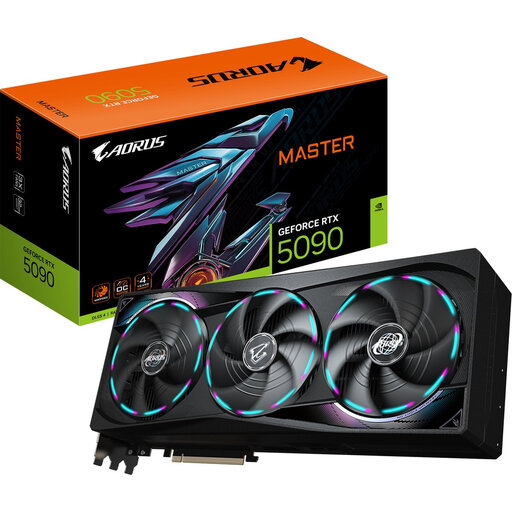
Why it suits this profile: For users looking for a standalone graphics card for demanding 4K workloads, multiple screens or intensive content creation.
The card dimensions, 16-pin connector and recommended 1000W power supply are listed, so you can check your case and power supply in advance.
32 GB GDDR7, PCIe 5.0, three DisplayPort 2.1b connections and support for up to four screens, according to the product specifications.
We’ve put together a complete, up-to-date list of products that meet these strict selection criteria and current European safety regulations.
32 GB DDR5 is a practical choice for gaming, streaming and everyday multitasking. If you use demanding video-editing software, virtual machines or large media projects, you could consider 64 GB. Always check the motherboard’s maximum memory capacity.
It depends on the configuration and how you use it. A desktop is usually easier to upgrade, while a laptop combines the screen, keyboard and computer components. For both, check the power rating of the power supply or adapter, the cooling and how many hours you use it each day.
Yes. A gaming smartphone is generally suitable for calls, apps and media too. A rugged smartphone also puts the focus on protection from dust, water and drops. IP68, IP69K and MIL-STD-810H are product ratings; follow the manufacturer’s instructions and make sure all covers are properly closed.
