
Vandaag of morgen in huis

Kwaliteit gegarandeerd

Welkomstaanbiedingen ontgrendelen: GRATIS bezorging | Tot 80% korting | Gratis 30 dagen JoyPlus-proefperiode
Download de app
If you're serious about gaming, you know the right equipment can make all the difference. But the market for gaming gear is saturated with marketing terms and specifications that confuse more than they clarify. Many gamers invest in expensive equipment that doesn't improve their performance, simply because they fall for common traps. Let's break down the pitfalls to avoid and what you should actually focus on.
The most common bad purchases stem from a few persistent myths:
To avoid buyer's remorse, focus on the specs that directly impact your performance. These are the factors that separate the best from the rest.
The polling rate, measured in Hertz (Hz), indicates how often your mouse or keyboard reports its position to the computer. The standard is 1000Hz (1000 times per second). For competitive gamers and esports accessories, however, a higher polling rate is a game-changer. An 8K polling rate (8000Hz) provides noticeably smoother cursor movement and lower latency. This means the on-screen movement almost perfectly matches your hand's motion, which is crucial in fast-paced shooters.
The switches in your mouse and keyboard determine their feel and response time.
Weight is especially critical for a wireless gaming mouse. A lightweight mouse (under 60 grams) reduces strain on your wrist and arm, allowing for faster, more precise movements during long gaming sessions. While the shape should also fit your hand comfortably, a lower weight is an objective advantage for fast-paced gameplay.
Not every gamer needs the same thing. Here are a few choices tailored to specific profiles and playstyles.
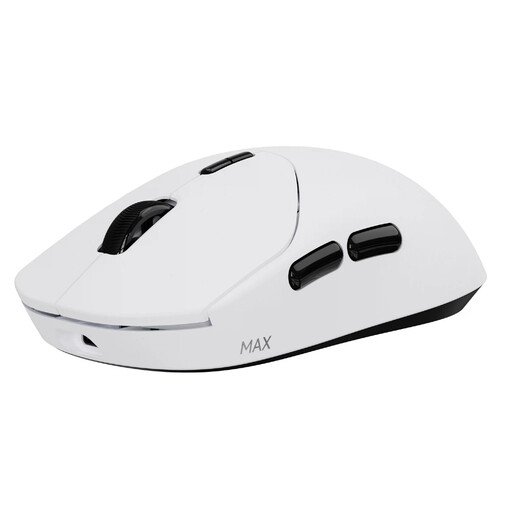
Why This Fits Their Persona: This gamer seeks every possible advantage. For them, the combination of an ultra-lightweight design and the fastest response time isn't a luxury—it's a necessity for top-tier performance.
This Rapoo mouse debunks the myth that wireless is slower with a native 8K polling rate. Its optical switches prevent the durability issues common in traditional mechanical mouse switches.
Extremely lightweight (53g) for swift movements and durable optical switches rated by the manufacturer for 120 million clicks.
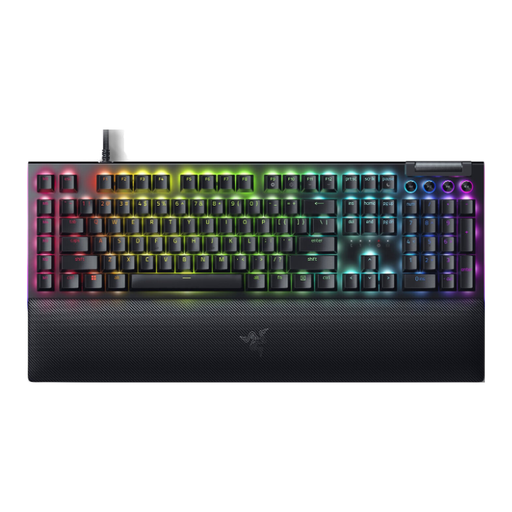
Why This Fits Their Persona: Ideal for gamers who need rapid, repeated keystrokes without the loud clicks. Perfect for streamers or anyone gaming late at night who doesn't want to disturb housemates.
This Razer keyboard proves that not all mechanical switches are loud. The Yellow switches are linear and quiet, offering a performance-focused experience without the noise.
Fast and quiet linear switches with a 1.2mm actuation point. Comes with a magnetic wrist rest for added comfort.
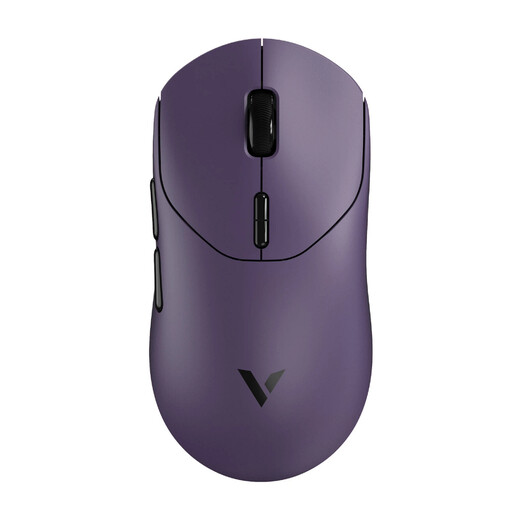
Why This Fits Their Persona: This gamer wants the latest tech, like a high polling rate and low weight, but prefers the familiar, tactile feel of a mechanical mouse click.
This model offers a choice. Instead of just pushing the latest optical technology, it acknowledges the preference for the feel of mechanical switches without compromising on other performance features.
Combines a native 8K polling rate and a lightweight mouse design (53g) with the familiar feedback of mechanical switches.
A complete RGB gaming setup often requires keyboards with programmable keys. We've curated an up-to-date list of products that meet these strict selection criteria.
For the average gamer, 1000Hz is perfectly fine. But for competitive players with a high-refresh-rate monitor (e.g., 240Hz or higher), an 8K polling rate can provide visibly smoother tracking and a fractionally faster response time. It's one of those details that can make all the difference at the highest level of play.
This varies greatly by model. While older mice required frequent charging, the technology has improved significantly. According to the manufacturer Rapoo, their newer models, like the VT series, can last up to 750 hours on a single charge at a 1000Hz polling rate. This makes battery life a non-issue for most users.
A mechanical gaming keyboard uses individual, spring-loaded switches under each key, unlike the rubber domes found in standard keyboards. This results in more precise and faster keystroke registration, better durability, and the ability to choose a switch type that perfectly matches your preference for feel and sound.
