
Vandaag of morgen in huis

Kwaliteit gegarandeerd

Welkomstaanbiedingen ontgrendelen: GRATIS bezorging | Tot 80% korting | Gratis 30 dagen JoyPlus-proefperiode
Download de app
As a Joybuy Product Recommendation Officer, I see daily how the gaming gear market is flooded with marketing terms and promises. It's tough to determine what really matters and what's just fluff. A bad purchase not only leads to frustration but is also a waste of your money. Let's break down the most common pitfalls for PC gamers, so you can make an informed choice.
To avoid the pitfalls, it's helpful to focus on specifications that directly impact your gaming experience. Here are the three most important factors for your PC gaming accessories.
The core of any good gaming keyboard is its switches.
Also, look for anti-ghosting and N-key rollover (NKRO). These features ensure that the keyboard correctly registers multiple simultaneous keystrokes, which is crucial in hectic games.
Forget the high DPI numbers. This is what counts for a gaming mouse:
The choice between wired and wireless is personal. Modern wireless technology, such as 2.4 GHz connections, offers latency comparable to wired equipment.
Below are some products that suit different types of gamers, based on their objective specifications.
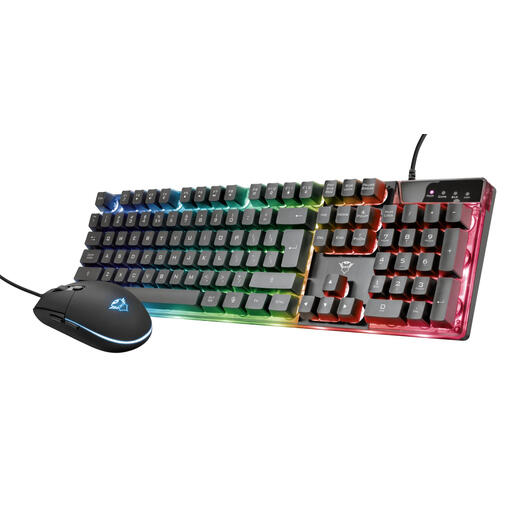
Why This Fits Their Persona: Ideal for those starting with PC gaming and looking for a complete, budget-friendly set. This keyboard and mouse combo offers all the basic functionalities you need to start playing immediately, without a major investment.
This set avoids the "style over substance" pitfall. While it has RGB lighting, it also offers functional extras like anti-ghosting for 8 keys and an adjustable DPI (up to 3000), which is genuinely useful for gaming.
Complete plug-and-play set with both keyboard and mouse. The mouse has an adjustable DPI, and the keyboard features a game mode to disable the Windows key.
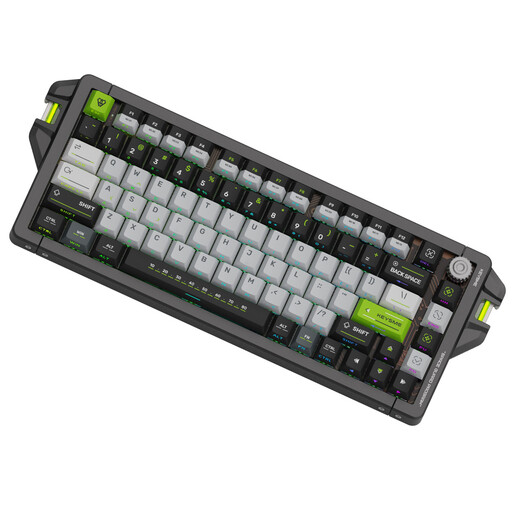
Why This Fits Their Persona: For the serious gamer where every millisecond counts. This keyboard is built for maximum performance with a focus on speed, precision, and customisation—essential for competitive play.
This keyboard focuses on verifiable performance instead of marketing hype. The 8kHz polling rate and adjustable magnetic switches (0.1–4.0mm) are concrete specifications that offer a measurable advantage, unlike a uselessly high DPI.
Extremely low latency (0.125ms) and Rapid Trigger technology for instant activation and reset. The CNC aluminium case ensures a robust and durable build quality.
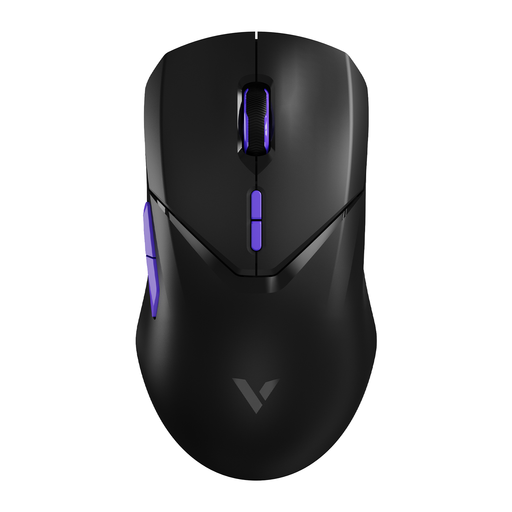
Why This Fits Their Persona: Perfect for gamers who want a minimalist, cable-free setup without compromising on performance. This wireless gaming mouse combines a sleek design with high-end technology for maximum freedom of movement.
This mouse debunks the old myth that wireless is always slower. With a 4000Hz wireless polling rate, it offers a response time four times faster than the 1000Hz standard, surpassing the performance of many wired mice.
Lightweight design (68 grams) for swift movements and a long battery life of 180 hours. The high-quality PAW 3398 sensor ensures extremely precise tracking.
We have compiled a complete, up-to-date list of products that fully meet these strict selection criteria and local regulations.
A good mechanical keyboard is a long-term investment. The switches are typically rated for 50 to 100 million keystrokes per key. With average use, such a keyboard can easily last 10 years or more, much longer than a standard membrane keyboard.
No, absolutely not. An extremely high DPI setting makes the cursor too sensitive and difficult to control. Most gamers find a DPI between 800 and 1600 most comfortable for precision work in shooters. A mouse with a reliable sensor and an adjustable DPI is far more valuable than one that only advertises a high number.
The primary benefit of RGB lighting is aesthetic; it makes your gaming setup look personal and stylish. Functionally, it can also be useful. Some games and software use the lighting to display information, such as low health (flashing red) or an active ability. For most users, however, it is mainly a matter of taste.
