
Vandaag of morgen in huis

Kwaliteit gegarandeerd

Welkomstaanbiedingen ontgrendelen: GRATIS bezorging | Tot 80% korting | Gratis 30 dagen JoyPlus-proefperiode
Download de app
Buying a gaming desktop PC might seem straightforward: choose a fast processor, an RTX graphics card and enough RAM. In practice, the most important differences often come down to the details. An eye-catching RGB case tells you little about how easy a system is to upgrade, while a powerful graphics card won’t necessarily suit your monitor or power supply.
For gamers, streamers and content creators, there are three key pitfalls to watch out for:
The graphics card has a major impact on image quality and frames per second. For 1080p gaming, a desktop PC with an RTX 5050 may be suitable, depending on the game and its settings. If you want to play at 1440p, consider a desktop PC with an RTX 5060 or a more powerful configuration.
A desktop PC with an RTX 5080 is designed for users considering higher graphics settings, ray tracing and 4K resolution. Actual performance varies from game to game. According to the manufacturer, features such as DLSS can help in supported games, but they aren’t available in every title or configured in the same way.
Also check the amount of video memory. For example, the Acer Nitro 20 has an RTX 5050 with 8GB of video memory, while the Ryzen 7 configuration uses an RTX 5080 with 16GB of video memory.
A Ryzen gaming PC with a Ryzen 7 series processor could be a good choice for high frame rates and running multiple tasks at once. The Gaming Desktop PC with Ryzen 7 7800X3D has 8 cores, a boost clock of up to 5.0 GHz and 3D V-Cache. Paired with 32GB of DDR5-6000, it’s designed for gaming, streaming and multitasking.
An Intel gaming PC may also suit users who combine gaming with video editing or other demanding applications. For example, the OMEN 35L uses an Intel Core i7-14700F with 20 cores and a maximum clock speed of 5.4 GHz, according to the listed product specifications.
For a typical gaming PC, 16GB of RAM is a good starting point. A gaming PC with 32GB of RAM gives you more room for browser tabs, streaming software, chat programmes and creative applications. Check whether you can upgrade the memory. The Lenovo Legion T5 comes with 16GB of DDR5 and, according to its product specifications, supports upgrades to 32GB. The OMEN 35L lists support for up to 128GB.
A gaming PC with a 1TB SSD gives you space for Windows, programmes and several games. An NVMe SSD uses a fast PCIe interface and generally reduces loading and start-up times compared with older hard drives. However, check how much free space will be left after installation; modern games can take up a lot of storage.
The power supply needs to suit the graphics card and other components. Don’t just look at the wattage: check the type of power supply and which connections it has. The Ryzen 7 configuration has an ASUS power supply rated at 850W with an 80 Plus Gold rating. The Acer Nitro 20 lists a 400W power supply. These systems aren’t necessarily equally easy to upgrade.
Cooling deserves extra attention during long gaming sessions. The Ryzen 7 configuration uses a 360mm ARGB liquid cooler and seven RGB fans. According to its product specifications, the Lenovo Legion T5 doesn’t have liquid cooling. Place any desktop on a hard, well-ventilated surface and don’t block the vents.
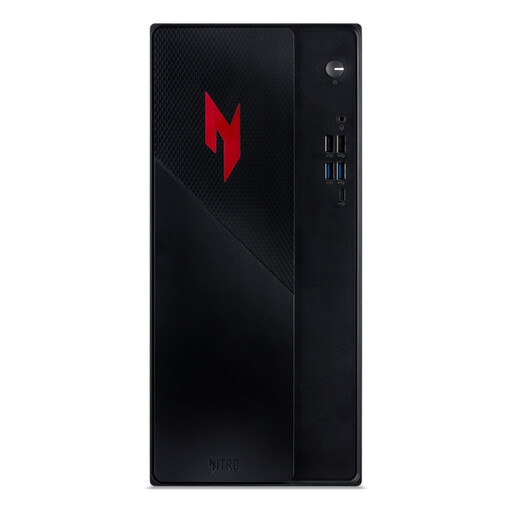
Why it suits this profile: This compact gaming computer combines an RTX 5050 with 16GB of DDR4 and a 1TB PCIe NVMe SSD. It’s a good fit for anyone looking for a ready-to-use desktop for everyday gaming and applications.
The storage and memory capacities are clearly listed. However, check beforehand whether 16GB will be enough for your games and streaming programmes.
RTX 5050, 16GB DDR4, 1TB NVMe SSD, Wi-Fi 6E and a compact size of 160 × 306 × 348 mm.
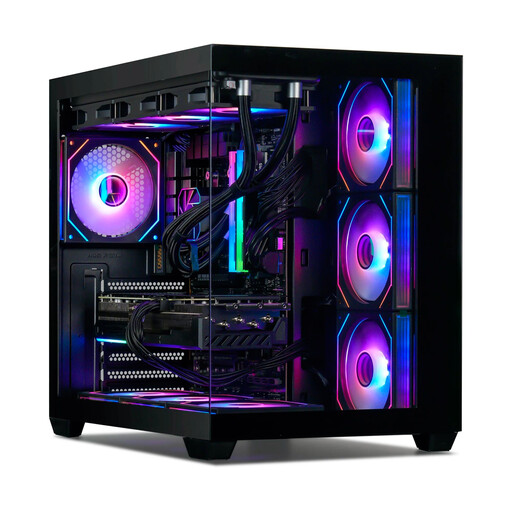
Why it suits this profile: The Ryzen 7 7800X3D, RTX 5080 with 16GB and 32GB of DDR5 make a good combination for users who want to game at 1440p or 4K while streaming and multitasking.
The configuration lists more than just the RTX graphics card: it also specifies the processor, RAM, SSD, cooling and power supply. This makes it easier to assess the system as a whole.
32GB DDR5-6000, 1TB NVMe SSD, Wi-Fi 6E, an 850W 80 Plus Gold power supply and 360mm ARGB cooling.
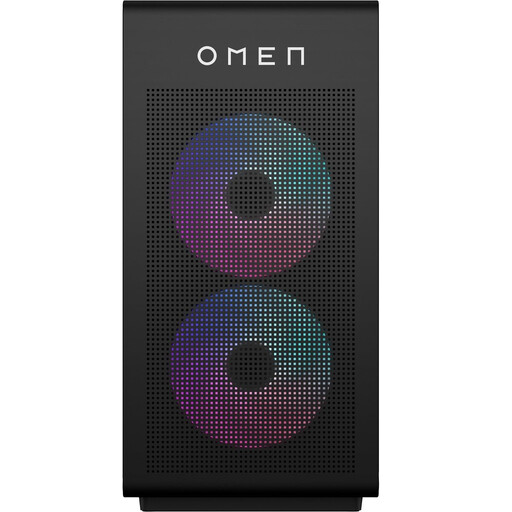
Why it suits this profile: This desktop combines an Intel Core i7-14700F with an RTX 5060, 16GB of DDR5 and a 1TB SSD. It’s a good fit for gamers who also stream, multitask or create content.
According to the description, the case supports upgrades to 128GB of RAM. Beforehand, check which components you might want to add later and whether the power supply can support them.
20-core Intel processor, RTX 5060 with 8GB GDDR6, upgradeable DDR5 memory and DisplayPort 2.1.
A good gaming desk set-up needs enough space for your monitor, keyboard, mouse and PC accessories. If you’re choosing a desk with integrated lighting, check the power connection, cable management and maximum load too. The 140 cm SEVEN WARRIOR desk has a metal frame, a CPU stand, monitor stand, headphone hook, two power sockets and two USB ports. According to the product information, the desktop is made of particleboard rather than solid wood.
If you switch between working, gaming and studying, consider an adjustable-height gaming desk. The JoySelect desk is electrically adjustable from 72 to 118 cm, has two memory settings and supports a maximum load of 70 kg according to the listed specifications. Before assembly, check that the floor is level and that all cables have enough room to move.
We’ve put together a full, up-to-date list of products that meet these strict selection criteria and the applicable European safety regulations.
For many games and everyday use, 16GB can be enough. If you stream, run lots of programmes in the background, edit video or use large mod packs, 32GB gives you more room to work with. Always check whether the motherboard has extra RAM slots and what maximum capacity it supports.
Its lifespan depends on how you use it, how well you manage dust, its cooling and future system requirements. A PC with upgradeable RAM, free storage slots and a suitable power supply can be adapted for longer. Clean the vents regularly and don’t place the desktop in an enclosed cabinet.
Actual power consumption varies depending on the game, resolution, settings and workload. The wattage shown on the power supply is its maximum system rating, not its constant power consumption. For a more accurate picture, use an energy meter between the socket and the PC. Also take into account the power used by monitors, lighting and other accessories.
