
Start with the controller
You want to charge one controller and first check which cable and battery are right for your model. Xbox Support from Microsoft and Nintendo outline different charging options for different controllers.


Start by checking your controller model, connection and battery: a USB cable won’t charge AA batteries by itself. A single-port USB charger may suit you if you’re charging one compatible controller. More ports are useful if you also want to connect other desk devices, while a controller-specific charging station is only suitable for the models it was designed for. When choosing a mains charger, check the relevant product safety information; the Netherlands Food and Consumer Product Safety Authority outlines the requirements for electrical products.
You want to charge one controller and first check which cable and battery are right for your model. Xbox Support from Microsoft and Nintendo outline different charging options for different controllers.
You want to connect other devices as well as your controller, so you’re checking the number of ports and how the power is distributed. UGREEN lists multiple ports on its chargers.
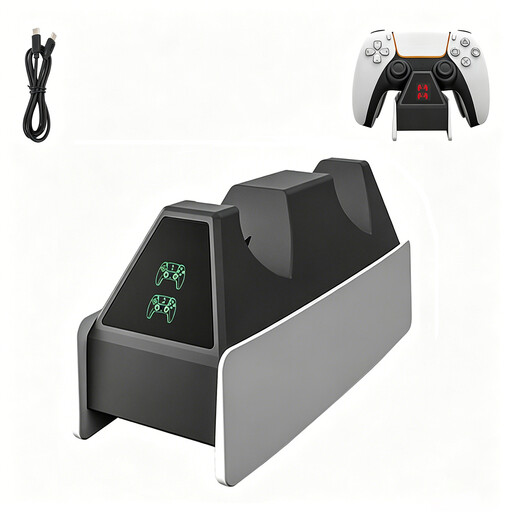
You want to charge one or two compatible PlayStation controllers in a dedicated spot without connecting them to your PS5. Sony Interactive Entertainment describes this option for DualSense and DualSense Edge controllers.
First, check whether the controller itself can charge through the connection you’ve chosen. Then decide whether you also want to connect other devices at the same time or would prefer a dedicated charging spot designed for your model.
| What to consider | What to look for | Who it matters to |
|---|---|---|
| Controller and battery | Check the controller model, connection, battery type and required cable. | If I want to find out first whether my controller can charge via USB, I check that the connection, battery and cable are compatible. Around 36% of consumers prioritise compatibility. |
| Mains charger safety | Check the product details, seller and CE marking where required for the mains charger. | When buying a mains charger, I want to be able to check the product information and seller before using it on my desk. Around 29% of consumers prioritise verifiable safety information. |
| Charging multiple devices | Count the devices you’ll connect at the same time, and check the port types and power distribution. | If I want to connect desk devices as well as my controller, I check that the ports are suitable and that enough power is available for the combination. Around 21% of consumers prioritise charging multiple devices at once. |
| Dedicated charging spot | Check which controller models are supported, how many charging points there are and whether a power supply is included. | If I want to charge a DualSense or DualSense Edge in a dedicated spot, I check that the station is compatible with my controller. Around 14% of consumers prioritise a dedicated charging spot like this. |
A USB connection doesn’t mean the AA batteries in an Xbox controller will charge through the cable. Xbox Support from Microsoft distinguishes between AA batteries and a rechargeable battery pack with a USB-C cable.
Before choosing a cable, charger or dock, check which type of battery your controller uses.
If you want to charge via USB but use AA batteries, you may need a separate rechargeable battery solution.
With a multi-port charger, the available power can change when you connect more devices.
Compare the stated power distribution across the ports for the devices you want to charge at the same time.
Sony specifies the DualSense Charging Station CFI-ZDS1 for DualSense and DualSense Edge controllers. That doesn’t make it suitable for other controllers.
Check the station’s stated compatibility. For other controllers, choose a solution based on their own charging requirements.
You may still need a separate charger for other devices.
Sony describes a model-specific charging station for up to two DualSense or DualSense Edge controllers.
Belkin offers general-purpose USB chargers, including a 20 W USB-C wall charger for one connected device.
UGREEN’s EU catalogue includes products such as a 65 W Nexode wall charger with three ports.
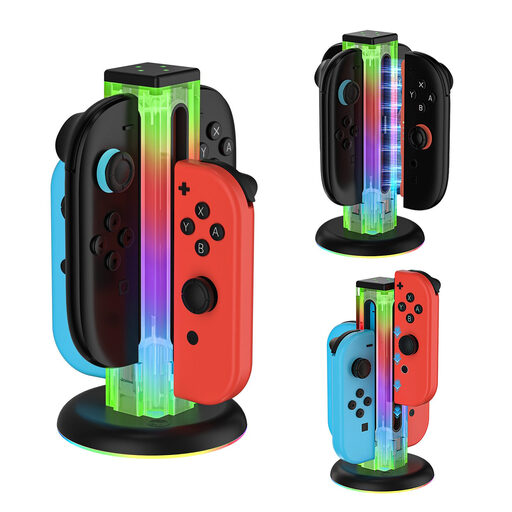
This selection includes controller charging stations and USB options for your desk, from Joy-Con and PS VR2 Sense stations to multi-port chargers.
 No image available
A model-specific charging station for charging and storing Joy-Con controllers in one place.
The product name lists compatibility with the Switch series, OLED and Switch 2.
The description mentions four charging points and a USB-C cable.
 No image available
May suit a desk where you want to connect a controller and other devices at the same time. Check that your controller and cable are compatible with the port you choose.
The product description lists two built-in retractable USB-C cables and four additional ports.
According to the description, up to six devices can be connected at once. Check the product information for the relevant safety details before using a mains charger.
 No image available
A model-specific station for anyone who wants to charge two PS VR2 Sense controllers at once and keep them together.
The product description lists magnetic attachment, an included USB-C cable and a detachable headset holder.
Compatibility is listed for PS VR2 Sense controllers.
 No image available
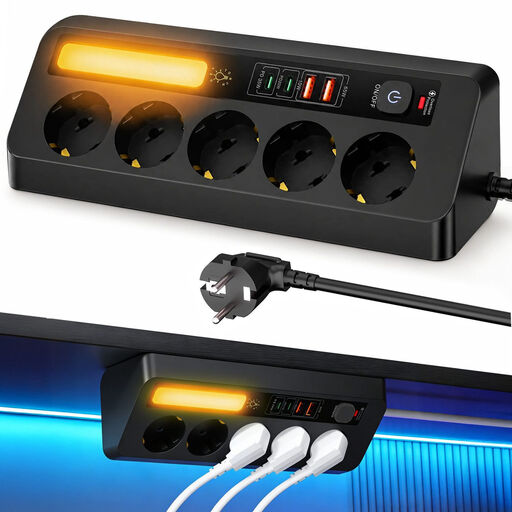
May suit a desk where you want to connect USB devices and other plugs in one place. Check that the USB ports are compatible with your controller cable.
The product name lists four USB ports, PD 35 W, an on/off switch and a 2 m cable.
Before use, check the product details and the relevant safety information for the mains charger.
 No image available
May suit you if you want to connect several USB devices to one charging point. Check that one of the ports and cables is suitable for your controller.
The product name lists USB-A and USB-C ports, and says it’s suitable for home or office use. Check the port configuration and product safety information for your intended use.
No, not with the cable alone. Xbox Support from Microsoft distinguishes between AA batteries and the rechargeable Xbox battery with a USB-C cable. First, check which battery solution your controller uses.
Yes, if the USB power setting is configured appropriately. Sony Interactive Entertainment lists the ‘Always’ and ‘3 Hours’ options for supplying power to USB ports. For the CFI-2000 model group, Sony also lists ‘Adaptive’. Check this setting if charging via the console stops.
Nintendo describes charging it with the supplied USB charging cable via a powered Switch dock, or directly with adaptor HAC-002 or another compatible adaptor. According to Nintendo, the charging light turns off when the controller is fully charged.
Online purchases generally come with a statutory 14-day cooling-off period after delivery, although there are exceptions. ACM ConsuWijzer explains the conditions. The statutory guarantee also applies: if a product develops a fault sooner than you could reasonably expect with normal use, the seller must offer an appropriate solution.
CE marking is compulsory for electrical products where the rules apply. The Netherlands Food and Consumer Product Safety Authority outlines the applicable requirements under the Low Voltage Directive. A CE marking alone doesn’t prove that an individual product is safe.