What should you consider when choosing?
First, check that your console or PC and the game support the controller. Then decide whether game-specific effects, a tidy desk, how it feels in your hands or battery management matters most to you.
| What to consider |
What should you check? |
Who is this important to? |
| Device and game compatibility |
Check support for your console or PC, the game and the connection required. Steam shows controller support for each game; PlayStation, Xbox and 8BitDo list platform-specific features. |
If I switch between PC and console, I want to know in advance whether my device and game will work together. Around 29% of consumers put device and game compatibility first. |
| Tactile gameplay |
Check whether your game supports haptics or adaptive triggers. PlayStation states that haptic feedback on PC requires both a USB connection and game support. |
If tactile effects and trigger resistance are to enhance my cinematic gaming experience, I check which features are available in each game. Around 23% of consumers prioritise game-specific effects. |
| Connection and desk space |
Measure the available cable route and check for a free USB port and room for an adapter. The PowerA Enhanced Wired has a 3 m cable; the 8BitDo Ultimate 2C Wireless uses 2.4 GHz or a cable with Windows. |
If my desk is short on space, I don’t want a cable or adapter getting in the way. Around 18% of consumers choose mainly based on connection and available desk space. |
| Grip and button reach |
Compare the shape and button layout, and try it in your hands if possible. Extra buttons don’t prove that a controller will be more comfortable for everyone. |
If I play for long periods, I want the grip and buttons to suit my hands. Around 18% of consumers give the feel in their hands and button reach the most weight. |
| Battery management and extra purchases |
Check which batteries or rechargeable battery are included and whether you need a separate charging solution. Xbox Support states that rechargeable AA batteries don’t charge inside the controller. |
If I play wirelessly, I want to know how the controller is powered and what I’ll need. Around 12% of consumers prioritise the power source and potential extra costs. |
Joybuy products for PC and console use
This selection includes wireless Xbox and DualSense controllers, as well as models for PC or mobile use. Check that your game and device support the controller and features you want.
 No image available
Xbox Wireless Controller - Ice Breaker Special Edition
A good fit for Xbox or Windows if you want to play wirelessly and your console or PC is among the listed platforms.
The product information lists Xbox Wireless and Bluetooth, and states that two AA batteries are included. According to Xbox Support, rechargeable AA batteries don’t charge inside the controller.
View at Joybuy
 No image available
PlayStation DualSense Wireless Controller - Grand Theft Auto VI White Limited Edition
An option if you play on PS5 or want to use DualSense features in a supported PC game.
The product information lists haptic feedback, adaptive triggers and USB-C or Bluetooth connectivity. PlayStation states that haptic feedback on PC requires both USB and support from the game.
View at Joybuy
 No image available
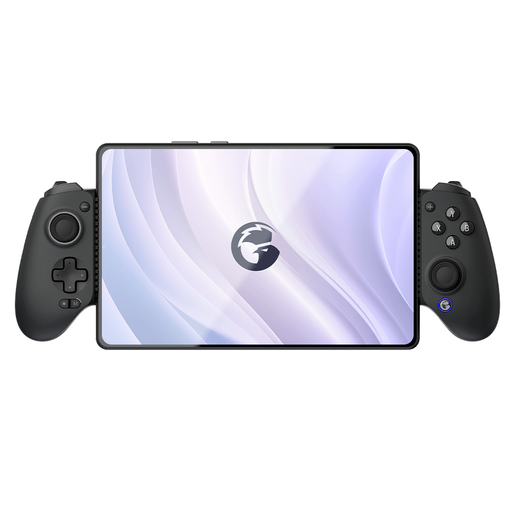
GameSir G8 Galileo Plus Bluetooth Wireless Mobile Game Controller
The product information lists PC and mobile devices. Check the connection and support for your specific game before choosing this model.
The description lists Hall Effect triggers, programmable buttons and an adjustable telescopic phone holder.
View at Joybuy
 No image available
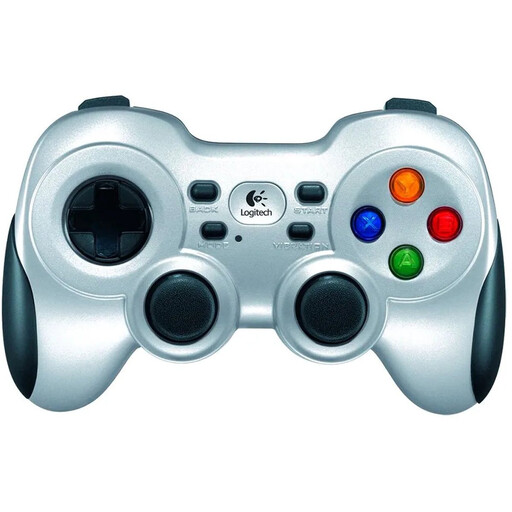
Logitech F710 Wireless Gaming Controller for PC Silver
An option for PC if you want to connect wirelessly using the included nano receiver.
The product information lists a 2.4 GHz receiver, dual vibration motors and two AA batteries. Vibration works in games that support it.
View at Joybuy
 No image available
BEITONG KP70 Haptic Feedback Elite Wireless Controller
An option to consider if you use a PC and want haptic feedback or adjustable controls; check which connection your setup requires.
The product name lists adjustable triggers, a joystick with adjustable resistance and six programmable buttons. The product information lists PC, Nintendo Switch, Nintendo Switch 2, iOS and Android.
View at Joybuy
Frequently asked questions
Can I connect a DualSense to my Windows PC and use all its effects?
Not automatically: according to PlayStation, haptic feedback on PC requires both a USB connection and support from the game. Also check whether adaptive triggers are available in each game.
How do I connect the 8BitDo Ultimate 2C Wireless to my Windows PC?
According to 8BitDo, you can use 2.4 GHz via the included USB-A adapter or a cable with this model. Bluetooth is listed for Android, so check that you have a suitable USB port available.
Will rechargeable AA batteries charge when I connect my Xbox controller?
No. Xbox Support states that rechargeable AA batteries don’t charge inside the controller; charge them according to the manufacturer’s instructions. If you’re using a separate Xbox rechargeable battery, check which version and cable are compatible.
What can I do if a controller develops a fault during normal use in the Netherlands?
Contact the seller to exercise your statutory rights. According to the Dutch government, there is no fixed statutory warranty period in the Netherlands; what you can reasonably expect depends, among other things, on the product and the sales information. A manufacturer’s warranty doesn’t replace these rights.
Can I return a controller bought online if it isn’t faulty?
According to the Dutch government, many online purchases made at a distance from a business come with a 14-day cooling-off period. Check the terms and any applicable exceptions; this is separate from your rights if the product is faulty.


