
Console RPG players
You play on Xbox, PlayStation or Nintendo Switch and want to choose a controller that suits your system. For Nintendo, it’s important not to confuse the original Switch Pro Controller with the separate Switch 2 Pro Controller.


Start with a controller that works with your console or PC and your game, then decide where to connect your headphones. A controller’s headphone socket does not work in the same way on every platform: Sony, for example, says that DualSense’s headphone socket requires a wired controller connection on PC. The Switch 2 Pro Controller is designed exclusively for Nintendo Switch 2.
You play on Xbox, PlayStation or Nintendo Switch and want to choose a controller that suits your system. For Nintendo, it’s important not to confuse the original Switch Pro Controller with the separate Switch 2 Pro Controller.
You want to connect your headphones directly, so you need to check that the socket works with your platform and the connection method you’re using.
You connect your headphones separately and choose a controller based on the PC connection, controls and power options that suit your setup.
First check support for your platform and game, then see where and how your headphones connect.
| What to consider | What should you check? | Who should consider this? |
|---|---|---|
| Platform and game | Check your exact console model, PC connection and the game’s controller support. | If I want to make sure my controller works with my system and sci-fi RPG, I check that combination first. Around 33% of consumers prioritise platform compatibility. |
| Headphone socket | Check the socket type, microphone use and compatibility with your platform and connection. | If I want to connect my wired headphones to the controller, I check that they’ll also work with my chosen connection method. Around 33% of consumers prioritise the headphone socket. |
| Power and session length | Check whether the model uses batteries, a built-in rechargeable battery or a USB cable, and what you’ll need for it. | If I want to play for a long time, I consider charging, batteries or a cable that’s a practical length. Around 20% of consumers prioritise power and uninterrupted use. |
| Controls and feedback | Check whether any extra buttons or feedback features are supported by your platform and game. | If I want to customise the controls or use feedback supported by the game, I check that these features are available in my game. Around 14% of consumers prioritise customisable controls or feedback. |
According to Sony, the DualSense headphone socket only works on PC and Mac when the controller is connected by cable. Pairing via Bluetooth alone does not guarantee that audio will work.
Before choosing, check audio support for your exact controller, device and connection method.
Nintendo lists a 3.5mm socket for the Switch 2 Pro Controller and says that this model is designed exclusively for Switch 2. Don’t assume that the original Switch Pro Controller has the same audio socket.
Compare the full product name with the system you play on, and check the audio features of that exact model.
A Dutch PC controller list from Techboer specifies AA batteries for the standard Xbox controller. Choosing between batteries, a rechargeable battery and a wired controller can affect what you need to recharge or replace while playing.
Check which type of power the model uses and decide which charging solution you want to use.
The standard Xbox Wireless Controller is designed for Xbox consoles and Windows, while the Elite range is a separate line with more customisation options.
DualSense is designed for PS5 and is also supported by certain PC games.
The original Switch Pro Controller and the separate Switch 2 Pro Controller are different models.
The G7 SE is a wired controller for Xbox and Windows with extra customisation options.
The Ultimate 2C Wireless is a PC option that connects via a 2.4GHz receiver or USB.
This selection includes controllers for PS4 and PC, Windows, Xbox and Nintendo Switch. Check the exact platform and audio support for each model before choosing.
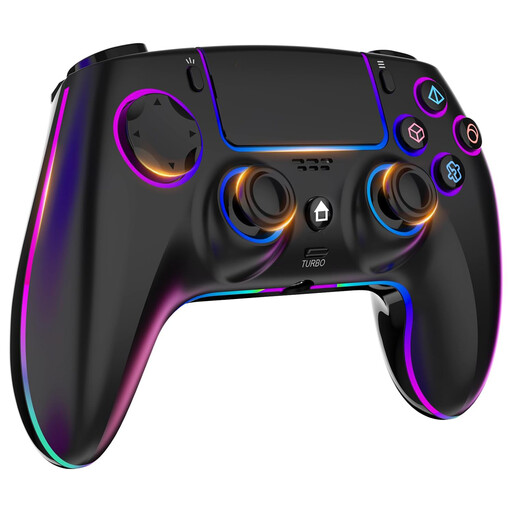 No image available
The product title lists PS4 and PC; the product information also mentions an integrated 3.5mm headphone socket. Check that it works with your system and connection.
 No image available
The product information mentions PC use and a 3.5mm socket. The title lists a PS5 layout, but that alone does not confirm PS5 compatibility.
 No image available
A wired option if you’re looking for a controller for Xbox or Windows and want to connect your headphones to the controller. The product title lists Xbox Series X/S, Xbox One and Windows 10/11; check the connection and features for your setup.
 No image available
The product information lists Nintendo Switch as a compatible platform. This is the original Switch Pro Controller; don’t assume it has the 3.5mm socket that Nintendo lists for the separate Switch 2 Pro Controller.
 No image available
The product title lists PC and Nintendo Switch as possible uses. Check the connection and platform support you need for your specific setup.
No. Sony says the DualSense headphone socket requires a wired controller connection on PC and Mac. Also check that your game supports the controller features you want.
Nintendo describes pairing via the supplied USB cable and controller grip, or through the controller menu and the SYNC button. The pairing instructions cover both Nintendo Switch and Switch 2.
Nintendo says that a maximum of two wireless controllers can be connected while using Bluetooth audio; a pair of Joy-Con counts as two controllers. The Bluetooth audio device may also cause lag.
If a product is faulty and does not do what you could reasonably expect during normal use, the seller is responsible under the legal guarantee; a manufacturer’s warranty does not replace this right. According to ACM ConsuWijzer, online purchases generally come with a 14-day cooling-off period from delivery, subject to legal exceptions.