
Console adventurers
You mainly play on one console and want to check in advance that the controller and your game’s features work with it. Microsoft, Sony and Nintendo provide information about support for different systems and models.


Start by choosing a controller that works with your console or PC and the specific game you play. Then consider its grip and how it’s powered or connected. PS5, Xbox, Windows and the different Switch generations each have their own compatibility requirements. Extra buttons and haptics are mainly worth considering if your game supports them and you want to use them.
You mainly play on one console and want to check in advance that the controller and your game’s features work with it. Microsoft, Sony and Nintendo provide information about support for different systems and models.
You want a grip and power or connection option that suit long gaming sessions. How a controller feels in your hands is personal, so also consider its shape and how easy the buttons are to reach.
You want to remap buttons or use haptics, so you check which features are available in each game. Sony says haptic feedback on PC requires support from the game and a USB connection.
First, check that your system and game are supported. Then compare how the controller feels in your hands and how it’s powered or connected. Consider extra features after that.
| What to consider | What to look for | Who this is for |
|---|---|---|
| Platform and game | Check the exact controller model, connection type and in-game support. Steam offers a filter for controller support; also check the information for the specific game. | If I want to be sure my controller works with my system and adventure game, compatibility comes first. Around 36% of consumers put platform and game compatibility at the top of their list. |
| Grip and controls | Compare the shape, texture and button layout. Some specific models have customisable rear buttons, but that doesn’t automatically make a controller more comfortable for every hand. | If I’m holding a controller for a long time, I want the grip and buttons to feel comfortable and easy to reach. Grip and controls are the top priority for around 29% of consumers. |
| Power and connection | Check whether the controller uses batteries, a built-in battery or a cable. Treat the stated battery life as a guide: how you use it and any accessories can affect how long it lasts. | If I don’t want to stop in the middle of a session to sort out power or a connection, I check how the controller is powered first. Uninterrupted play comes first for around 21% of consumers. |
| Extra features | Check whether the game supports haptics or adaptive triggers, and whether a particular connection is required. Button customisation varies by model. | I only choose extra buttons or feedback if I want to use those features and my game supports them. Around 14% of consumers prioritise customisable controls or supported feedback. |
A controller may connect to a PC, but some features may be limited depending on the game or connection. Sony says haptic feedback on PC requires both game support and a USB connection.
Check the information for your game and the required connection before relying on an extra feature.
Actual battery life can depend on how you use the controller and any accessories. A stated maximum or estimate won’t tell you exactly how long your session will last.
Plan ahead for how you’ll charge the controller, replace batteries or play with a cable, either during or between sessions.
Nintendo says the Switch 2 Pro Controller is for Switch 2 only. According to Nintendo, the older Switch Pro Controller can be paired wirelessly with Switch 2.
Check the full model name and which Switch you have.
A wireless Xbox controller may suit you if you play on Xbox or Windows and value a comfortable grip and wireless gaming.
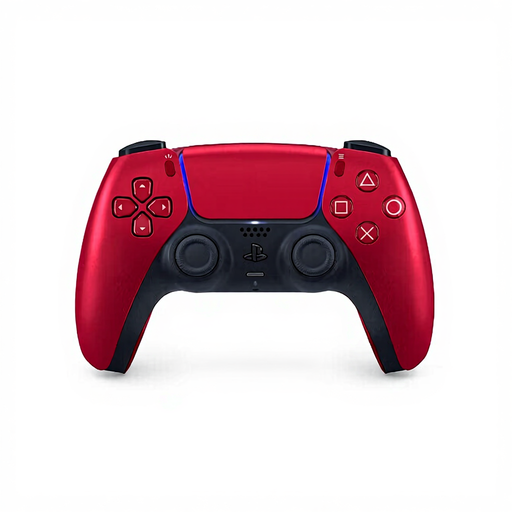
DualSense is an option for PS5. On PC, it’s worth checking support for each game.
Choose between Switch Pro controllers according to which Switch generation you use.
The Ultimate 2 Bluetooth is designed for use with Windows and Switch, and may suit you if you want customisable controls.
The wired G7 SE is an option for supported Xbox systems and Windows if a cable suits your gaming setup.
This selection includes controllers for Xbox or Windows, PlayStation 5, Nintendo Switch and Switch 2 systems. Check which features are available for each controller and game.
 No image available
A good fit if you want to play wired on supported Xbox systems or Windows and can use a cable at your gaming setup.
The controller has a wired USB connection and two programmable rear buttons. The cable runs between the controller and your setup.
 No image available
A wireless option if you’re looking for a controller for Nintendo Switch. Nintendo says this older Switch Pro model can also be paired wirelessly with Switch 2.
The product description mentions a built-in battery. This is a different model from the Switch 2 Pro Controller.
 No image available
A good fit if you play on PS5 and want to use haptic feedback or adaptive triggers when the game supports these features.
The controller has a built-in battery and USB-C. Sony says haptic feedback on PC requires game support and a USB connection.
 No image available
An option if you want to customise your controls and choose between different connection options for the listed systems.
The product name specifies wired use for Xbox and wireless use for PC and mobile. The description mentions programmable rear buttons.
 No image available
A good fit if you’re looking for a controller for Switch 2 and want to use features such as motion controls or HD Rumble when supported by the game.
The product description mentions a wireless connection and USB charging. Nintendo says this controller is for Switch 2 only.
Don’t assume they do. Sony says haptic feedback on PC requires both game support and a USB connection. Adaptive triggers also depend on the game.
No. Nintendo says the Switch 2 Pro Controller is for Switch 2 only. According to Nintendo, the older Switch Pro Controller can be paired wirelessly with Switch 2.
GameSir specifies a USB-C cable for connecting to a supported Xbox or Windows PC. Check in advance that the cable will suit your gaming setup.
For online purchases in the Netherlands, you generally have a statutory 14-day cooling-off period after delivery; ACM ConsuWijzer lists some exceptions. Check which terms apply to your purchase and handle the product carefully while trying it out.
You don’t need an extra warranty to have statutory rights. According to the Dutch government, there is no fixed statutory warranty period in the Netherlands; if a product is faulty, contact the seller. Consider a paid extension based on the additional rights the seller actually offers.