What should you consider when choosing?
First, check that the controller works with your system and game. Then find out how many players and which controls the game supports. Finally, consider your screen setup for daytime use.
| Consideration |
What should you check? |
Who should prioritise this? |
| Compatibility |
Check the exact system, controller model and whether the game supports its inputs and features. |
If I don’t want to choose a controller that won’t work with my system or game, compatibility comes first. Around 36% of consumers say this is their main concern when buying. |
| Another local player slot |
Check your game’s player limit and whether each player needs an individual Joy-Con or a full controller. |
I want a friend or housemate to be able to join in, not just an extra controller to be connected. Around 29% of consumers prioritise this. |
| Buttons and controls |
Compare the required sticks and buttons with the controller layout, and check whether any extra buttons work with your system. |
If my arena game requires lots of actions, I want to know whether the controls are up to the task. Around 21% of consumers make this their top priority. |
| Daytime gaming |
Assess how visible the screen is and where it sits in your play area; on Switch 2, you can adjust brightness in handheld or tabletop mode. |
If I sometimes use my portable screen during the day, I first want to know whether I can see it clearly. This is the main concern for around 14% of consumers. |
Brands to consider
These brands offer some useful options, but compatibility and features depend on the product range and game.
Nintendo
Joy-Con 2 for split controls and the Switch 2 Pro Controller for a full gamepad on Switch 2.
- Nintendo describes a Joy-Con 2 set as two separate controllers for supported local games.
- The Switch 2 Pro Controller has assignable GL/GR buttons.
- The Switch 2 Pro Controller doesn’t work with the original Switch, and the right layout depends on the game.
Microsoft Xbox
Wireless Xbox controllers for Xbox and supported Windows games.
- Microsoft lists compatibility with Xbox and Windows.
- The version supplied with a USB-C cable can also be used for wired gaming.
- Check that the version you choose actually includes a cable.
Sony PlayStation
DualSense for PS5 and supported PC games.
- PlayStation describes USB and Bluetooth use on PC.
- On PC, adaptive triggers depend on the game; PlayStation also says USB is required for haptic feedback.
8BitDo
The Pro 2 is for players who use supported Switch and Windows devices and want customisable buttons.
- 8BitDo lists customisable back buttons and several platform modes.
- 8BitDo says a firmware update is required for Switch 2; this alone doesn’t mean you’ll gain an advantage in a game.
Razer
The Wolverine V3 Tournament Edition is a wired controller with extra buttons for Xbox and PC.
- Razer lists six customisable extra buttons for this model.
- Its wired connection and listed platforms make it less of an obvious choice for Switch, PS5 or a portable setup.
Joybuy controller picks for local gaming
This selection includes controllers and controller pairs for Switch and Switch 2 setups, PS4 and PS5, and PC. Check which features and local players are supported for each model and game.
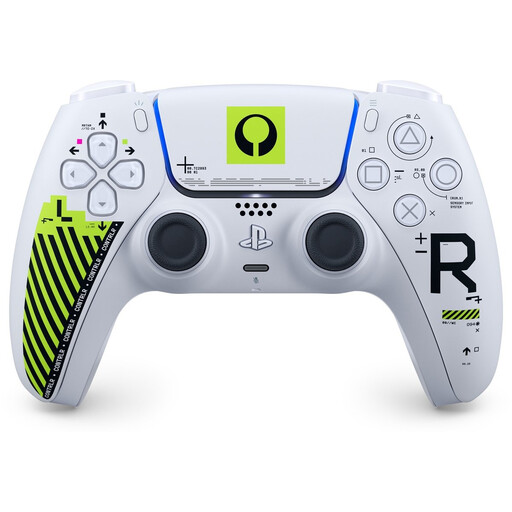 Image unavailable
Sony PS5 DualSense Wireless Controller - Marathon Limited Edition
A good fit for a PS5 setup. For PC use and extra features, check what your game supports.
The product description lists haptic feedback, adaptive triggers and a built-in microphone. USB-C use is described for PC; haptics and adaptive triggers depend on the game.
Joybuy
 Image unavailable
Hori Wired Controller Horipad Turbo for Switch and Switch 2, Pokémon Eevee Cottage Core Edition
A wired option for a Switch or Switch 2 setup if you want to use programmable back buttons.
The product description lists programmable back buttons and a Turbo function. The controller is wired; according to the description, a USB cable isn’t included.
Joybuy
 Image unavailable
KONIX JoyPad controller pair for Nintendo Switch, Switch OLED and Switch 2, blue and red
A pair of controllers for a Switch setup. Whether two players can use them separately depends on the game.
The product description lists Bluetooth, a gyroscope, vibration feedback and battery life of up to 8 hours.
Joybuy
 Image unavailable
Black wireless Dualshock game controller for PS4 and PC
An option for a PS4 or PC setup. Check which features your game supports.
The product description lists a wireless range of up to 10 metres, a touchpad, a gyroscope and dual vibration motors. A USB cable is mentioned for the initial pairing.
Joybuy
 Image unavailable
Wireless game controller with dual vibration and gyroscope for Switch and PC
Designed for a Switch or PC setup. Check compatibility with your specific game.
The product description lists wireless controls, dual vibration motors and a gyroscope sensor.
Joybuy
Frequently asked questions
Can eight connected controllers always support eight players on Switch 2?
No. Nintendo says that up to eight wireless controllers can be used in most situations, but the maximum also depends on the type of controller, the features in use and local communication. The game also determines how many players can join in at once.
What should you check before buying a PC controller for an arena game?
Check controller support and the local player limit for the specific game. Arena Arcade Fest, for example, lists 1–4 local players and partial controller support; this information doesn’t automatically apply to other games.
How can you adapt a Switch 2 setup for daytime use?
Nintendo describes automatic or manual screen brightness in handheld and tabletop mode. Test visibility where you plan to play; changing the controller won’t affect screen brightness.
How do you pair a Switch 2 Pro Controller?
Nintendo describes either syncing wirelessly or connecting the controller to the charging grip while the Switch 2 is docked in it.
What are your rights if your controller is faulty or you buy it online?
According to the Dutch government, if a product is faulty you’re entitled to a legal guarantee and the seller must resolve the problem; the Netherlands doesn’t have one fixed legal guarantee period for all products. ACM ConsuWijzer states that online product purchases generally come with a cancellation period that ends 14 days after delivery, although exceptions apply.


