
Console player looking for a compatible controller
You want to play open-world games on your existing console without mixing up Switch generations, Xbox and PS5. Nintendo and Xbox set out compatibility for each system and model.


First, choose a controller that suits your console or PC and the game. Then decide whether to connect your headphones to the controller or the gaming system. On Windows, the connection method matters: according to Xbox Support, Xbox controller audio works via USB or a compatible Xbox Wireless Adapter, not Bluetooth. For long quests, also consider the power supply, cables and controls you want.
You want to play open-world games on your existing console without mixing up Switch generations, Xbox and PS5. Nintendo and Xbox set out compatibility for each system and model.
You want to know whether your wired headphones or headset will work with the controller, including when it’s connected wirelessly to a PC. PlayStation and Xbox specify the requirements for controller audio on PC.
You want to play for longer with a comfortable grip and a reliable power supply, and perhaps configurable buttons, without overlooking the audio connection. Nintendo, 8BitDo and PowerA describe relevant features of their models.
First check that the system, game and audio connection are compatible. Then compare the power supply and extra controls.
| What to consider | What should you check? | Who should prioritise this? |
|---|---|---|
| Compatibility | Check the exact console generation, PC connection and support for your game. | If I want to play on my existing console or PC, I want to avoid finding that the controller or its extra features aren’t compatible with my system and game. Around 36% of consumers prioritise compatibility with their console, PC and game. |
| Headset audio | Check where the headphones connect and whether audio works with your connection. Also consider whether you need a microphone. | If I want to listen or chat through the controller while playing, I want to know what connection I need. Around 29% of consumers give working headphone audio top priority. |
| Long gaming sessions | Compare the power supply and cable with your gaming setup. Treat stated battery life as an estimate, as it can vary. | If I want to play for a long time, I want to know in advance whether recharging or a cable will interrupt my session. Around 21% of consumers prioritise a practical power or cable solution. |
| Configurable controls | Check which buttons you can remap on the exact model and whether your game supports the function you want. | If I’d rather assign certain actions to different buttons, I want to know what the model and game allow. Around 14% of consumers say configurable controls are their top preference. |
Having a headset socket doesn’t mean controller audio will also work over Bluetooth on Windows. Xbox Support specifies USB or a compatible Xbox Wireless Adapter for audio through an Xbox controller. For the DualSense headset socket on PC and Mac, PlayStation requires a wired controller connection.
First decide how you want to connect your headphones, then check the connection requirements for the exact controller model.
You may need a compatible USB cable or Xbox Wireless Adapter to use audio through the controller, so check whether you already have one.
According to Nintendo, the Switch 2 Pro Controller works only with Switch 2. So you’ll need to choose a controller that matches the generation of your original Switch or Switch 2 console.
Check the full model name against your console generation before you order.
Nintendo says Bluetooth microphones won’t work, audio may lag and you can connect a maximum of two wireless controllers while using Bluetooth audio.
Decide in advance whether you only want to listen or also need a microphone, and whether these limitations are acceptable for your gaming session.
ACM ConsuWijzer explains that the seller is responsible if a product develops a fault sooner than you could reasonably expect with normal use. Your statutory rights are not the same as a fixed manufacturer’s warranty period.
Keep your proof of purchase and contact the seller if you think a product is faulty.
DualSense for PS5, also usable with supported PC games and devices subject to specific requirements.
Xbox Wireless Controller for Xbox Series X|S and supported Windows devices.
Separate Pro controllers for the original Switch and Switch 2; your console generation determines which controller is compatible.
Ultimate 2C Wireless for Windows and Android, with extra assignable buttons.
Enhanced Wired Controller for compatible Xbox and Windows games: a wired option with a headset socket.
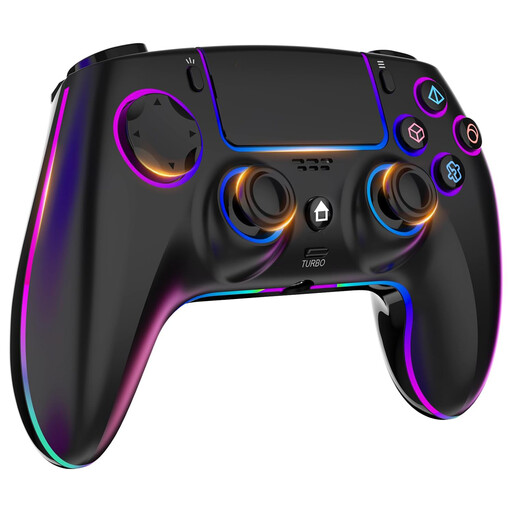
This Joybuy selection includes controllers for PS4 or PC and for both Nintendo Switch generations. Headset sockets and connection requirements vary by model.
 No image available
For anyone looking for a wireless controller for PS4 or PC with a headphone jack on the controller. On PC, check that audio through the socket works with your connection method.
The product name specifies a wireless connection, PS4/PC compatibility, a headphone jack and a 1000 mAh battery. The product description mentions an ergonomic design and up to 8 hours of wireless play.
 No image available
For anyone playing on the original Nintendo Switch who wants to use headphones through the system. The Switch 2 Pro Controller is a different model for a different console generation.
Nintendo describes Bluetooth audio through the Switch system. Audio may lag, Bluetooth microphones can’t be used, and a maximum of two wireless controllers can be connected. Nintendo estimates that the Switch Pro Controller’s battery lasts around 40 hours; this can vary depending on how it’s used.
 No image available
For anyone playing on Switch 2 who wants to connect headphones or a headset directly to the controller. According to Nintendo, this model doesn’t work with the original Switch.
Nintendo confirms that it has an audio socket for headphones or a headset. The product description mentions a rechargeable battery and an included USB charging cable.
No. According to Xbox Support, audio through the controller doesn’t work via Bluetooth on Windows 10 and 11. USB or a compatible Xbox Wireless Adapter supports this feature. You can also connect the headset directly to a suitable audio device.
Not with a wireless controller connection: PlayStation says the controller must be connected by cable to use the headset socket on PC and Mac.
No. Nintendo says the Switch 2 Pro Controller can only be used with Switch 2. So check your console generation before choosing a Pro Controller.
Pair the headphones via Bluetooth audio in the system settings. Nintendo warns that Bluetooth microphones won’t work, audio may lag and a maximum of two wireless controllers can be connected while Bluetooth audio is in use.
Online purchases in the Netherlands generally come with a statutory cooling-off period; ACM ConsuWijzer specifies 14 days after delivery, subject to legal exceptions. If a product develops a fault sooner than you could reasonably expect with normal use, the seller is responsible for providing an appropriate remedy at no cost under your statutory rights.