
Console gamer who just wants it to work
You play on one console and want to check in advance that the controller is compatible. For example, Nintendo distinguishes between the original Switch and Switch 2.


First, choose a controller that works with your console or PC. Then consider whether supported haptics, wireless play or a wired connection is best for your gaming set-up. A controller won’t fix screen glare: Arboportaal recommends positioning your screen in relation to the window and tackling disruptive incoming light separately.
You play on one console and want to check in advance that the controller is compatible. For example, Nintendo distinguishes between the original Switch and Switch 2.
You want to feel the effects in story-driven games, but first want to check whether your platform and game support them. Sony notes that haptics and adaptive triggers depend on the game.
You play near a window and want to consider both screen readability and how much freedom of movement you need around your gaming area. Arboportaal offers advice on positioning a screen in relation to a window.
First, check compatibility with your gaming system. Deal with disruptive daylight separately: controller lighting won’t solve screen glare.
| What to consider | What to look for | Who should give this more thought? |
|---|---|---|
| Compatibility | Check the exact console, controller model and any PC connection requirements. Nintendo confirms that the Switch 2 Pro Controller doesn’t work with the original Switch. | I want to play on my own console without discovering afterwards that the controller doesn’t work. Around 31% of consumers prioritise compatibility with their gaming system. |
| Clear view of the game | Consider incoming light and screen position; Arboportaal recommends positioning your viewing direction parallel to the window. | If daylight makes the screen difficult to read, I want to improve the picture first; lighting on a controller won’t tackle the glare. Around 25% of consumers prioritise being able to see the screen clearly in a bright room. |
| Immersive effects | Check whether haptics, triggers or vibration are supported for each game and platform. Sony notes that DualSense effects depend on the game and may require USB on PC. | In a cinematic adventure, I only want to consider immersive effects if my game supports them. Around 25% of consumers prioritise supported gameplay effects. |
| Cable and power | For a wired controller, measure the distance you’ll need to cover. For a wireless model, check which batteries, battery pack or charging accessories you’ll need; Microsoft lists AA batteries or a compatible battery pack for the Xbox controller. | If I sit further from the screen, I want to know whether a cable will be long enough or what power a wireless controller needs. Around 19% of consumers focus mainly on seating distance and power. |
RGB lighting on a controller won’t change how much daylight falls on the screen. PowerA describes Lumectra as lighting on the controller; Arboportaal highlights the effect of bright sunlight on screen readability.
Consider screen position and daylight separately from your choice of controller.
Nintendo says that the Nintendo Switch 2 Pro Controller doesn’t work with the original Nintendo Switch.
Compare the full model name with the console you own.
Sony notes that haptic feedback and adaptive triggers only work when the game supports them. A USB connection may be needed for these features on PC.
Check whether your games support these features and which connection they require before factoring them into your decision.
Microsoft lists AA batteries and a compatible rechargeable battery pack as power options.
Check what’s included with the model you choose and decide in advance how you want to power the controller.
The DualSense is designed for PS5 players who want to use haptics and adaptive triggers in supported games. Sony also lists PC, Mac and mobile devices as compatible uses.
The Xbox Wireless Controller is designed for Xbox consoles and supported Windows and mobile devices.
The Switch 2 Pro Controller is an option for Switch 2 players who want to use the listed controller features.
According to 8BitDo, the Ultimate 2 Bluetooth is designed for supported Switch and Windows systems.
The wired Advantage Wired Controller with Lumectra is an option for a fixed gaming set-up with supported Xbox or Windows systems.
This Joybuy selection includes controllers for Xbox and Windows, Nintendo Switch and Switch 2, and PS5. Before choosing, check which model is right for your gaming system.
 No image available
Suitable for playing on the listed Xbox systems or Windows 10/11 when you want a wireless connection.
Wireless connection; 2 AA batteries included. The product description also mentions textured triggers, rubberised rear grips and a headset jack.
 No image available
An option for playing on Nintendo Switch if you’re looking for a wireless controller with vibration.
The product description mentions HD Rumble, motion controls, amiibo functionality and a built-in rechargeable battery.
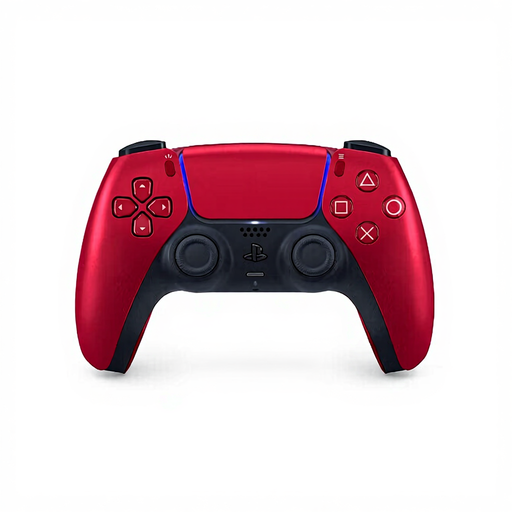 No image available
Suitable for PS5 games that support haptic feedback and adaptive triggers.
The product description lists PS5, PC, Mac and mobile devices. The gameplay effects mentioned depend on game support; USB may be required on PC. A built-in microphone and rechargeable battery are also listed.
 No image available
A wired option for a fixed gaming set-up with Xbox Series X|S, Xbox One or Windows 10/11.
The product description mentions a detachable 3 m USB-C cable, Hall Effect sticks and triggers, vibration motors and a textured surface.
 No image available
Designed for Switch 2; Nintendo notes that the Switch 2 Pro Controller doesn’t work with the original Switch.
The product description mentions Bluetooth, a rechargeable battery and an included USB charging cable, as well as HD Rumble and motion controls.
Not to fix screen glare. First, check whether changing the screen position or using blinds helps; PowerA describes Lumectra as lighting on the controller.
No. Sony notes that the game must support these features and that a USB connection may be needed on PC.
It depends on the model. Microsoft lists AA batteries or a compatible rechargeable battery pack for the Xbox controller; Nintendo includes a USB charging cable with the Switch 2 Pro Controller. Check what’s included with the model you choose.
According to the Dutch government, you can contact the retailer if a product doesn’t meet the required standards. There is no fixed statutory warranty period; any manufacturer’s warranty is in addition to your legal rights.
For many consumer purchases made at a distance, the Dutch government says you have 14 days to change your mind. Check whether your purchase is covered by these rules.