First, choose a controller that works with your console or PC and the exploration game you play. Then decide whether you want adjustable lighting, extra controls or tactile feedback. Lighting on the controller casing doesn’t automatically mean the button labels are illuminated, and a cable may limit where you can sit.
Who is this choice relevant to?
Console gamer who explores in the dark
You mainly want to know whether the controller works with your PS5, Xbox or Switch and the game you play. Xbox, PlayStation and Nintendo list support and features by platform and model, so check the combination that applies to you.
Player who wants adjustable lighting
You want to adjust the controller’s brightness while playing in a dark room. PowerA describes three-zone adjustable lighting on the Spectra Infinity, but that doesn’t mean the button labels themselves light up.
PC player who wants customisable controls
You want to access extra actions using assignable buttons, and you’re checking the connection type for the model you’re considering. PlayStation lists DualSense features for certain PC games, while 8BitDo specifies different platforms and connections for its Ultimate 2C models.
What should you look for?
First, check that the controller works with your system and game. Then compare the lighting, controls and feedback, as well as how you play and charge it.
| What to consider |
What should you check? |
Who is this important to? |
| Compatibility |
Check the exact console model or operating system, the connection and whether the game supports it. |
I want to know first and foremost whether my controller and exploration game work on my system; platform compatibility is the top priority for around 31% of consumers. |
| Lighting |
Check which parts light up and whether you can adjust the colour or brightness. Don’t rely on the term RGB alone. |
If I want to control my controller’s lighting in a dark room, that’s the most important factor for around 25% of consumers. |
| Buttons and grip |
Look at the position of the sticks and buttons, the grip and whether extra buttons can be assigned on your platform. |
I want to reach actions comfortably while exploring and find the layout easy to use; that’s the top priority for around 19% of consumers. |
| Game feedback |
Check whether the specific game supports the vibration, haptics or adaptive triggers you want. |
If I mainly want tactile signals from the game, that feedback is the top priority for around 13% of consumers. |
| Seating distance and power |
Check the cable routing, adapter and power method for the exact model, and make sure they suit where you sit. |
I want to keep playing without a cable or charging break getting in the way of my set-up; that’s the main consideration for around 12% of consumers. |
Common selection mistakes
-
Assuming RGB means the button labels light up
The PowerA Spectra Infinity specifications describe adjustable lighting zones, not illuminated letters or symbols on every button.
Decide whether you want ambient lighting or more legible button labels, and check these features separately.
-
Assuming 8BitDo models with similar names are interchangeable
The Ultimate 2C Wireless is designed for Windows and Android, with different connection options. The Ultimate 2C Bluetooth is the Switch-focused model, with its own version requirements.
Check the full model name, platform, connection type and any firmware or system requirements.
-
Expecting DualSense features to work in every PC game
PlayStation describes haptic feedback and adaptive triggers for certain PC games, not every title.
Check whether the game you want to play supports these features before taking them into account.
-
Choosing a wired controller without considering where you sit
The PowerA Spectra Infinity’s cable may affect where you can sit and how you connect it to your system.
Check that the connection and cable routing suit your set-up.
Brands to consider
Microsoft Xbox
A relevant choice for supported Xbox consoles, Windows PCs and mobile devices.
- Microsoft lists features including textured grips, a hybrid D-pad, Bluetooth and button mapping.
- These features don’t confirm illuminated button labels or compatibility with PlayStation or Switch systems.
Sony PlayStation
A relevant choice for PS5 players and PC users who check whether their game is supported.
- PlayStation describes haptic feedback and adaptive triggers for certain PC games.
- The PC features mentioned depend on the game and don’t automatically apply to every title.
Nintendo
The Switch Pro Controller and Switch 2 Pro Controller are separate models for different needs within the Switch family.
- Nintendo lists motion controls and HD Rumble for the Switch Pro Controller. The Switch 2 Pro Controller includes configurable GL and GR buttons, a C Button and an audio jack.
- Check which model suits your Switch system and the features you want; don’t treat the two models as the same controller.
PowerA
The wired Spectra Infinity is an option if you want adjustable lighting on a supported Xbox system.
- PowerA specifies three zones with adjustable colour and brightness, plus assignable buttons.
- The specifications refer to lighting zones, not illuminated button labels; the cable may limit your set-up.
8BitDo
The Ultimate 2C Wireless for Windows and Android and the Ultimate 2C Bluetooth for Switch are different models.
- The official specifications list assignable extra buttons on both models.
- Platforms and connections differ. For Switch 2, 8BitDo specifies a firmware update and minimum system version for the Bluetooth model.
Joybuy products
This selection includes controllers for Xbox and Windows, Nintendo Switch and PS5, with options for extra buttons, controller lighting and game feedback.
 No image available
GameSir G7 SE Dynamic Blue wired Xbox controller
This wired model is an option for Xbox and Windows users who want two programmable rear buttons.
The product information lists Xbox Series X/S, Xbox One and Windows 10/11.
The wired connection may limit where you can sit.
Joybuy
 No image available
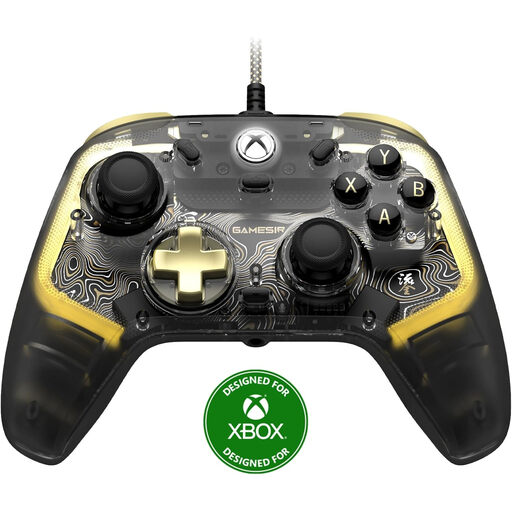
GameSir Kaleid Flux Smoke Transparent RGB
This wired Xbox controller is an option if you’re looking for RGB lighting on your controller. Check separately which parts light up and whether you can adjust the brightness.
The product information lists Xbox Series X/S, Xbox One and Windows 10/11.
The wired connection may limit where you can sit.
Joybuy
 No image available
Nintendo Switch Pro Controller black
This wireless controller is designed for Nintendo Switch users who want motion controls and HD Rumble.
The product information also lists amiibo functionality.
Joybuy
 No image available
BEITONG KP70 Elite Wireless Gaming Controller
The product title lists six programmable buttons and support for PC and Nintendo Switch/Switch 2. Check that the connection and features suit your system.
The product information lists wired, wireless and Bluetooth connections, plus a 1500 mAh battery.
The title also mentions haptic feedback triggers and adjustable joystick resistance.
Joybuy
 No image available
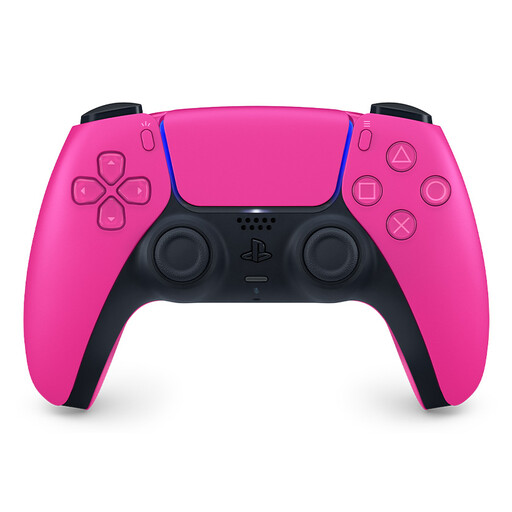
PlayStation PS5 DualSense Nova Pink
This PS5 controller is an option if you want to use haptic feedback and adaptive triggers in games that support these features.
The product information lists a built-in microphone and USB-C charging.
Joybuy
Frequently asked questions
Are lighting zones the same as illuminated button labels?
No. PowerA describes three zones on the Spectra Infinity with adjustable colour and brightness. This doesn’t confirm that the letters or symbols on the buttons themselves are illuminated. Check separately if you want to be able to read the labels.
Do DualSense haptics and adaptive triggers work in every PC game?
No. PlayStation lists support in certain PC games. Check the compatibility information for the game you want to play.
How do you connect a Switch 2 Pro Controller to a Switch 2?
Nintendo describes both syncing with the included USB-C cable through the system or dock, and wireless pairing using the SYNC button from the controller menu.
How do you charge a Nintendo Switch Pro Controller?
Follow the instructions for your exact model. Nintendo says the Switch Pro Controller can be charged via the dock or a compatible power supply, and takes around six hours to charge. This doesn’t automatically apply to other controllers.
What returns and warranty rights apply to an online purchase in the Netherlands?
For many distance purchases, you have a 14-day cooling-off period. You also have a statutory warranty: if a product develops a fault sooner than you could reasonably expect under normal use, the seller must offer an appropriate remedy free of charge. There is no fixed warranty period for this statutory guarantee in the Netherlands.


