
Sofa gamers with one console
You’re looking for controllers for a co-op game that supports local play, so everyone can play from the sofa without a cable running to the controller. Check that the game supports the number of players you want.


First, choose a controller that works with your console or PC, as well as the co-op game and connection type you want to use. Then check the connection where you’ll actually be sitting: a stated wireless range doesn’t guarantee a reliable signal indoors, while USB may be needed for certain features or games, and any cable needs to reach your seat.
You’re looking for controllers for a co-op game that supports local play, so everyone can play from the sofa without a cable running to the controller. Check that the game supports the number of players you want.
You play on a PC from the sofa and need to check both in-game support and the connection between the controller and PC. The connection type supported can vary from game to game.
You want to minimise interruptions to charge your controller or replace its batteries. The stated battery life depends on how you use it and which features are switched on.
| What to consider | What should you check? | Who should pay extra attention? |
|---|---|---|
| Platform, game and players | Check the exact console or PC, local co-op support, player limit, and which controllers and connection types are supported. | If I want to play with someone else, the game I choose needs to support our controllers and the number of players we want. Around 33% of consumers prioritise compatibility. |
| Connection from your seat | Check whether the controller uses Bluetooth, a wireless adapter or USB, and test the connection where you’ll be playing. | If I’m sitting far from the screen, I want to know whether the connection works there; a stated range isn’t a guarantee for my living room. Around 27% of consumers prioritise a reliable connection from their seat. |
| In-game controls | Check which buttons and features the game uses, and whether the features you want work with your chosen connection. | If a puzzle game requires specific controls, I want to know whether those features are available in my game. Around 20% of consumers prioritise controls that suit their needs. |
| Power | Check the battery type, what’s included, and how to charge the controller or replace its batteries. | If you’re playing together for a long time, you’ll want to minimise breaks to power up. Around 20% of consumers prioritise staying powered up during long sessions. |
The Steam listing for It Takes Two says that DualSense and DualShock are supported via USB only. So, a controller that can connect to a PC won’t necessarily work wirelessly with every PC game.
Check which controllers and connection types are supported for the specific game.
If USB is required, you’ll need a suitable cable that reaches your seat.
8BitDo states a range of 10 m for the Ultimate 2 Wireless under ideal laboratory conditions. Xbox Support notes that Bluetooth reliability also depends on the Bluetooth card in the connected device.
Test the connection where you’ll be sitting, and check where you can position a wireless adapter if needed.
Nintendo says that the Switch 2 Pro Controller doesn’t work with the original Switch. That’s why it’s important to check the model name when confirming compatibility.
Compare the full product name with your Switch generation and check whether your game supports it.
Choosing the wrong one could mean you still need to buy a compatible controller.
ACM ConsuWijzer distinguishes between your legal guarantee and the manufacturer’s warranty. Your legal rights apply even if you haven’t bought an extra warranty plan.
Before paying for an extra plan, compare its cover with the legal rights you already have.
An extra plan could be an unnecessary expense if you expect it to replace your legal guarantee.
These brands are included as a guide. When choosing, always check the exact controller, device, game and connection type you need.
DualSense is designed for PS5 and can also be used with certain PCs and other specified devices.
The Xbox Wireless Controller is designed for compatible Xbox consoles and PCs.
The Switch Pro Controller is an option for Switch players. Make sure you don’t confuse it with the Switch 2 Pro Controller.
The Ultimate 2 Wireless is a wireless option designed for PC, with a USB-C adapter. Check support for your device and game.
This selection includes controllers for Xbox, PS5, Nintendo Switch and PC. Before choosing, check that the game, device and connection type are compatible. The Dutch Authority for Digital Infrastructure states that wireless equipment sold in the Netherlands must meet the applicable requirements, including carrying a CE mark.
 No image available
Ideal if you play on a compatible Xbox console or Windows PC. Also check that your game supports it and that it works with your preferred connection.
The product information lists Xbox Wireless and Bluetooth, two AA batteries included, and battery life of up to 40 hours. Microsoft states this as a maximum; actual battery life depends on usage conditions.
 No image available
Ideal if you play on PS5. For PC use, check that your game supports the controller with your chosen connection.
The product information lists Bluetooth for PS5 and USB-C for PC. PlayStation states that haptic feedback in supported PC games requires USB.
 No image available
Ideal if you play a compatible game on Nintendo Switch. Check your Switch generation and whether the game supports local co-op.
Nintendo states that a fully charged Switch Pro Controller offers around 40 hours of play, depending on the software and features used.
 No image available
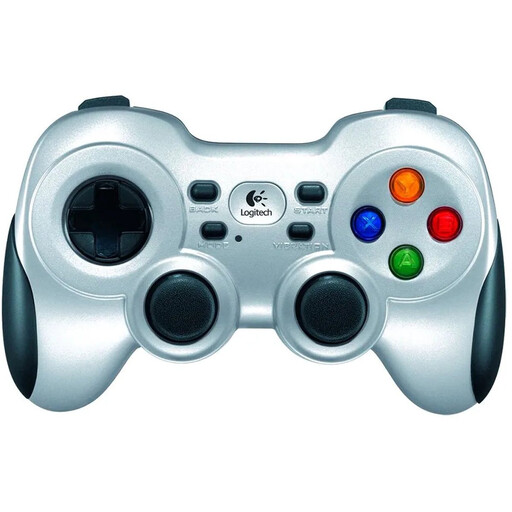
Ideal if you play on a PC and can plug the included wireless receiver into a suitable position. Check that your game supports it.
The product information lists a 2.4 GHz connection via a nano receiver, as well as an extension cable for the receiver. The cable helps you position the receiver, but doesn’t guarantee a specific range.
 No image available
Ideal if you play on a compatible PC or Nintendo Switch and want to compare different connection types. Platform compatibility doesn’t automatically mean that a specific game will support it.
The product information lists 2.4 GHz wireless, Bluetooth and wired connections, as well as interchangeable sticks, buttons, D-pads and vibration motors.
Check the game and game mode first; the number of controllers needed varies from game to game. The Steam listing for It Takes Two mentions shared or split-screen co-op, and says that DualSense and DualShock are supported via USB only in that PC version.
Nintendo describes pairing it either with the included USB cable connected to the dock or by pressing the SYNC button from the controller menu. The Switch must be switched on to pair the controller.
Contact the seller and ask for a solution under your legal rights. ACM ConsuWijzer states that the legal guarantee is separate from the manufacturer’s warranty, and that the seller must resolve, free of charge and in line with the applicable conditions, any issue with a product that doesn’t do what you could reasonably expect it to do.
The Dutch Authority for Digital Infrastructure states that equipment sold in the Netherlands must meet the applicable requirements, including carrying a CE mark. Check the product information and markings on the item itself; a general product listing doesn’t establish whether an individual item complies.
For a standard online product purchase, ACM ConsuWijzer generally states that you have up to 14 days after delivery to change your mind, subject to legal exceptions. Check the conditions for unpacking, trying out and returning the specific item you’ve bought.