Start with your console and check that the game supports local co-op with the controller setup you have in mind. There’s no single controller that suits every gaming setup. Next, choose between wireless play, taking the power source into account, and a cable that reaches your seat. When it comes to lighting, check exactly which parts light up: manufacturers’ specifications aren’t a comparative real-world test.
Who is this relevant for?
Players who need a second controller
You play together on one system and want to make sure the extra controller works with both the system and the game. Nintendo and PlayStation describe extra controllers as a way to play together; the number of players who can join in depends on the game.
Players who want to adjust the lighting
You play in a dark room and want adjustable controller lighting. Bear in mind that decorative RGB lighting doesn’t necessarily mean the button labels are illuminated.
Players with a fixed seat
You sit close enough to the system to use a cable, and weigh that up against charging or replacing batteries when playing wirelessly.
What should you look for when choosing?
Start with your console and the game’s co-op mode. Then assess the lighting, power source and cable reach in relation to your gaming setup.
| What to consider |
What should you check? |
Who is this important for? |
| Console and co-op |
Check the exact console and generation, as well as how many controllers or Joy-Cons the game requires for local co-op. |
If I want to play with someone on one system, both the console and the game need to support the setup I have in mind. Around 39% of consumers prioritise this compatibility. |
| Lighting |
Check whether the RGB zones are adjustable and whether the button labels light up on the exact version. |
If I want to adjust the lighting in a dark room, I need to know exactly what lights up. Around 23% of consumers prioritise adjustable lighting. |
| Wireless and power |
Check whether the version is rechargeable or uses AA batteries; treat stated battery life as dependent on usage. |
If I want more freedom to sit without a cable across the floor, I also need to consider charging or batteries. Around 23% of consumers prioritise wireless freedom and the power source. |
| Cable reach |
Measure the cable route to your seat and check what’s included with the exact version. |
If I’d rather not manage a wireless power source, the cable needs to reach my seat safely. Around 15% of consumers prioritise a wired setup and a suitable cable length. |
Common mistakes
-
Assuming RGB zones mean the button labels are illuminated
The Afterglow specifications mention RGB zones and lighting modes, but that doesn’t mean the buttons are easy to read in the dark.
Check which parts light up on the exact version and whether you can adjust the brightness.
-
Assuming every Switch controller is fully interchangeable
Nintendo says that a Switch Pro Controller can be used wirelessly with Switch 2. The Switch 2 Pro Controller also has features including a C button and an audio jack.
Choose based on your system and the features your game requires, not just the name Pro Controller.
-
Forgetting the cable route to the sofa
PowerA specifies a 3 m cable for the Enhanced Wired version reviewed. The route around furniture may be longer than the straight-line distance to the system.
Measure a safe cable route before choosing a wired controller.
A short cable may mean adjusting your seat or cable setup.
-
Confusing the manufacturer’s warranty with your statutory rights
ACM ConsuWijzer distinguishes between the seller’s or manufacturer’s warranty and your statutory rights.
Keep your proof of purchase and, if a product develops a fault too soon, contact the seller first.
Brands to compare
Nintendo
Controllers for playing together on Switch and Switch 2 systems.
- Nintendo lists motion controls and an estimated battery life of around 40 hours after a full charge for the Switch Pro Controller. Battery life may depend on the software and features used.
- The Switch 2 Pro Controller has additional features, including a C button and an audio jack. Check which generation and features you need.
PlayStation
The DualSense range is an option if you need an extra controller for a PS5.
- Sony lists haptic feedback and adaptive triggers; whether they’re used depends on the game.
- According to the product information, DualSense isn’t compatible with PS4. Also check whether your game supports the features you want.
Xbox
Microsoft’s wireless controller is designed for Xbox consoles and the listed, supported PC and mobile devices.
- Microsoft lists features including Bluetooth, button mapping, textured grip and a hybrid D-pad.
- Check the power source for the exact version. Compatibility with a device doesn’t guarantee that every game supports the same features.
Turtle Beach
The Afterglow Wave is an option if you’re looking for adjustable lighting on the Switch models listed.
- Turtle Beach lists eight RGB zones and four lighting modes.
- RGB zones don’t prove that the button labels light up. Check this separately if visibility in the dark is important.
PowerA
The Enhanced Wired range offers a wired option for Xbox Series X|S, Xbox One and Windows.
- For the version reviewed, PowerA lists a detachable 3 m USB cable and two mappable buttons.
- Check that the cable reaches your seat. The listed specifications don’t demonstrate a performance advantage over wireless controllers.
Controllers at Joybuy
The models shown are wireless options for Switch, PS5, Xbox and PC; some versions list adjustable lighting. Check that your console and game are supported for each controller.
 No image available
NAXSIR Wireless Gamepad for Switch, 7-Color LED, 04-66666666
A wireless option for Switch. The product information lists a rechargeable battery, gyroscope, vibration feedback and 7-colour LED lighting. The title mentions Bluetooth and a stated range of 10 m; check which parts of the controller light up.
View at Joybuy
 No image available
Turtle Beach Afterglow Wave Wireless Controller, Transparent
A wireless controller for Switch 2, Switch, Switch Lite and Switch OLED, according to the product title. The product information lists adjustable RGB lighting with four modes, two programmable rear buttons and TMR sticks. Check that the lighting and controls suit your gaming setup.
View at Joybuy
 No image available
VIELLAN Wireless Gaming Controller for PC
The product information lists PC use and a wireless connection. The title mentions Hall-effect joysticks, 255-level Hall triggers, programmable rear buttons, RGB lighting, a 1000 mAh battery and USB-C. Check compatibility with your exact device; a PS5 layout alone doesn’t confirm PS5 support.
View at Joybuy
 No image available
PS5 DualSense Wireless Controller, Gran Turismo Limited Edition
A wireless DualSense version for PS5. The product information lists haptic feedback, adaptive triggers and a built-in rechargeable battery; whether a game uses the controller’s features varies from game to game.
View at Joybuy
 No image available
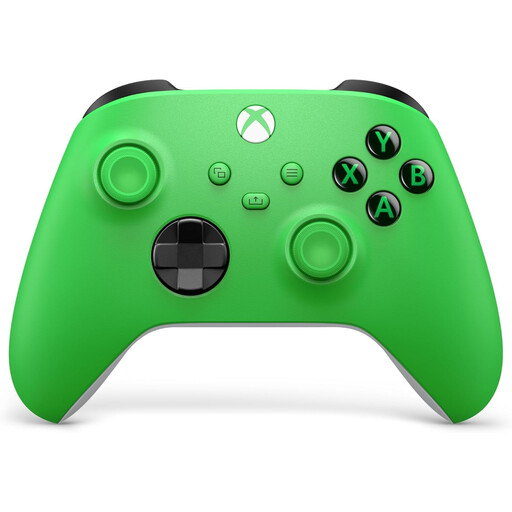
Xbox Wireless Controller, Velocity Green
A wireless option for Xbox Series X/S and Xbox One; the product information also lists supported Windows PCs and mobile devices. This version uses AA batteries. Check compatibility with your device and game before choosing.
View at Joybuy
Frequently asked questions
Can two players share one controller?
It depends on the game and the mode you’re playing. Check how many separate controllers or Joy-Cons the local co-op mode requires. Nintendo describes extra controllers as a way to play together, but that doesn’t apply automatically to every game.
What should I look out for when pairing a Switch Pro Controller?
Make sure your Switch or Switch 2 system is switched on: Nintendo says you can’t sync while the system is off or in sleep mode. Then follow your system’s pairing instructions and check in the game that both players have been assigned.
How can I avoid having to stop and charge during a long session?
Charge a rechargeable controller beforehand or check which batteries your version needs. Nintendo gives an estimated battery life of around 40 hours for a fully charged Switch Pro Controller; software and the features you use may reduce this.
What are my rights when buying a controller online in the Netherlands?
ACM ConsuWijzer states that for an online product purchase, the statutory 14-day cooling-off period ends 14 days after delivery. Your statutory rights are separate from any manufacturer’s warranty. If a product doesn’t meet what you could reasonably expect, contact the seller to discuss an appropriate solution.


