
Console adventurer
You play on Xbox, PS5 or Switch and want to check that the controller works with your system and the features you want to use in your game. Microsoft, PlayStation and Nintendo set out compatibility by platform and product.


First, choose a controller that works with your console or PC and whose controls are supported by your game. Then compare the grip, connection and features you actually want to use. A controller won’t improve visibility on your screen: Nintendo says brightness adjustment on Switch 2 is available only in handheld or tabletop mode.
You play on Xbox, PS5 or Switch and want to check that the controller works with your system and the features you want to use in your game. Microsoft, PlayStation and Nintendo set out compatibility by platform and product.
You play historical adventures on PC and want to check both the connection and game support. For example, PlayStation says that haptic feedback with DualSense on PC requires a supported game and a USB connection.
You want comfortable controls and a clear view of the screen. Brightness settings are part of the screen, not the controller; Nintendo describes this setting for Switch 2 in handheld and tabletop mode.
| What to consider | What should you check? | Who should focus on this? |
|---|---|---|
| Compatibility | Make a note of your console or PC and the exact game. Then check that the full controller model is supported by the platform and game. | I want to avoid finding that my controller doesn’t work with my system or game. Around 40% of consumers in this buying context put compatibility first. |
| Grip and controls | Compare the button layout and grip. If you want special feedback or motion features, check that your game supports them. | If I’m navigating and using buttons frequently during an adventure, I want a layout that suits my preferences. Around 30% of consumers prioritise controls. |
| Screen visibility | Consider screen positioning and picture settings separately from the controller. For Switch 2, Nintendo mentions brightness adjustment in handheld or tabletop mode. | If the picture is hard to see in a bright room, I want to address the screen setup first. Around 20% of consumers prioritise visibility. |
| Power and connection | Check the connection and power requirements for each model. PlayStation says a USB connection is needed for haptic feedback with DualSense on PC; the connection also depends on the game. | I want to know how I’ll play and what the chosen connection requires before starting a gaming session. Around 10% of consumers prioritise power and connection. |
The two 8BitDo Ultimate 2C models reviewed list different platforms and connection options. Bluetooth alone doesn’t tell you whether a particular model will work with your system.
Compare the full model name with compatibility for your device and game.
PlayStation says adaptive triggers and haptic feedback depend on game support. For haptic feedback on PC, PlayStation also specifies a USB connection.
Check support for the specific game and the required connection before making these features a deciding factor.
A controller won’t change the screen’s brightness. Nintendo describes brightness adjustment for Switch 2 when used in handheld or tabletop mode.
Consider the screen positioning and available picture settings separately.
Nintendo says the Switch 2 Pro Controller works only with Switch 2. Nintendo also explains how to pair the original Switch Pro Controller with a Switch or Switch 2.
Check the full product name and your Switch model before choosing.
According to Microsoft, the Xbox Wireless Controller is an option to consider for Xbox consoles and Windows PCs.
DualSense is the PS5 option and may also be suitable for compatible PC games and devices.
The original Switch Pro Controller and the separate Switch 2 Pro Controller are for different Switch models.
The Ultimate 2C models reviewed are alternatives for different platforms and connection types.
This selection at Joybuy includes DualSense, Xbox and Nintendo Switch controllers, as well as models whose product names mention multiple platforms. For each model, check that the connection and game support are right for your system.
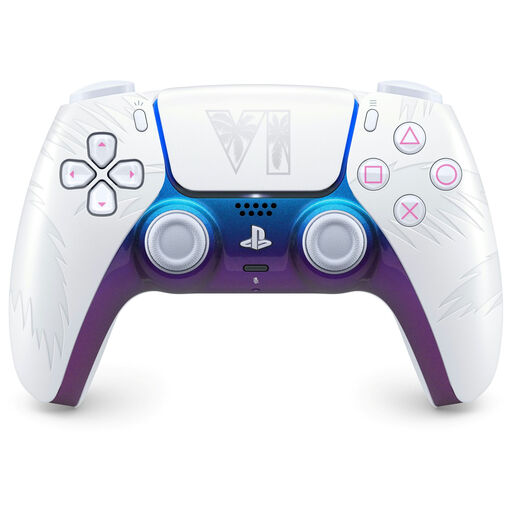 No image available
An option to consider for PS5 and compatible PC games; check whether the DualSense features you want work with each game.
The product name lists PS5, PC, Mac and Mobile. PlayStation says haptic feedback on PC requires a supported game and a USB connection.
 No image available
An option to consider if you play on Xbox or want an Xbox controller for a Windows PC. Also check that your game supports controller input.
Microsoft lists support for Xbox consoles and Windows PCs for the Xbox Wireless Controller.
 No image available
An option to consider for Nintendo Switch. Check that your game supports it, and don’t confuse this controller with the separate Switch 2 Pro Controller.
Nintendo explains how to pair the original Switch Pro Controller with a Switch or Switch 2.
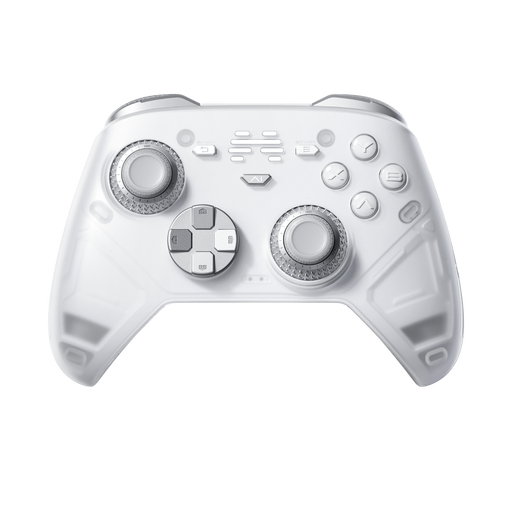 No image available
The product name lists PC, Nintendo Switch, Switch 2, Steam and Android; check which connection is right for your device and game.
The product name lists six programmable buttons and haptic feedback triggers.
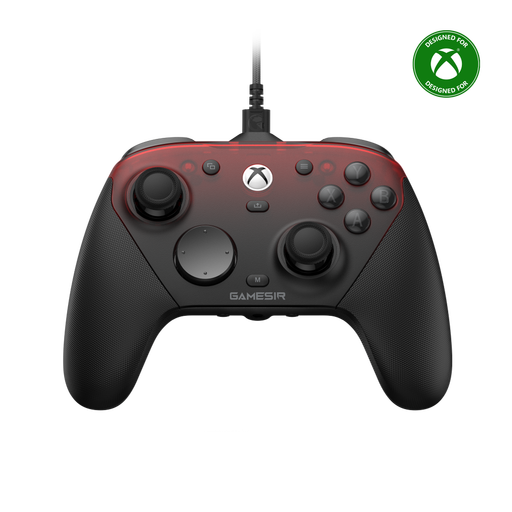 No image available
The product name lists Xbox Series X|S, Xbox One, PC, Android and Steam. Check which connection is intended for your device.
The name distinguishes a wired Xbox connection from wireless connections for PC and mobile.
No, a controller won’t adjust screen brightness. For Switch 2, Nintendo describes automatic or manual brightness adjustment in handheld or tabletop mode. For other screens, check their own picture settings and consider how much light is falling on them.
Nintendo describes wireless pairing and pairing via a USB cable to the dock for both Switch and Switch 2. Follow the instructions for your system; the Switch 2 Pro Controller is a different product and, according to Nintendo, works only with Switch 2.
No. According to PlayStation, adaptive triggers and haptic feedback depend on game support; haptic feedback on PC also requires a USB connection.
For a product purchase, you’re entitled to a legal guarantee, according to the Dutch government. For online purchases from a business, you’ll generally have a 14-day cooling-off period, although there are exceptions. Any manufacturer’s guarantee is separate from your legal guarantee.