
Vandaag of morgen in huis

Kwaliteit gegarandeerd

Welkomstaanbiedingen ontgrendelen: GRATIS bezorging | Tot 80% korting | Gratis 30 dagen JoyPlus-proefperiode
Download de app
If you're looking for new gaming accessories, the sheer number of options can be overwhelming. Manufacturers throw around terms like "ultra-high DPI" and "zero-latency," but what do those specs really mean for your gaming experience? Many gamers fall into marketing traps and overpay for features they don't need. As a Joybuy Product Recommendation Officer, I'll help you cut through the hype and make the right choices for your PC gaming gear.
Before we look at products, it's important to recognise the most common mistakes. This will help you avoid wasting money on specifications that add little practical value.
Instead of focusing on marketing terms, concentrate on the specifications that genuinely impact your performance and comfort. Here are the three most important points to watch out for.
A good gaming mouse doesn't need a sky-high DPI, but a stable and reliable sensor. A high-quality optical sensor ensures accurate tracking without jitter or prediction (angle snapping), even during fast movements.
The choice between wired and wireless is personal, but the technology behind it is crucial.
For keyboards, the switch type defines the feel and performance.
Below is a selection of products that suit different user profiles, based on their objective specifications.
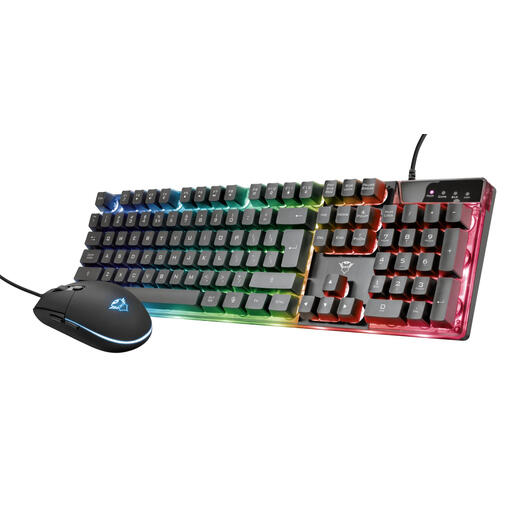
Why This Fits Their Persona: This is an ideal starting point for those new to PC gaming. You get a complete, functional set with a 'gaming' look, without paying a premium for separate components.
This set sidesteps the 'gaming tax' by offering an affordable all-in-one solution. You're investing in a solid foundation instead of overpaying for a single overhyped product.
The mouse has an adjustable DPI (800-3000), and the membrane keyboard features anti-ghosting, which is essential for gaming. Plug-and-play convenience.
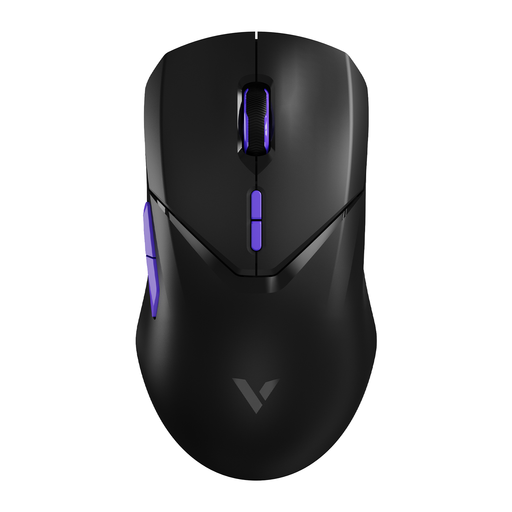
Why This Fits Their Persona: This user is looking for every possible advantage. A lightweight mouse with a top-tier sensor and minimal delay isn't a luxury, but a necessity for fast reactions.
Instead of focusing on the maximum 26,000 DPI, this Rapoo mouse delivers performance where it counts: a high-quality PAW 3398 sensor and an extremely low weight (68 grams) for effortless control.
The combination of a low weight, a top-tier sensor, and a 4000Hz wireless polling rate ensures a highly responsive experience. The 180-hour battery life is a practical bonus.
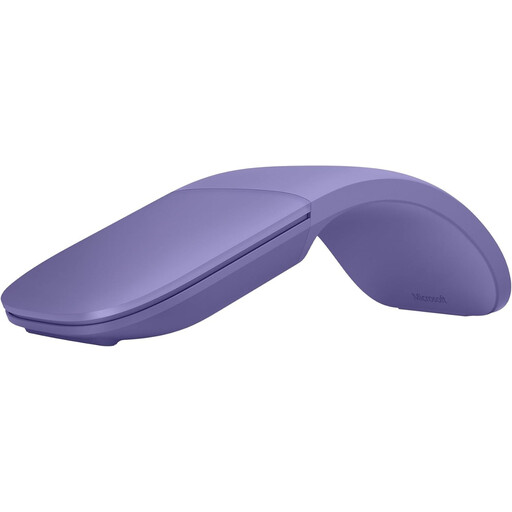
Why This Fits Their Persona: Perfect for those who want a stylish, minimalist setup for work but also play the occasional game. Portability and design are more important here than extreme gaming specs.
This Microsoft Surface mouse completely ignores the 'gaming tax'. It's a premium productivity mouse that focuses on design and functionality, proving you don't need a 'gaming' label for a great experience.
Unique foldable and ultra-light (78 grams) design, ideal for on-the-go use. The Bluetooth connection ensures a clutter-free desk, and the scroll plane supports both vertical and horizontal scrolling.
We have compiled a complete, up-to-date list of products that meet these strict selection criteria and comply with local regulations.
Here are answers to some common questions that arise when purchasing new gaming accessories.
For most gamers, a DPI setting between 400 and 1600 is more than sufficient. A higher maximum DPI on the box is purely a marketing tactic. It's more important that the mouse has a high-quality sensor and that you can adjust the DPI in steps to find the perfect sensitivity for your playstyle.
For many gamers, yes. A mechanical keyboard offers faster response, more precision through clear feedback, and a longer lifespan. However, it is also louder and more expensive than a membrane keyboard. The choice is personal, but if you play competitively, a mechanical model is worth considering.
A 2.4GHz wireless gaming mouse uses a dedicated USB dongle for a fast and stable connection with very low latency, which is ideal for gaming. A Bluetooth mouse connects directly to your device's built-in Bluetooth, which is convenient for laptops and tablets. However, the latency is typically slightly higher, making it less suitable for fast-paced, competitive games.
