
Vandaag of morgen in huis

Kwaliteit gegarandeerd

Welkomstaanbiedingen ontgrendelen: GRATIS bezorging | Tot 80% korting | Gratis 30 dagen JoyPlus-proefperiode
Download de app
The right gaming accessories can be the difference between a frustrating session and a victory. But the market is flooded with marketing jargon and specs that often confuse more than they clarify. Before you invest in an upgrade for your PC, PlayStation, or Xbox, it's crucial to recognise a few common pitfalls.
Many gamers fall into the trap of superfluous features. Think of a gaming mouse with an extremely high DPI that's unusable in practice, or a "universal" gaming headset that becomes irritating after just an hour. Another misconception is that wireless is always superior. While the freedom is nice, it can come at the cost of response time (latency) and the constant worry of a dead battery. This guide will help you cut through the hype and focus on what truly matters for your playstyle.
To make an informed choice, it helps to understand a few technical specifications. These aren't complex details, but practical considerations that directly impact the quality of your gaming experience.
The way your accessory connects is crucial for performance.
An accessory can have the best specs, but if it's not comfortable, you won't enjoy using it.
This seems obvious but is often overlooked. Always check if the accessory is officially compatible with your system. Look specifically for mentions like PS5 accessories, Xbox accessories, or Windows 10/11 support. A "PlayStation Licensed" product, for example, guarantees seamless operation and integration with your console.
Below are a few popular choices, tailored to different types of gamers. We explain why a product fits a certain profile and how it avoids the pitfalls mentioned earlier.
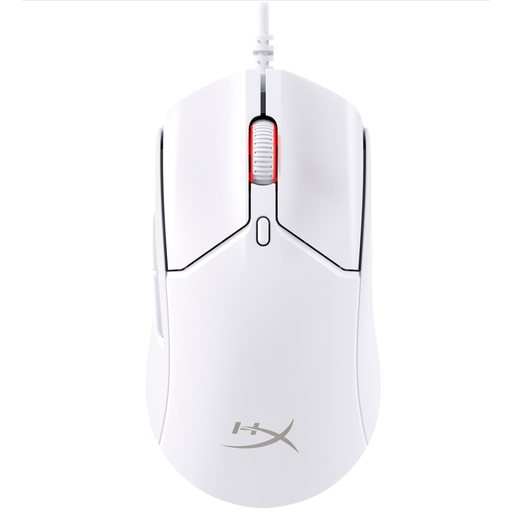
Why This Fits Their Persona: For gamers where response time is everything. This mouse is extremely lightweight and focuses on pure performance, which is essential in fast-paced shooters and esports titles. Plus, its white colour fits perfectly into a clean, modern setup.
This model sidesteps the 'high DPI' trap. Instead of focusing on an unnecessarily high number, it offers an extremely high 8,000 Hz polling rate. This means the mouse reports its position more frequently, resulting in noticeably smoother and more direct cursor movement.
Its ultra-lightweight design at 52 grams reduces fatigue and enables fast, precise movements. The wired connection guarantees a stable connection without any input lag.
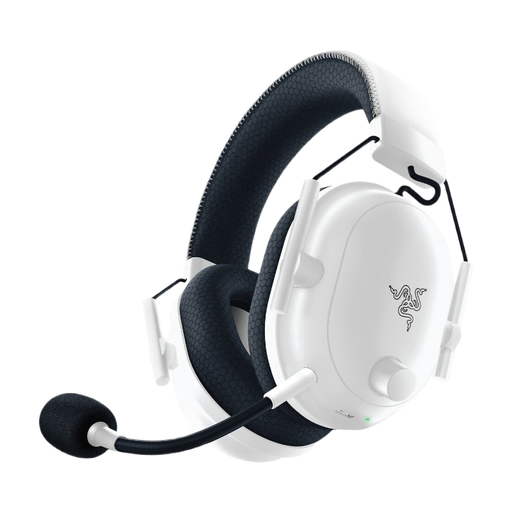
Why This Fits Their Persona: Ideal for PS5 players seeking a combination of performance, comfort, and style. The wireless freedom and sleek white design make it a perfect match for a white gaming setup.
This headset avoids the 'one-size-fits-all' comfort trap. Its lightweight design and memory foam ear cushions are specifically engineered for long-lasting comfort, which is crucial for extended gaming sessions on the console. The passive noise isolation helps you stay focused.
The official PlayStation license guarantees seamless compatibility. Its HyperClear cardioid microphone ensures clear communication with teammates. The 24-hour battery life is more than enough for several evenings of gaming.
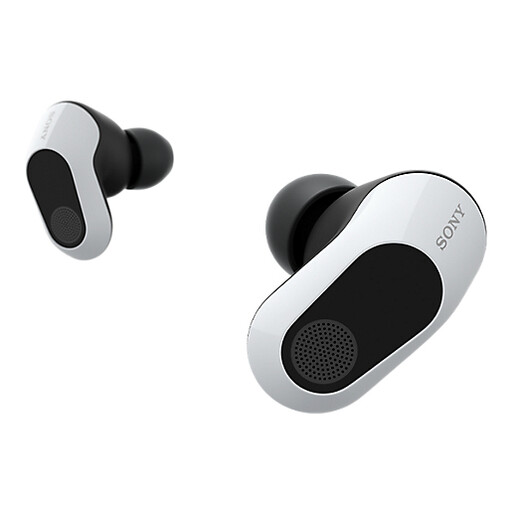
Why This Fits Their Persona: For those who game on various devices, including handhelds like the Asus ROG Ally or Nintendo Switch. These gaming earbuds deliver high-quality sound and low latency in a compact, portable form factor.
These earbuds solve the 'wireless latency' pitfall. While standard Bluetooth earbuds often suffer from delay, the Inzone Buds offer an ultra-low latency of under 30ms via the included USB-C dongle. This makes them suitable for serious gaming sessions.
Active noise cancellation filters out ambient sound, making them ideal for gaming on a train or in a noisy environment. According to Sony, the 360 Spatial Sound technology provides precise audio positioning, allowing you to hear opponents approaching.
A clean, white setup is a popular choice. If you're looking to refresh the core of your station in addition to your accessories, check out our selection of consoles that are a perfect match.
For most gamers, a setting between 1,600 and 3,200 DPI is more than sufficient for a balance between speed and precision. Many professional players even use lower settings (400-1,600 DPI) for maximum control in shooters. An extremely high maximum DPI, like 26,000, is primarily a marketing number. The quality and consistency of the sensor are far more important than the maximum DPI figure.
That depends on your priorities. Wireless offers freedom of movement, which is very convenient. However, pay attention to battery life and connection technology. A 2.4GHz connection via a dongle typically has much lower latency than Bluetooth, making it more suitable for competitive gaming. For the purest audio and no battery worries, a wired gaming headset remains a solid and often more affordable choice.
Most modern controllers, like the Sony PlayStation 5 DualSense or the GameSir G7 SE, work on a Windows PC via a USB cable or Bluetooth. The easiest 'plug-and-play' experience on PC is typically offered by controllers designed specifically for Xbox. Always check the product page for specific compatibility with "Windows 10/11". Sometimes, additional software is required to use all features, such as haptic feedback.
