
Vandaag of morgen in huis

Kwaliteit gegarandeerd

Welkomstaanbiedingen ontgrendelen: GRATIS bezorging | Tot 80% korting | Gratis 30 dagen JoyPlus-proefperiode
Download de app
If you want to buy games and gaming PCs, you will quickly come across two very different product categories: board games for playing at home and ready-made computers for digital games. In both cases, the choice may seem straightforward, but marketing copy can sometimes leave important details out.
For example, a low price says little if a card game is unsuitable for the players’ age group. And a gaming desktop with a powerful graphics card can still disappoint if the storage, power supply or connections do not suit the way you use it. Use these checkpoints to compare products based on practical specifications rather than attention-grabbing claims.
Always check:
A game for 2 to 4 players is not automatically suitable for a large family. A party game for adults may also be less suitable for children aged 7 or 8. Hitster, for example, requires a smartphone with an internet connection and the accompanying app. This is important information when you are buying a game as a gift.
A Monopoly expansion does not work on its own. The Free Parking Jackpot Expansion Pack requires the classic Monopoly game. So, when buying expansions, always check what you need to already own. The same applies to some collectables: an album, NFC-compatible console or NFC reader may be required separately.
When buying a gaming PC, many people look first at the RTX 5060, RTX 5070 or RTX 5080. That is understandable, but it is the complete configuration that determines whether the computer is right for you. Also pay attention to:
A gaming PC with 16 GB of RAM may be suitable for many everyday games, but storage capacity can vary considerably. A gaming PC with a 1 TB SSD offers more space than a model with 480 or 500 GB. Also check whether the product includes a power cable, Wi-Fi adapter or other accessories.
When buying board games and card games for the whole family, the game details are more important than a general label such as “family game”. Look at the specific features.
If you are looking for strategy games, Rummikub and Skip-Bo Masters are a better fit than a fast-paced party game. Rummikub contains 106 tiles, four racks and rules in Dutch. Skip-Bo Masters contains 168 cards and adds coins to the familiar game concept.
A Ryzen gaming PC can be appealing if you want to put together a standalone desktop without components. However, compare the complete system. The Shark Max Bite R501 combines an AMD Ryzen 5 5500 with an RTX 5060, 16 GB DDR4 and a 1 TB NVMe SSD. The Acer Nitro 20 has an Intel Core 5 210H, RTX 5050, 16 GB DDR4 and a 1 TB PCIe NVMe SSD.
When choosing an RTX 5060 gaming PC, pay particular attention to the resolution you want to play at and the available storage. For Full HD gaming, a compact system is often practical. If you install larger games, 1 TB will generally give you more room than 480 or 500 GB. Claims about image quality, ray tracing or DLSS relate to features of the stated hardware and software; actual performance varies depending on the game, settings and monitor.
An RTX 5080 graphics card is an individual component, not a complete computer. According to the product specifications, the Gigabyte GeForce RTX 5080 Gaming OC features 16 GB GDDR7, a PCIe 5.0 x16 interface, three DisplayPort connections and one HDMI connection. The card is approximately 340 mm long, 140 mm wide and four slots high.
Before buying, check:
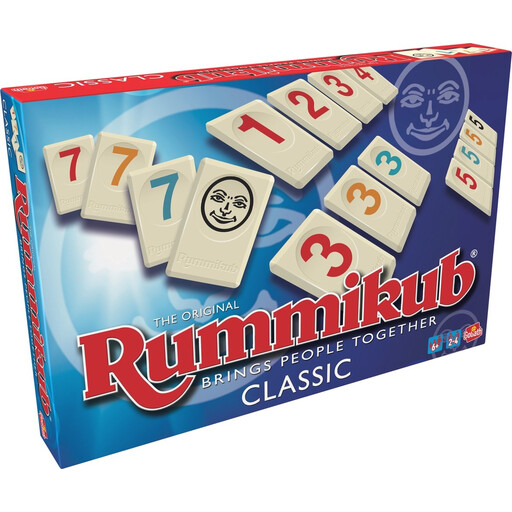
Why it suits this profile: A family game in Dutch with clear player limits and a stated playing time of around 60 minutes.
The box states 2–4 players, ages 7+ and 106 tiles. This lets you see in advance whether the game is suitable for your family.
106 plastic tiles, four racks, no batteries and instructions in Dutch.
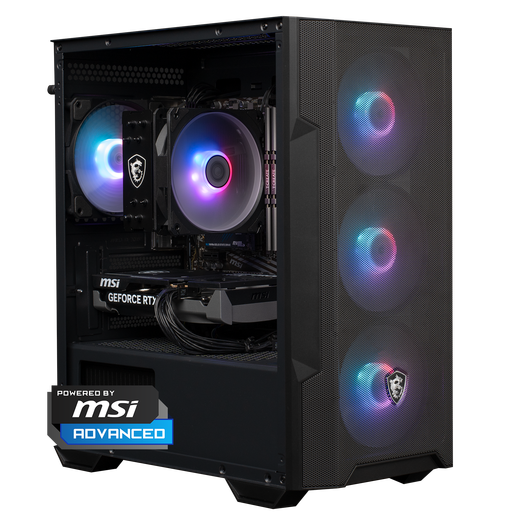
Why it suits this profile: A ready-made gaming desktop with Windows 11 Home, 16 GB of RAM and 1 TB of NVMe storage.
The processor, graphics card, RAM, SSD and power supply are listed separately, so you do not have to rely on the RTX designation alone.
RTX 5060, 16 GB DDR4, 1 TB NVMe SSD and a compact 388 × 200 × 423 mm design.
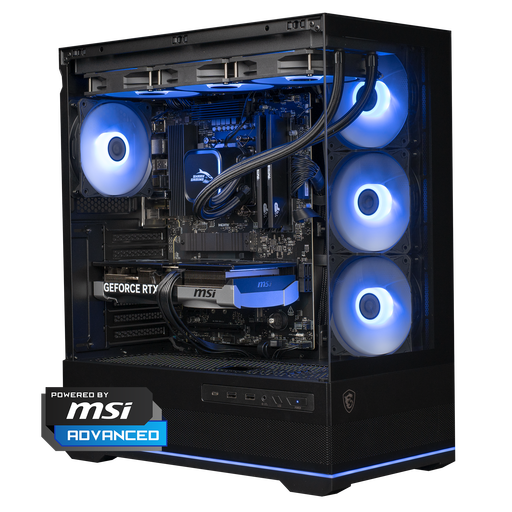
Why it suits this profile: For users looking for a Ryzen gaming PC with a Ryzen 7 7800X3D, RTX 5070 and generous NVMe storage.
The configuration lists more than just the RTX 5070: it also includes 16 GB DDR5, 1 TB NVMe, a 750W power supply and a 360mm cooler.
Ryzen 7 7800X3D, RTX 5070 12 GB, DDR5 memory, 1 TB SSD and Windows 11 Home.
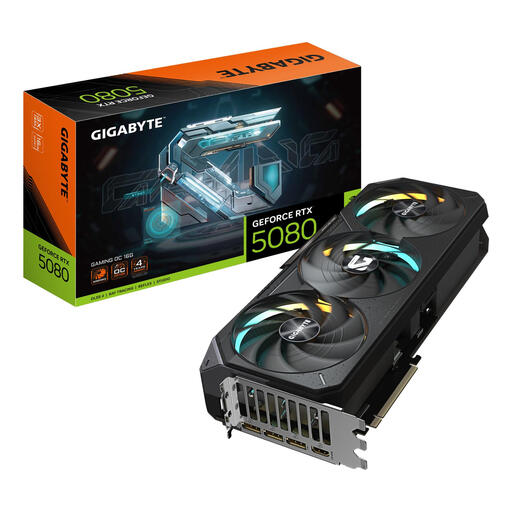
Why it suits this profile: A standalone graphics card for anyone who already has a suitable PC or wants to upgrade a system with a specific goal in mind.
The dimensions, four-slot height, 360W power consumption and recommended power supply of at least 850W can all be checked in advance.
16 GB GDDR7, PCIe 5.0 x16, three DisplayPort connections and one HDMI connection.
We have put together a complete, up-to-date list of products that fully meet these strict selection criteria and the applicable European safety regulations.
Power consumption depends on the processor, graphics card, power supply, length of use and game settings. A system with an RTX 5080 will generally use more power under load than a PC with an RTX 5060, but exact consumption varies. Check the stated power rating of the power supply and make sure there is sufficient ventilation.
Lifespan varies depending on the individual components and how the PC is used. A PC with sufficient storage, upgradeable memory and a suitable power supply can remain practical for longer. When buying, check whether additional SSD storage or RAM can be added later. Also keep dust out of the ventilation openings and do not use the computer in an enclosed cabinet.
Start by considering which games will be played and the desired resolution. For simple or competitive games, an RTX 5060 gaming PC with 16 GB of RAM may be sufficient. Also pay attention to parental controls, screen time and the age rating of individual games. For playing together without installing anything, family games, Rummikub and card games are often easier to use.
