If you want to puzzle together without a TV, look for a Nintendo Switch with tabletop mode and a game that supports local co-op for two players on one system. If you already have a TV, a PlayStation 5 or Xbox Series S could also work. Check that the game supports local play, find out which controllers you’ll need, and decide whether you want to use games on disc.
Which setup is right for you?
Together on one small screen
You want to puzzle side by side without setting up a TV. A sturdy adjustable stand, a clear view of the shared screen and two suitable ways to play are important. Nintendo describes this way of playing for Snipperclips and the Switch OLED.
Together on your existing TV
You already have a TV and want a game that supports local co-op, with a suitable controller for each player. PlayStation describes It Takes Two as playable on a shared screen, while Xbox lists local co-op for two players in Unravel Two.
Keep playing games you already own
You want to carry on playing games you’ve bought before. Check compatibility for each title, and see whether you have physical discs: the PS5 Digital Edition and Xbox Series S mentioned here don’t use discs.
What should you look for?
Start with where you’ll play: choose between a shared built-in screen and your existing TV. Then check the exact game, the number of players and which controllers you’ll need.
| What to consider |
What should you check? |
Who is this important for? |
| Local co-op in the game |
Check whether the specific game lets two players play locally on one system, and find out which controls you’ll need. |
If I want to work on one puzzle together, I want to know for certain that the game is designed for two players locally. Around 36% of consumers prioritise local co-op puzzle games. |
| Screen and setup |
Check whether tabletop mode suits your space and everyone can see the screen. With a TV, check there’s room for the console and dock. |
If you don’t want to use a TV or have limited space, one shared screen needs to be practical. Around 29% of consumers focus mainly on having a straightforward setup. |
| Controllers and included game |
Check what’s in the box and compare it with the game’s control requirements; don’t assume two controllers or a game are included. |
If I want to get started straight away with two players, I want to know in advance what comes with the console and what else I’ll need. Around 21% of consumers focus mainly on having a complete gaming setup. |
| Games you already own |
Check whether the specific game is compatible and whether you can use physical discs with the console edition you choose. |
If you want to keep playing games you’ve already bought, consider the title, version and whether it’s physical or digital. Around 14% of consumers prioritise keeping access to their existing games. |
Common buying mistakes
-
Confusing online multiplayer with playing together on the sofa
A multiplayer listing doesn’t automatically mean that two players can play on one console. Local play is exactly what matters when you’re puzzling together in a small space.
Check the specific game listing for local co-op and the number of players you want.
-
Assuming every console is ready for two players straight away
The PS5 Digital Edition sold separately that we looked at is listed with one DualSense controller. For Snipperclips, Nintendo lists two players using Joy-Con controllers separately.
Compare what’s in the specific box with the game’s controller requirements.
-
Choosing a digital console when you have games on disc
The PS5 Digital Edition and Xbox Series S mentioned here don’t use discs, so you can’t play physical games directly on these consoles.
First check which games you own physically, then choose the right console edition.
If you want to play a disc game on a digital console, check whether you can also buy that game digitally.
-
Assuming all older Switch games work on Switch 2
Nintendo warns that some Switch games may not be supported or may not be fully compatible with Switch 2.
Check the specific game and play mode before letting compatibility make the decision for you.
Brands to consider
Nintendo
Depending on the model and game, Nintendo offers ways to play together on a shared console screen, in tabletop mode or on a TV.
- Nintendo lists two-player co-op for Snipperclips, with Joy-Con controllers used separately. The Switch OLED has an adjustable stand.
- Nintendo says some older Switch games may not be compatible, or may not be fully compatible, with Switch 2. Also check how the game you choose can be played.
PlayStation
The PS5 is designed for playing on a TV. PlayStation describes It Takes Two as a two-player adventure on a shared screen.
- PlayStation lists It Takes Two as a game you can play together locally on the sofa.
- The standalone PS5 Digital Edition with 825 GB that we looked at is listed with one DualSense controller and has no disc drive. Two players will therefore need a suitable second controller.
Xbox
The Xbox Series S is an all-digital console for your TV. Unravel Two is listed for Series X|S with local co-op for two players.
- The Xbox game listing confirms local co-op for two players in Unravel Two.
- The Series S has no built-in screen and doesn’t play discs. Before you buy, check that it supports the game you want and that you have a second controller if needed.
Joybuy product picks
These Joybuy picks suit playing together on a TV or shared console screen, as well as portable handheld gaming. Check that each game supports local co-op for two players and the controls you want to use.
 No image available
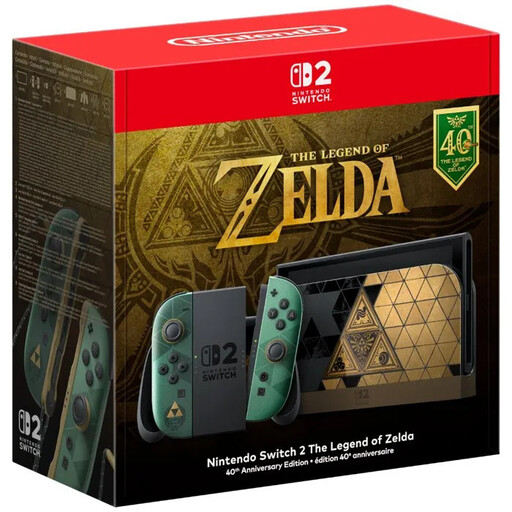
Nintendo Switch 2 The Legend of Zelda 40th Anniversary Edition, EU Version
The built-in stand and screen let you play in tabletop mode without a TV. Just check that your chosen game supports local co-op for two players.
According to the product description, the screen measures 7.9 inches diagonally and the stand adjusts to 150°. Two detachable Joy-Con 2 controllers are listed.
The product description says that no game is included. Nintendo warns that some older Switch games may not be compatible, or may not be fully compatible.
Joybuy
 No image available
Lenovo Legion Go 8ASP2
This is a portable handheld games console. Check whether the game you want lets you play together locally on one device, and which controls you’ll need.
Joybuy
 No image available
Lenovo Legion Go S 8APU1, 83N6001TMH
This handheld gaming PC has built-in controls. Check whether each game supports local co-op on one device and how a second player can join in.
SteamOS is listed as the operating system.
Joybuy
 No image available
MSI Claw A8 BZ2EM-047NL, 8-inch, 1 TB, white
This is a portable games console. Check whether the game you want supports local co-op and how a second player will control it.
The product description lists an 8-inch touchscreen and a D-pad. According to the product information, the charger must be bought separately.
Joybuy
 No image available
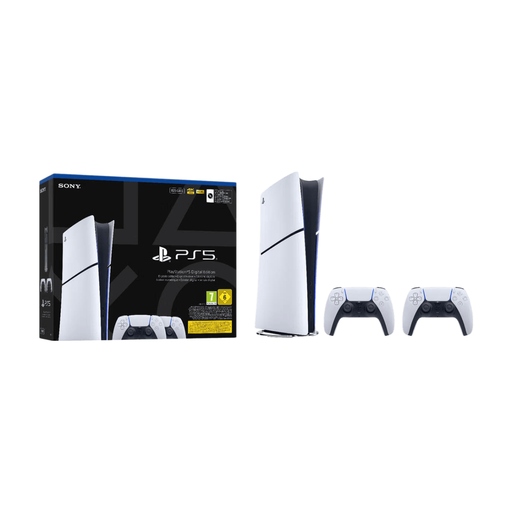
Sony PlayStation 5 Slim Digital 825 GB, 2 controllers
This PS5 Digital Edition is designed for use with a TV. PlayStation describes It Takes Two as supporting local co-op on a shared screen.
The product title lists two controllers. This is a digital edition without a disc drive, so games on disc can’t be used directly.
Joybuy
Frequently asked questions
Is ‘multiplayer’ enough to know whether we can puzzle together on one console?
No. Check whether the specific game supports local play. Nintendo lists Snipperclips for two players on a TV or in tabletop mode; Xbox lists local co-op for two players in Unravel Two.
Can I use my old Switch dock with Switch 2 in TV mode?
No. Nintendo requires a Switch 2 dock for TV mode and says that the old Switch dock and Switch power supply won’t work for this.
How do I connect a standard Switch or Switch OLED to a TV?
Nintendo says you’ll need a dock, a compatible power supply and an HDMI connection to the TV. Detach the Joy-Con controllers to play wirelessly. The Nintendo Switch Lite doesn’t support TV mode.
What can I do if my new console turns out to be faulty?
According to the Dutch government, the retailer must put a faulty product right. There is no fixed statutory warranty period in the Netherlands; a manufacturer’s warranty doesn’t replace your legal rights.
Do I have a cooling-off period when I buy a console online?
For many distance purchases made by consumers, the Dutch government says there is a 14-day cooling-off period. Check the terms for a digital game bought separately; this information doesn’t establish a right to return every download.


