What should you consider when choosing?
Switch or Switch OLED with Joy-Con
A good fit if: you mainly want to play minigames with detached Joy-Con and don’t want to rely on a camera-based mode.
Bear in mind: the Joy-Con and features required vary by game and mode. Also check that the game supports TV play.
Nintendo Switch 2
A good fit if: you want to use specific Switch 2 modes in Jamboree TV with a camera, microphone or mouse controls.
Bear in mind: the compatible USB-C camera is sold separately. Some older minigames require a right Joy-Con from the original Switch.
Xbox Series S with phone-controlled games
A good fit if: players would rather use their own phone, tablet or laptop as a control device. The Jackbox Party Trilogy 2.0 mentioned here uses internet-connected devices.
Bear in mind: this collection is in English, and the Series S doesn’t play games on disc.
PlayStation 5 with local multiplayer games
A good fit if: you want to play PS5 games as well as host party nights, and your chosen game supports local multiplayer with controllers.
Bear in mind: PlayStation lists one DualSense controller with the standard console with disc drive. Some local game modes may need extra controllers.
Start with the game and mode you want to play, then choose a console and control devices to match.
| What to consider |
What should you check? |
Who should give this more weight? |
| Playing from seats at an angle |
Check whether the game mode uses buttons, motion controls, phones or a camera, and whether everyone’s intended seat is in view. |
If I’m not sitting directly in front of the TV, I want to know whether I can control the chosen mode from my seat; around 36% of consumers prioritise being able to play from their seat. |
| Type of motion gameplay |
Check which controller the minigame requires, especially for older Switch games played on Switch 2. |
If I want to tilt, shake or move in front of a camera, I want to choose the right type of control; around 29% of consumers prioritise motion gameplay. |
| Players and control devices |
Check the player limit for your chosen mode and count the controllers or compatible phones you’ll need. |
If the size of our group varies, I want to know in advance whether everyone can play at once; around 21% of consumers check group capacity first. |
| Overall set-up and use |
Check TV mode, game compatibility and whether your preferred game is available digitally or on disc. |
If I want to use the console for more than party nights, I want to take the required set-up and games I already own into account; around 14% of consumers prioritise overall versatility. |
Joybuy product picks
This selection of Joybuy products covers motion-based gaming and party or local multiplayer. Check the controls, game mode and devices required for each game you want to play.
 No image available
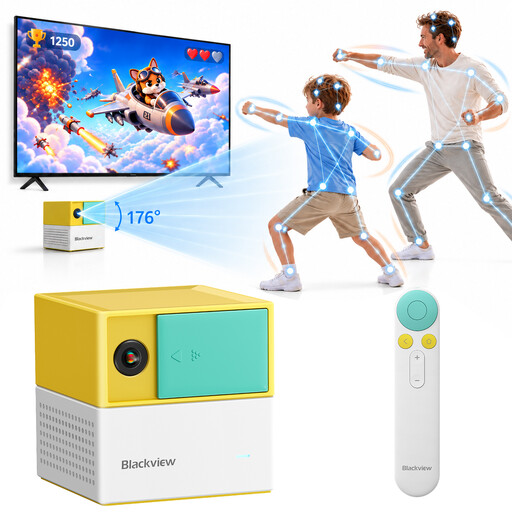
Blackview PlayPop 8 AI Motion Game Console
The product title describes controller-free gaming; check whether it supports the party minigames and seating arrangement you want.
The title mentions 17-point AI tracking and up to 4 players.
View at Joybuy
 No image available
Nintendo Switch 2 Console (EU)
Play together on your TV with detachable Joy-Con 2 controllers. Nintendo also describes specific Jamboree TV modes using a camera, microphone or mouse controls.
A compatible USB-C camera for supported camera modes is sold separately. Some older Switch minigames with infrared controls require a right Joy-Con from the original Switch.
View at Joybuy
 No image available
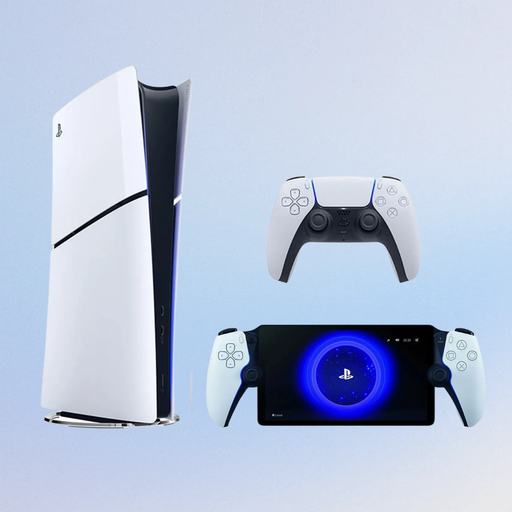
Sony PlayStation 5 Slim 825GB Digital Edition + PlayStation Portal Remote Player, White (PS5)
PlayStation lists local multiplayer games for PS5. Check how many controllers your chosen game needs and whether it’s available digitally.
The product title specifies an 825 GB Digital Edition and a white PlayStation Portal Remote Player.
View at Joybuy
Frequently asked questions
Will motion-controlled minigames work automatically if you’re sitting at an angle to the TV?
No, it depends on the controls used by the minigame. Check which device tracks your movements. For a camera-based mode, make sure players can be seen from their own seats.
Can I play every older Switch minigame with Joy-Con 2?
No. Nintendo says Joy-Con 2 controllers don’t have an infrared motion camera. Older games that use this feature require a right Joy-Con from the original Switch.
What should I check if the motion controls aren’t responding properly?
First, check that the game uses the controls in question. For Joy-Con 2, Nintendo recommends checking for system and controller updates, among other things, and recalibrating the motion controls.
Do I need an online subscription for a local party night?
Requirements depend on the game mode you choose. Nintendo says online play for Super Mario Party Jamboree requires a Nintendo Switch Online membership and a copy of the game on each participating system. The Jackbox games mentioned here use internet-connected devices as controllers.
Who can help me in the Netherlands if a console I’ve bought is faulty?
Contact the seller. According to the Dutch government, there is no fixed statutory warranty period for all products in the Netherlands; your statutory rights are separate from any manufacturer’s warranty or additional cover.


