Start with the mystery games you want to play, then check which console and version each title is available for. Next, choose between a built-in screen and playing on your monitor, and decide whether you want to use digital games, game cards or discs. If you’re considering a Steam Deck, also check the playability of each PC game you want to play.
Which games console is right for you?
The player with a wish list
You already have some mystery games in mind and want to check which console and version they’re available for. Nintendo, Sony, Xbox and Valve provide game or compatibility information that lets you check each title individually.
The player with a small desk
You want to follow clues and read text without cluttering your home office. A built-in screen, stand or dock for an external display could all be factors; Valve, for example, describes a dock for the Steam Deck.
The player who switches between handheld and other play
You want to play at your desk and elsewhere, so you’re comparing handheld play with the games you already own. Nintendo lists exceptions to Switch game compatibility with Switch 2, while Valve lets you check Deck compatibility for each game.
What should you consider when choosing?
First, check whether the mystery games you want work on the console. Then decide which screen setup and game format suit your desk and existing collection.
| What to consider |
What should you check? |
Who is this important for? |
| Availability and version |
Check the platform and edition for each game. For Switch games, also check compatibility with Switch 2. |
If I want to play a specific detective game, I want to know in advance whether that particular version works on my console. Around 33% of consumers prioritise whether the game they want is available. |
| Screen and desk setup |
Check the video input on your monitor and whether you need a stand, dock or extra space. |
If my desk is short on space, I weigh up a built-in screen against playing on my monitor. Around 27% of consumers give screen and desk setup top priority. |
| Portability and existing games |
Check compatibility with your Switch games, or the playability and controls of your Steam games on the Deck. |
If I also want to play elsewhere or already own games, I want to know whether they’ll work on my handheld device. Around 20% of consumers prioritise flexible play or their existing game library. |
| Digital or physical |
Check whether your console has a disc drive, which game formats you already own and how much storage you need. |
If I want to keep using discs, I don’t want to choose an all-digital console by mistake. Around 20% of consumers focus on how they buy games and potential follow-up purchases. |
Things to watch out for
-
Assuming an announced game is already playable
Nintendo lists 10 December 2026 as the release date for Professor Layton and the New World of Steam. As of 25 October 2026, that date is still in the future.
If you want to play straight away, base your purchase on games that have already been released and are compatible with your console. Keep announced titles separate.
-
Choosing a digital console when you want to use discs
The Xbox Series S and PS5 Digital Edition don’t have a disc drive, so you can’t play your existing discs on these consoles.
Before buying games, check which physical games you want to keep using and which console version you’re choosing.
-
Assuming a standard microSD card can store Switch 2 games
Nintendo says you need microSD Express to expand Switch 2 game storage.
Check the card standard before buying extra storage. You’ll need the right type of card to expand your game storage.
-
Assuming every Steam game will work well on Steam Deck
Playability and controls can vary from game to game. The fact that a game is on Steam doesn’t, by itself, confirm that it’s suitable for Deck.
Check the compatibility status and controls for the specific mystery games you want to play.
Brands to compare
Nintendo
Switch models let you play on the built-in screen and, depending on the model and setup, can also be used with an external display.
- Nintendo says Switch 2 has a 7.9-inch screen, HDMI output via the dock and 256 GB of system memory.
- According to Nintendo, the Nintendo Switch – OLED Model has a 7-inch OLED screen and 64 GB of system memory.
- Nintendo warns that some original Switch games aren’t compatible, or aren’t fully compatible, with Switch 2. Check each title you want to play.
Sony PlayStation
PS5 versions are designed for play on an external display. You can choose between a model with a disc drive and a Digital Edition.
- Sony lists mystery games for PlayStation, including The Rise of the Golden Idol.
- According to Sony, the PS5 version with a disc drive can play discs.
- Sony says the PS5 Digital Edition doesn’t have a disc drive. Check which version is available for each game you want.
Microsoft Xbox
Xbox Series S suits a fixed, all-digital setup, provided the games you want are available in the Xbox catalogue.
- Xbox says Series S doesn’t play discs; it’s a digital games console.
- Xbox lists Pentiment for Xbox Series X|S.
- A game being included with a subscription doesn’t guarantee it’ll remain available there. Check the current terms for each title.
Valve
Steam Deck OLED offers a portable way to play Steam PC games. You can connect an external display with a separate dock setup.
- Valve lists a 7.4-inch screen for the 512 GB Steam Deck OLED model.
- Valve describes a dock for connecting to external displays.
- Check compatibility and controls for each game. A game being listed on Steam doesn’t automatically mean it’s suitable for Steam Deck.
Games consoles at Joybuy
This selection includes a PS5 with a disc drive and handheld or hybrid games consoles. Check that each model and game suits the mystery games you want to play and the way you want to play them.
 No image available
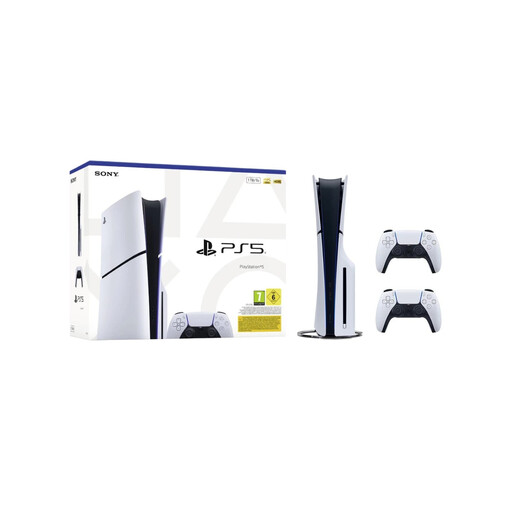
Sony PlayStation 5 Slim Disc Edition 1TB with 2 white DualSense controllers
Ideal if you want to play mystery games on PlayStation on an external display and use discs too. The product name lists 1 TB and two white DualSense controllers. Sony lists mystery games for PlayStation, including The Rise of the Golden Idol.
View at Joybuy
 No image available
Lenovo Legion Go 8ASP2
The product name identifies this model as a handheld games console. Check whether each mystery game you want to play is compatible with this device.
View at Joybuy
 No image available
Nintendo Switch console bundle 32GB with Mario Kart 8 Deluxe game card
A Switch bundle for anyone weighing up handheld, tabletop and TV play. The product name lists 32GB and a physical Mario Kart 8 Deluxe game card. Nintendo lists The Case of the Golden Idol as a Switch game.
View at Joybuy
 No image available
Nintendo Switch Lite handheld bundle 32GB, turquoise
Ideal if you want to play mystery games on a handheld. The product name lists 32GB and a download bundle with Tomodachi Life: Wo Träume wahr werden. The product information specifies handheld play, with no TV output.
View at Joybuy
 No image available
Nintendo Switch 2 console, EU
Worth considering if you want to switch between handheld and TV play. Nintendo lists a 7.9-inch screen and 256 GB of system memory for Switch 2. Some Switch games aren’t compatible, or aren’t fully compatible, so check each title you want to play.
View at Joybuy
Frequently asked questions
Can I play my existing Switch mystery games on a Switch 2?
Many physical and digital Switch games are compatible, but Nintendo lists exceptions and cases of incomplete compatibility. Check the specific game rather than assuming it’ll work from your existing collection.
Do I need a separate screen to use a Steam Deck at my desk?
No, the 512 GB Steam Deck OLED has a built-in screen. Valve describes a dock for connecting to an external display. You should also check whether your games are playable on Deck.
Do I need a subscription to play a mystery game?
Not if the game is available to buy separately and can be played without a subscription. Xbox lists both a purchase option and a Game Pass option for Pentiment. Check the terms for the specific title and way you want to play.
What warranty do I get when buying a console in the Netherlands?
According to the Dutch government, you’re entitled to a product that’s fit for purpose, but there’s no fixed statutory warranty period covering all products in the Netherlands. If something is faulty, contact the seller. A manufacturer’s warranty or an extra warranty doesn’t replace your statutory rights.
Can I return a console bought online?
For eligible distance purchases by consumers, the Dutch government says you’ll often have a 14-day cooling-off period. Check the terms that apply to your purchase; a purchase from a private seller isn’t automatically treated as the same kind of distance purchase.


