What should you consider when choosing?
Choose your game and play style first, then check that the console, controllers and any online features are compatible.
| What to consider |
What should you check? |
Who is this important for? |
| Motion controls |
Check the exact game title, supported console, Joy-Con combination and play style. |
If I want to recreate sports with others, I need to know whether the game supports the movements and controllers we want to use. Around 36% of consumers prioritise motion-controlled sports. |
| Playing without a TV during the day |
Decide whether you’ll play indoors or outdoors, and check whether the game supports handheld or tabletop mode. |
If the TV isn’t available, I want to be able to play my chosen game on the built-in screen. Around 29% of consumers prioritise playing without a TV during the day. |
| Sports games on a TV |
Check your preferred game and platform version, the number of local players and the requirements for online play. |
If I mainly want to play football with standard controllers, I first check which games are available for my TV console. Around 21% of consumers prioritise football or other button-controlled sports on a TV. |
| Choosing games and a console |
Check which games and accessories are included in the bundle and whether the console plays physical discs. |
If I want to weigh up my games and any online access in advance, I check what the bundle contains and what type of games the console uses. Around 14% of consumers prioritise overall costs and flexibility in their choice of games. |
Games consoles and bundles on Joybuy
These Joybuy products are Nintendo Switch and Switch 2 consoles or bundles for motion-controlled sports on a TV, as well as other compatible games you may sometimes want to play without a TV. Check each bundle to see whether it actually includes the sports game you’re looking for.
 No image available
Nintendo Switch 2 bundle with Nintendo Switch Sports Resort and 3 months of Nintendo Switch Online
A good fit if you want to play motion-controlled sports with Nintendo Switch Sports Resort; Nintendo says this game is exclusive to Switch 2 and features twelve sports.
The bundle includes Joy-Con 2 and a three-month Nintendo Switch Online membership. Attach the wrist straps when using the controllers wirelessly, and check the online requirements once the included membership expires.
Joybuy
 No image available
Nintendo Switch bundle with Mario Kart 8 Deluxe, physical game card and 32 GB
This bundle is a console option if you’re looking for a Nintendo Switch for compatible TV games; the game listed in the bundle is Mario Kart 8 Deluxe, not Nintendo Switch Sports.
The product description lists Joy-Con controllers and TV, tabletop and handheld modes. Nintendo Switch Sports itself does not support handheld mode, so check the play style for each game separately.
Joybuy
 No image available
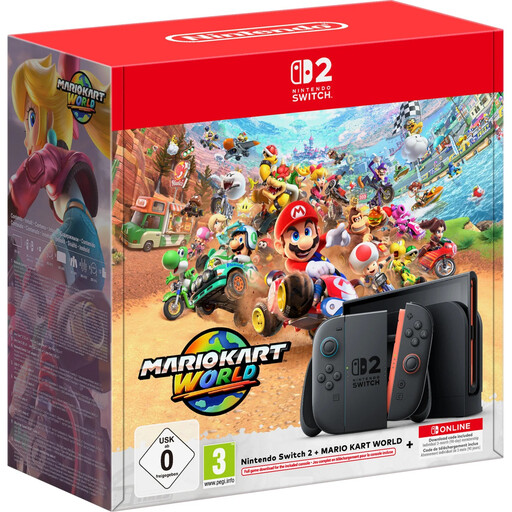
Nintendo Switch 2 bundle with Mario Kart World download, 3 months of Nintendo Switch Online and 256 GB
This Switch 2 bundle may suit you if you want the Switch 2 platform for compatible games and occasionally want to play without a TV. Sports Resort isn’t listed as an included game.
The product description lists a 7.9-inch LCD screen, Joy-Con 2 and handheld play. The game mentioned is Mario Kart World; check separately whether your chosen sports game is included.
The bundle includes three months of Nintendo Switch Online. Check the requirements for online features after this period.
Joybuy
Frequently asked questions
Can I play Nintendo Switch Sports in handheld mode on a Switch 2?
No. Nintendo says Nintendo Switch Sports does not support handheld mode and is played in TV mode. Also check which Joy-Con combination is needed for your chosen sport; Joy-Con 2 does not work with the leg strap mentioned.
What should we do before playing a motion-controlled sports game?
First, check the controls for your chosen game. Nintendo recommends attaching the wrist straps to Joy-Con 2 when using the controllers wirelessly. Wear the strap around your wrist, hold the controller securely and make sure you have plenty of room to move.
Is an OLED screen automatically easier to read outdoors during the day?
The screen specifications don’t tell you that. Nintendo lists a 7-inch OLED screen for the Switch OLED and a 7.9-inch LCD screen for Switch 2, but these figures don’t compare how easy they are to read in direct sunlight. If this matters to you, check how well the screen works in those conditions separately.
Do I always need an online subscription for sports games?
Not for every mode. Nintendo says an active Nintendo Switch Online membership is required to play Nintendo Switch Sports online. PlayStation says PS Plus is required to play EA SPORTS FC 27 on PS5 online; the game also supports local players, according to PlayStation. Check the requirements for the exact game and mode.
What rights do I have in the Netherlands if I buy a console online or receive a faulty product?
According to the Dutch government, when you buy online from a business, you generally have a 14-day cooling-off period; applicable exceptions may apply. If a product is faulty, the seller is responsible for providing a product that works properly and is your point of contact for a solution.
Does a PEGI age rating tell me how difficult a game is?
No. PEGI ratings indicate a recommended minimum age based on a game’s content, not its level of difficulty. Check the rating for the specific game if children will be playing it.


