What should you consider when choosing?
Start with the game and number of players, then check your own media files and finally choose a version based on discs and how you plan to play.
Xbox Series X with disc drive
Choose this if: you want to play locally, use your own media through the Xbox Media Player app and need a disc drive.
Consider: check the media formats and game requirements; a digital Series X version is also available.
PS5 with disc drive or Digital Edition
Choose this if: the local game you want is available on PlayStation and you want to use USB media.
Consider: Rocket League split-screen requires two controllers; the Digital Edition does not have a built-in disc drive.
Xbox Series S
Choose this if: digital games are enough for you and you want to play your own USB media through the Xbox Media Player app.
Consider: the Series S does not have a disc drive. USB media storage is not the same as storage that can run optimised Series X|S games directly.
Nintendo Switch 2
Choose this if: playing locally in TV, tabletop or handheld mode is important to you.
Consider: Nintendo documents the album for gameplay captures, but not general playback of your own video or music files; use another device for this if needed.
| Consideration | What should you check? | Which consumers? |
|---|
| Local multiplayer |
Check the game title, mode, player limit, and the controllers and profiles required. |
If I want to play on one screen with friends, I want to know whether our game and chosen mode allow it. Around 31% of consumers put local multiplayer first. |
| Your own media files |
Check a representative file, its format, and the features available on the console and in the app. |
I want to access my own videos, music or photos, so I look beyond simply checking for a USB port. Around 31% of consumers prioritise their own files. |
| Disc drive |
Check the full version name and whether it works with your physical collection. |
If I want to keep using the discs I already own, the console version needs to support them. Around 23% of consumers say discs are the deciding factor. |
| Portability |
Check the play style and player limit of your chosen game; arrange a separate option for your own media if needed. |
I want to be able to play together without always needing a fixed TV setup. Around 15% of consumers prioritise portability. |
Joybuy products for local gaming
These Joybuy products are suited to local gaming or playing in different setups. Check each model separately to make sure it meets your needs for games and your own media files.
 No image available
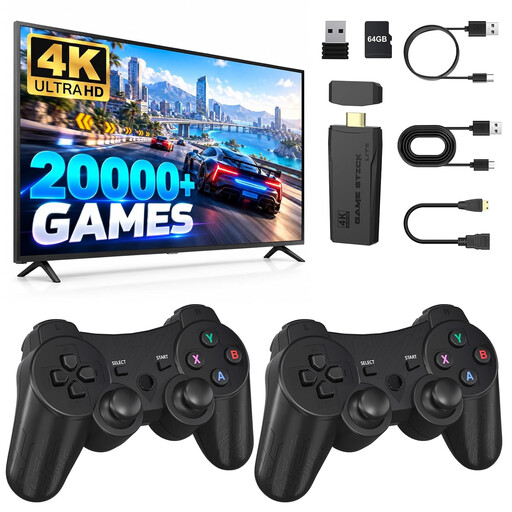
Retro Gaming Console 4K HDMI TV Game Stick with 2 Wireless Controllers
The product description lists supported two-player games and two wireless controllers.
The title mentions an HDMI connection and 2.4 GHz controllers. Check separately whether the console plays the media files of your own that you want to use.
View at Joybuy
 No image available
Sony PlayStation 5 Slim Digital Edition 825GB
This digital version is suitable for local gaming when the chosen game supports that mode; Epic Games says Rocket League split-screen requires two controllers.
The product information states that this version does not have a disc drive. Sony describes USB media features for PS5; check the file format of your own media.
View at Joybuy
 No image available
Nintendo Switch 2 Console EU
The product description lists TV, tabletop and handheld modes, plus detachable Joy-Con 2 controllers for different play setups.
Nintendo's documentation about the album for gameplay captures does not confirm a general playback feature for your own media files. Check the player limit and controller setup for the game you want to play.
View at Joybuy
Frequently asked questions
Is local multiplayer the same as being able to play without an internet connection?
No, it depends on the game and mode. Epic Games says Rocket League can be played locally and offline with a friend, but states that local multiplayer in Fortnite on PlayStation and Xbox requires a stable internet connection. Check the requirements for the specific game.
How do you prepare your files for USB?
First check the format and encoding of your files, and what the console supports. PlayStation Support specifies exFAT or FAT32 for video from USB on PS5; Xbox Support describes media playback through the Media Player app.
Can you play new Xbox Series X|S games directly from the same USB drive?
For Series X|S-optimised games, Xbox Support specifies internal storage or a separately sold Storage Expansion Card. A USB drive for media files is not a substitute for that storage.
What should you check if you want to keep using discs?
Check whether the exact console version has a suitable disc drive and whether your discs are compatible. The Xbox Series S does not have a disc drive; PS5 versions differ in this respect.
Can you use copied films or music as local files?
The Dutch Government states that, under certain conditions, you may make a private copy of texts, music or photos for personal use, but you may not distribute or make it available to the public. For computer programs and games, the Government only allows a backup copy.


