What should you consider when choosing?
Start with the games you want to play together, then check their local play modes and controller requirements. Finally, compare your TV set-up and decide whether you want discs or digital games.
Nintendo Switch 2
A good fit if: you want to combine local adventures with TV, tabletop and handheld play.
Bear in mind: the two Joy-Con 2 controllers don’t make up two complete player set-ups for every game. Compatibility with older Switch games also varies by title.
PlayStation 5
A good fit if: the PS5 adventures you choose offer local multiplayer and you have a suitable controller set-up.
Bear in mind: the PS5 Digital Edition has no disc drive. For other editions and bundles, check which controllers are included too.
Xbox Series S or Series X
A good fit if: your chosen co-op adventures are available on Xbox and the edition suits your digital games or discs.
Bear in mind: Microsoft specifies the Series S edition in this comparison as all-digital with 512 GB, and the Series X with a disc drive as 1 TB. Check the local play mode for each game.
| What to consider |
What should you check? |
Who should give this more thought? |
| Local co-op adventures |
For every game you’re interested in, check its local play mode, player count and platform. |
If we want to play an adventure together on the TV, I want to know that the game we choose really lets us play at the same time. Around 33% of consumers put the availability of local adventure games first. |
| Daytime visibility |
Look at the TV during the day from both seating positions and check for reflections. Also check the relevant HDMI input and picture settings. |
If daylight falls on the screen, I want to be able to see what’s happening from the sofa without expecting a console feature to fix the reflections. Around 27% of consumers give clear visibility of the shared TV screen their highest priority. |
| Suitable controllers |
Check what’s included in the exact bundle and the controller requirements for each game. |
If we want to play together straight away, I want to know whether the included controllers will work for our games. Around 20% of consumers consider a complete controller set-up that’s suitable for their games the most important factor. |
| Discs, digital games and extra purchases |
Compare the console edition and bundle with the games and controllers you want. If you’re expanding Switch 2 storage, check the required card standard. |
If I already own games on disc or think I might need extra storage, I want to know in advance which edition and accessories will suit my needs. Around 20% of consumers put the choice between discs and digital games, and additional purchases, first. |
To display games in up to 4K and HDR, both the game and TV need to support these features. Xbox Support also points out that not every HDMI input on a compatible TV supports the same picture features. Picture support won’t remove reflections from the screen.
Relevant brands
These brands offer different console editions and games. Check that each model, bundle and game suits your set-up.
Nintendo
A good choice if you want to combine local adventures with playing on the TV, at a table and on the go.
- Nintendo Netherlands lists local multiplayer for Super Mario 3D World + Bowser’s Fury. According to Nintendo, the standard Switch 2 bundle includes two Joy-Con 2 controllers.
- Nintendo says controller set-ups and compatibility with older Switch games may vary by game. 4K and HDR require a compatible game and TV.
PlayStation
A good choice if you want to play your chosen PS5 adventures locally and choose between an edition with a disc drive and the Digital Edition.
- PlayStation lists Split Fiction on PS5 for one to two players and describes local multiplayer using an extra DualSense controller.
- According to PlayStation, the PS5 Digital Edition has no disc drive. For other editions, check how many controllers are included in the bundle.
Xbox
A good choice if the adventure games you want to play are available on Xbox and you’re looking for a digital edition or a console with a disc drive.
- Microsoft specifies the Xbox Series S edition in this comparison as all-digital with 512 GB, and the Series X with a disc drive as 1 TB.
- The Xbox page for Split Fiction describes a co-op adventure. For every other game you’re interested in, check separately whether local co-op is available.
Joybuy product picks
This selection includes Nintendo Switch 2 editions for playing on the TV, in handheld mode or in tabletop mode, plus a portable MSI gaming console. For each model, check that it suits the games you want to play and how you want to play them.
 No image available
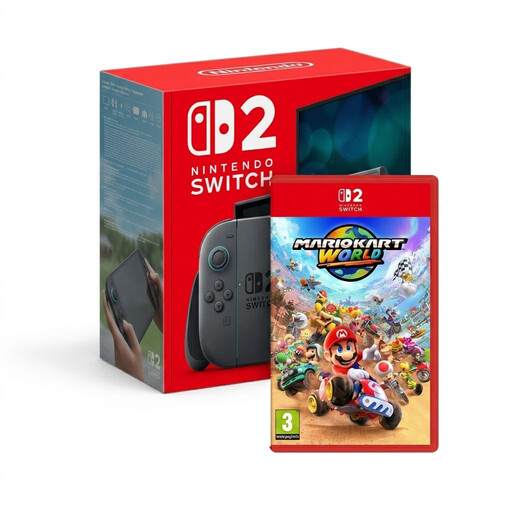
Nintendo Switch 2 + Mario Kart World
The bundle description mentions local play with friends and use on the TV or on the go. For the game you want to play, check its local play mode and controller requirements.
View at Joybuy
 No image available
Nintendo Switch 2 + Nintendo Switch Sports Resort bundle, 3 months of Nintendo Switch Online
This bundle is described as suitable for playing on the TV, in handheld mode or in tabletop mode. Check the game’s local play mode and controller requirements.
The bundle name includes three months of Nintendo Switch Online.
View at Joybuy
 No image available
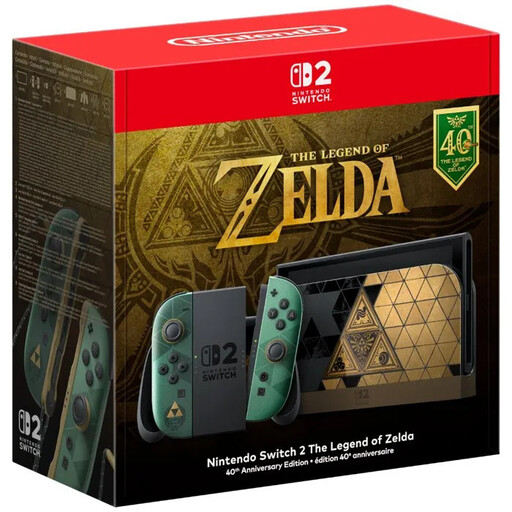
Nintendo Switch 2 Console, The Legend of Zelda 40th Anniversary Edition, EU Version
The description mentions playing on the TV, in handheld mode and in tabletop mode. Check that your chosen game and controller set-up work for these ways of playing.
No game is included.
View at Joybuy
 No image available
Nintendo Switch 2 Console (EU)
The description mentions TV, tabletop and handheld use. When choosing your games, check their local play mode and which controllers you’ll need.
View at Joybuy
 No image available
MSI Claw A8 BZ2EM-047NL, 1 TB
This portable model is an option if you want to play on a handheld device. Check that it supports the games you want to play and suits the way you want to play them.
The product information lists an 8-inch touchscreen with a resolution of 1920 × 1200 and a brightness of 500 cd/m².
According to the product information, the charger must be purchased separately.
View at Joybuy
Frequently asked questions
Does ‘multiplayer’ mean we can play an adventure together on one TV?
No. Check the specific game to see whether local co-op is available and how many players can join in. Nintendo lists local multiplayer for Super Mario 3D World + Bowser’s Fury; PlayStation lists Split Fiction on PS5 for one to two players.
How do I connect a console in a bright living room?
For TV gaming, use a suitable HDMI connection and check for reflections from both seating positions during the day. For 4K and HDR, the game, console and TV must support the relevant feature. Xbox Support notes that some TV inputs support fewer picture features than others.
Do I need an online subscription for local co-op?
Don’t assume so based on information about online multiplayer: online and local play are different modes. The Dutch PlayStation page for Split Fiction lists PS Plus for online play and one to two players. Check the game’s requirements and the play mode you want to use.
What can I do if the console develops a fault after I buy it?
According to the Dutch government, you’re entitled to a product that works properly when you buy it, and you can ask the seller to put things right if there’s a problem. Any manufacturer’s guarantee or extra warranty offered doesn’t replace your statutory rights.
Is a PEGI age rating on its own a compulsory minimum age for playing at home?
The Dutch government describes game age ratings as recommendations, and PEGI calls its ratings a guide to help parents choose a game. If children will be playing, also look at why a particular game received its rating. This explanation does not make any claims about specific sales rules.


