
Players sharing a wide sofa
If you’re not all sitting directly in front of the TV, check the picture from both seats. RTINGS highlights wide viewing angles as something to consider when watching TV with several people.


First, choose a game that supports local co-op on your preferred console, then decide whether you want to play at a table or on a TV. The Nintendo Switch 2 and Switch OLED have built-in screens for tabletop play; with a PS5 or Xbox Series S, visibility from the side also depends on your TV’s viewing angle. Check that the game and the included controllers are suitable for two players, too.
If you’re not all sitting directly in front of the TV, check the picture from both seats. RTINGS highlights wide viewing angles as something to consider when watching TV with several people.
Before choosing a console, check that your specific game supports local co-op on one system. For example, PlayStation Netherlands and Xbox Netherlands describe split-screen play for It Takes Two.
If you also want to play together when the TV isn’t available, compare the built-in screen, stand and supported controls. Nintendo describes tabletop play using the built-in screen on Switch models.
| What to consider | What should you check? | Who is this important for? |
|---|---|---|
| Picture from the side | View the TV from both seats and check its horizontal viewing angle. With split-screen play, also consider how easy text is to read. | If I’m playing from the side, I want both players to be able to see the shared picture clearly. Around 31% of consumers say viewing angle is their main consideration. |
| Local co-op for each game | Check the exact game edition and platform, and whether two players can play on one system with a shared screen. | If there’s already an adventure on our wish list, I want to make sure that particular edition supports playing together. Around 31% of consumers prioritise the local co-op game they want to play. |
| Controls for two players | Compare the number of controllers required for each game with what’s included in the box and the supported controller setup. | If we want to start playing with two people straight away, I want to know whether the controls included in the box are enough. For around 23% of consumers, the controllers required are their first consideration. |
| Physical or digital games | Check whether the console has a disc drive and whether your chosen games and any extra controllers are compatible with that version. | If I want to play physical games, the console needs to play discs; I also want to know what else I’ll need. Around 15% of consumers give the way they buy games and any additional costs top priority. |
Playing together online, connecting locally across multiple systems and playing offline with a shared screen are different modes.
Check the exact game edition to see whether two players can play together on one system and one screen.
If a game doesn’t suit the way you want to play, you may need a different title or additional hardware.
When playing on a TV, visibility from seats at an angle also depends on the TV you’re using. A console screen for tabletop play is smaller than a TV.
First, check the picture from your seats, then decide whether you want to play on a TV or at a table.
If the picture on your existing TV isn’t clear enough from your seats, you may need to change your screen setup.
The standard PS5 box we looked at includes one DualSense controller. Sharing Joy-Con controllers only works if the game you choose supports that setup.
Compare what’s in the box with the number of players and the controller requirements of the game you want.
You may need an extra compatible controller for two players.
The Xbox Series S we looked at is all-digital; the PS5 version we looked at, which has a disc drive, can play compatible physical games.
Decide in advance whether you need physical games, and check the exact console version.
You may need to buy games from your physical collection again digitally if your chosen console can’t play discs.
The Switch models we looked at combine TV play with a built-in screen for tabletop play. The game you want and how you plan to play will determine which version is right for you.
The PS5 with a disc drive we looked at is a TV console for players who want to use compatible physical games. PlayStation describes It Takes Two as a couch co-op game with split-screen play.
The Xbox Series S we looked at is an all-digital TV console. Xbox lists offline split-screen co-op for the Xbox edition of It Takes Two.
This selection includes consoles for tabletop play, TV gaming and handheld play. Check that the play mode suits your setup for each model and game.
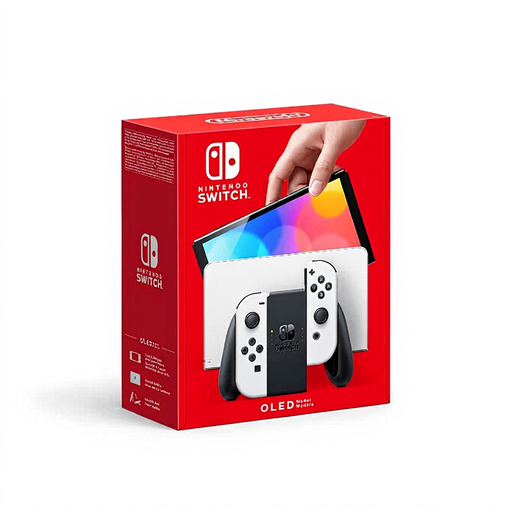 Image unavailable
A good choice for tabletop play if you also want to play without a TV.
This model has a 7-inch OLED screen and a wide, adjustable stand. Check that the game you want to play is compatible with this model.
 Image unavailable
A good choice if you want to play on both a TV and at a table.
The console description lists a built-in 7.9-inch LCD screen, a tabletop stand and detachable Joy-Con 2 controllers. Check that your chosen game supports the local play mode you want.
 Image unavailable
A good choice for playing digital games on a TV; visibility from the side also depends on your TV.
PlayStation lists local split-screen play for It Takes Two on PS5. The product description includes one DualSense controller; check which controllers two players will need.
 Image unavailable
Suitable for handheld play if you don’t want to rely on a TV.
This bundle includes Tomodachi Life: Wo Träume wahr werden as a download and a 30-day Nintendo Switch Online trial. This model is for handheld play only and doesn’t support TV output.
 Image unavailable
A good choice for players looking for local split-screen multiplayer in TV or tabletop mode.
The bundle includes Mario Kart 8 Deluxe as a physical game card. It’s a racing game, not a co-op adventure, so also check that your chosen title supports local co-op.
No. Check your TV’s viewing angle from where you’ll be sitting. A Switch with a built-in screen also lets you play at a table, but make sure the smaller screen is easy for everyone to see.
Nintendo describes tabletop mode as playing with the system on a flat surface after removing it from the dock and unfolding the stand. Detach the Joy-Con 2 controllers if you want to play this way, and check that the game supports the local multiplayer mode you want.
Not for a game’s offline mode, if it supports that way of playing. Xbox lists offline split-screen co-op for It Takes Two; online play is a different mode.
As well as any manufacturer’s or seller’s warranty, you’re covered by the statutory guarantee. According to ACM ConsuWijzer, if a product breaks sooner than you could reasonably expect under normal use, the seller must put it right free of charge, for example by repairing or replacing it. A stated manufacturer’s warranty period doesn’t automatically limit this statutory right.
According to ACM ConsuWijzer, when you buy a product online you generally have a statutory cooling-off period of up to 14 days after delivery. Check the terms that apply to your purchase.