
Regular co-op duos
You want to play story-led adventures together on one console. Before choosing a console, check whether the specific game supports local play.


First, choose the adventure games you want to play together, then check whether each one supports local co-op on a single console. Switch systems also offer tabletop and TV play. With PS5 or Xbox Series S, your choice will depend on the games you want, the controllers you need and whether you want to use discs.
You want to play story-led adventures together on one console. Before choosing a console, check whether the specific game supports local play.
You want to be able to play when the TV is in use, too. A console that supports tabletop play could be a practical option.
You want to keep playing games you already own, so check whether they're available on disc, game card or digitally for the console version you choose.
A good fit if: you want to play together on the TV as well as without needing a free screen, and your chosen co-op game is available for Switch 2.
Bear in mind: Nintendo says some original Switch games are not compatible, or are not fully compatible, with Switch 2.
A good fit if: the games you want are available on the original Switch and you want to switch between TV and tabletop play.
Bear in mind: according to Nintendo, whether one Joy-Con per player is enough depends on the game and the supported play style.
A good fit if: the local co-op adventures you want are available on PS5. Choose a version with a disc drive if you want to play compatible physical games.
Bear in mind: you may need an extra DualSense controller to play together; the digital version has no built-in disc drive.
A good fit if: you want to play digital games and have checked that your chosen game supports local co-op on one console.
Bear in mind: Series S is all-digital; Microsoft lists versions with 512 GB and 1 TB.
| What to consider | What should you check? | Who is this most important for? |
|---|---|---|
| The co-op game you want | Check the platform, local co-op mode and player count for the specific game. | If there's one particular adventure we want to play together, I want to check first that it supports local co-op on one console. Around 33% of consumers put their preferred local co-op game first. |
| Playing without a free TV | Check that both the console and game support tabletop play, and that the built-in screen suits the way you want to use it. | When the TV is in use, I want us to be able to play together on a built-in screen. Around 27% of consumers make playing without a free TV their top priority. |
| A complete set-up for two | Compare what comes in the bundle with the game's controller requirements. | Before we start playing together, I want to know whether the version includes the controllers we need. Around 20% of consumers make having a complete set-up for playing together their top priority. |
| Keep playing games you already own | Check the game format and whether it's compatible with the exact console version. | If we already own games on disc or game card, I want to know whether they'll work on the console we've chosen. Around 20% of consumers make their existing games collection their top priority. |
A game with multiplayer does not necessarily include a local co-op mode. The available modes can vary from game to game.
Before choosing a game, check its local co-op mode, platform and player count specifically.
The controller set-up you need depends on the game and what comes with the version you choose. PlayStation recommends an extra DualSense controller for local PS5 multiplayer; on Switch, using separate Joy-Cons depends on the software.
Compare what's included in the bundle with the game's controller requirements.
Xbox Series S is all-digital, while a PS5 version with a disc drive can play compatible discs.
Check the format of the games you want to play before choosing a console version.
Nintendo warns that some original Switch games are not compatible, or are not fully compatible, with Switch 2.
Check the specific game and the controllers it needs before relying on compatibility.
Switch, Switch OLED and Switch 2 are worth considering if you want to switch between TV and tabletop play. Check the local co-op mode for each game.
PS5 is worth considering for duos who want to play local PS5 games and choose between a version with a disc drive and a digital edition.
Xbox Series S is an option if you want to play your chosen games digitally and check local co-op support for each game.
These Joybuy products are suited to playing together with housemates. They include versions for TV play and, for the Switch models, play without a TV too.
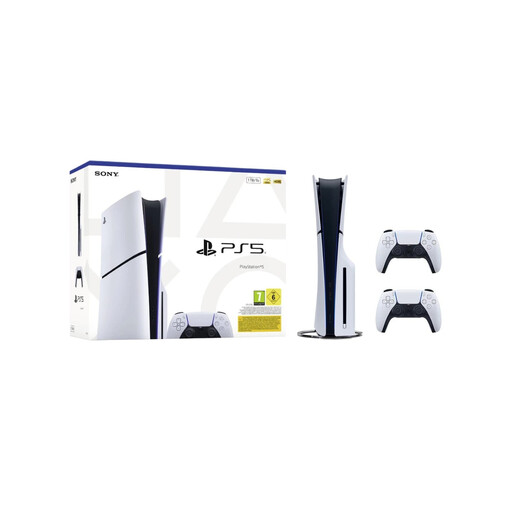 Image unavailable
The bundle includes two controllers for playing together on one console.
Disc Edition; 1 TB; two wireless DualSense controllers; EU version.
 Image unavailable
The listed tabletop, handheld and TV modes give you ways to play when the TV is in use.
The product name mentions an easily replaceable battery; the description lists Joy-Con 2 controllers and a dock.
 Image unavailable
This bundle could be a good fit if you also want a game with your console and would like to switch between TV and handheld play.
256 GB; Mario Kart World download; 3 months of Nintendo Switch Online.
 Image unavailable
Tabletop mode lets you play together when the TV is not free; just check the game's controller requirements first.
The product description lists an adjustable stand and a dock with HDMI.
 Image unavailable
The listed tabletop, handheld and TV modes are useful if you want to switch between playing with and without a TV.
The product description lists a 7.9-inch screen, an adjustable stand and Joy-Con 2 controllers.
Not as a general requirement for local co-op: check the local mode for the game you've chosen. PlayStation says a paid PlayStation Plus subscription is needed for online multiplayer; EA confirms that Split Fiction supports couch co-op on Switch 2.
Nintendo explains how to connect it using the dock, power supply and HDMI cable. Then select the correct HDMI input on the TV. Switch Lite does not support TV mode.
In addition to any retailer or manufacturer warranty, your statutory warranty rights apply. The ACM says there is no fixed end date for these rights in the Netherlands: what matters is what you could reasonably expect from the product under normal use. If there's a fault, contact the retailer first.
The Dutch government says that for distance purchases, you usually have a 14-day cooling-off period. Check the terms and any exceptions that apply to your purchase; this is separate from reporting a fault.
The Dutch government describes age ratings for computer games as recommendations. Use the age rating and content descriptors to decide whether a game is suitable for the players.