
Puzzle-solving pair on the sofa
You mainly want to play together on one system. Check whether each game offers local co-op and which controllers you’ll need.


Start with the puzzle games you want to play together: check whether each title supports local co-op on one system and which controllers you’ll need. A Nintendo Switch suits players who want to switch between tabletop and TV play; a PS5 or Xbox Series S is designed for TV play, while a Steam Deck is best suited to those who already have compatible games in their Steam library. When you play during the day, the light in your playing area makes a difference: the screen type alone doesn’t guarantee that a screen will be easy to read in direct sunlight.
You mainly want to play together on one system. Check whether each game offers local co-op and which controllers you’ll need.
You’d like to play on a shared screen sometimes, and perhaps on a TV too. Decide whether you’ll mainly play indoors in daylight or outdoors as well; screen specifications alone won’t answer that question.
You already have games in mind or own some, and want to know whether they’ll work on your chosen games console. Check compatibility and two-player controls before choosing a different platform.
Start with the games you want and how you plan to play. Then check whether the screen, controllers and overall setup suit your playing area.
| What to consider | What should you look for? | Who is this important for? |
|---|---|---|
| Local co-op and games | Check the platform, local multiplayer support, player count and required controllers for each title. | I want to be sure we can really play the puzzle game together on one system. This is the main purchasing concern for around 36% of consumers. |
| Playing area and daylight | Decide whether you’ll play indoors or outdoors, and assess the light, viewing angle and screen size there. | If I want to play during the day without a TV, it matters whether we can share the screen comfortably where we’ll be playing. This is the main reason for around 29% of consumers. |
| Existing games and equipment | Check whether the exact game is compatible and whether you can use your current controllers or other accessories. | I want to keep playing the games I already own or have in mind before switching to a different platform. This is the priority for around 21% of consumers. |
| What you need for two players | Check what’s included and factor in the controllers, games and any online services you’ll need. | I want to know in advance what we’ll need for our two-player setup. This is the main purchasing concern for around 14% of consumers. |
A game may offer local and online co-op as separate options. Nintendo, for example, says that Unravel Two requires a compatible controller for each player in multiplayer mode.
Check the local play mode, player count and controls required for the game you want to play.
You may need an extra compatible controller for local multiplayer; playing remotely may come with different online requirements.
The screen type and size don’t automatically tell you how clearly you’ll be able to see the picture where you play, especially in direct sunlight.
Consider the difference between indoor daylight and outdoor use, and look out for reflections and viewing angles in your chosen playing area.
Nintendo warns that some older Switch games aren’t compatible, or may not be fully compatible. Original Joy-Con controllers can pair wirelessly, but can’t be attached to Switch 2.
Check compatibility for each game, and look separately at controller use and charging.
You may need a suitable charging accessory to charge original Joy-Cons if you’re not using an original Switch system.
According to Microsoft, the Xbox Series S 512 GB comes with one controller and has no disc drive. A PS5 bundle with two controllers won’t necessarily include the same items as other PS5 versions.
Check what’s included with the exact version and make a list of what you’ll need for local or online multiplayer.
You may need to buy a second controller, the game you want or an online subscription separately.
Nintendo Switch models are worth considering if you want to switch between TV play and sharing a screen.
PS5 versions are a TV-focused option for anyone who wants to play PlayStation games such as It Takes Two.
The Xbox Series S 512 GB is a digital console designed for use with a TV.
Steam Deck OLED is designed for portable play from a Steam library.
These products are selected for portable play or for switching between a built-in screen, tabletop mode and TV play. Check that each game’s local co-op and controller requirements suit your setup.
 Image unavailable
Suited to portable play; check that the controls for each puzzle game work for two players on this device.
8.8-inch OLED touchscreen; detachable controllers.
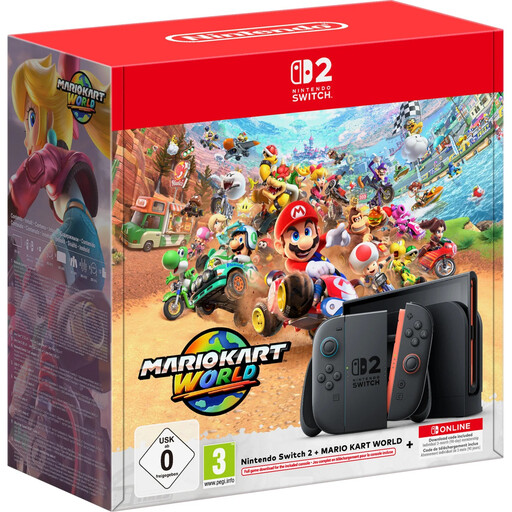 Image unavailable
Suited to those who want to switch between handheld and TV play; check compatibility and two-player controls for each game you want.
7.9-inch LCD screen and dock for TV play; the bundle includes Mario Kart World as a digital game.
Nintendo warns that some older Switch games aren’t compatible, or may not be fully compatible, with Switch 2.
 Image unavailable
Suited to portable play; check that each puzzle game and its controls work for the way you want to play together.
Windows 11 Home and a 7-inch FHD touchscreen.
The charger is not included, according to the product description.
 Image unavailable
Suited to playing at a table without a TV, with the option to switch to TV play too; check local co-op and controller requirements for each game.
7-inch OLED screen, adjustable stand and detachable Joy-Con controllers.
 Image unavailable
Suited to switching between handheld, tabletop and TV play; check that the game you want supports local co-op and works with the controls.
7.9-inch LCD screen, Joy-Con 2 controllers and adjustable stand.
Nintendo says some older Switch games aren’t compatible, or may not be fully compatible.
Yes, if the games support local co-op on one system. Nintendo describes Snipperclips as a two-player game; in Unravel Two’s multiplayer mode, each player needs a compatible controller.
According to Nintendo, original Switch Joy-Cons can be paired wirelessly, but can’t be attached to a Switch 2. To charge them, you’ll need an original Switch system or a suitable licensed charging accessory; check the game’s requirements too.
You can’t tell from the OLED label alone. Assess the light, reflections and viewing angle where you plan to play; indoor daylight is different from direct sunlight outdoors.
Not necessarily: local co-op and online multiplayer are different game modes. Sony says PlayStation Plus is required for online multiplayer; check whether your game is played locally or online and what conditions apply.
According to ACM ConsuWijzer, if a product doesn’t meet reasonable expectations under normal use, you’re entitled to a statutory guarantee in the Netherlands; the seller must then provide an appropriate solution free of charge. ACM ConsuWijzer also explains your rights when digital content, such as a game, doesn’t work as expected. This is separate from a voluntary manufacturer’s guarantee.