
Player with a fixed monitor
Wants to play action RPGs mainly at their desk, choosing games and editions first, then a console to suit their screen.


Start with the action RPGs and game editions you want to play, then choose between a fixed console for your monitor and a system you can also use as a handheld. Before you buy, check your screen, existing games, storage requirements and any subscription costs. Support for a particular display mode or a wide game library doesn’t guarantee that your specific game or edition will be compatible.
Wants to play action RPGs mainly at their desk, choosing games and editions first, then a console to suit their screen.
Wants to carry on playing away from their desk after work, so they consider handheld mode, game compatibility and battery life.
Already owns games on disc, digitally or on Steam, and wants to check which ones will work on their new system before buying.
| What to consider | What should you check? | Who should pay particular attention? |
|---|---|---|
| Games and editions you want | Check the platform, edition and any online requirements for each title. | I want to know before buying whether my favourite action RPG is available in the right edition; around 29% of consumers in this context put game availability first. |
| Display on your monitor | Compare the connections and supported display modes of your monitor, console and game. | If I mainly play on a fixed monitor, I want the combination to work with my screen; around 23% of consumers give monitor display quality top priority. |
| Playing away from your desk | Check handheld functionality, game compatibility and battery life under different usage conditions. | I want to carry on playing somewhere else after work, so I take game support and charging into account; around 18% of consumers prioritise portability. |
| Total cost of ownership | Factor in the games and storage you need, as well as any online costs. | I consider more than just the console: I also think about the games and online features I’ll actually use; around 18% of consumers prioritise total costs. |
| Existing games on disc | Check whether the console has a disc drive and supports the specific game. | If I want to keep playing my physical games, I need to choose the right console version; around 12% of consumers prioritise keeping their discs. |
The PS5 Digital Edition and the all-digital Xbox Series S don’t have a disc drive. This means you can’t use games you already own on disc with these consoles.
Make a list of the games you already own, then check the console version and support for each title.
If you already own games on disc, you may need to buy digital editions to play them on a digital console.
Available display features can depend on the game, screen and mode of use. A console’s specifications don’t automatically tell you which modes your action RPG offers.
Check the display modes available in your favourite game and compare them with what your monitor supports.
Nintendo specifies microSD Express for expanding Switch 2 game storage. Cards using other standards may not be suitable for this purpose.
Check the card type before buying extra storage for Switch 2 games.
According to the Dutch government, the retailer is your point of contact if there’s a problem with a product.
Compare the terms of any additional cover with your statutory rights before paying for it.
A good option if you want a fixed PS5 setup and are weighing up physical and digital games.
A good option if you’re considering a fixed console for a monitor and an Xbox game library.
A good option if you want to switch between playing on a screen and handheld gaming, provided your chosen game is available for Switch 2.
A good option if you want to play compatible games from your Steam library on the go.
This selection includes fixed consoles, a hybrid games console and handheld PCs for playing action RPGs on a monitor or in different places. Check whether the title and edition you want will work on your chosen system.
 No image available
The handheld design and stated display output are useful if you want to play on the go and connect the console to a screen too.
8.8-inch OLED screen; two USB4 ports with DisplayPort 2.1; Windows 11 Home.
 No image available
This version suits anyone who wants to play ELDEN RING digitally on PS5 and doesn’t need physical game discs.
825 GB SSD; supports 4K output.
This version has no disc drive and can’t play physical game discs.
 No image available
This handheld version is a good option if you want to play PC games in different places; check support for each game you want to play.
7-inch FHD touchscreen with 120 Hz; Windows 11 Home.
The charger isn’t included and must be purchased separately.
 No image available
This hybrid console is a good option if you want to switch between handheld play and playing with a dock; Nintendo lists ELDEN RING Tarnished Edition for Switch 2.
Built-in 7.9-inch screen; dock output up to 4K.
For extra game storage, Nintendo specifies compatible microSD Express cards.
 No image available
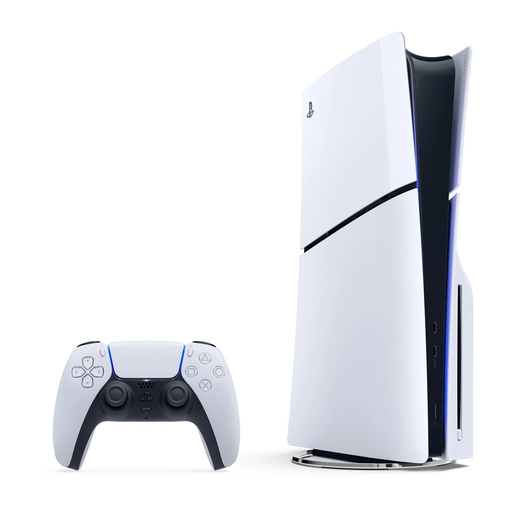
This fixed PS5 version is a good option if you want to play ELDEN RING on PS5 and use physical game editions too.
Disc drive; 1 TB storage; supports PS5 and PS4 game discs.
No, not on every console. Check that the version has a compatible disc drive and supports the specific game version. The all-digital PS5 Digital Edition and Xbox Series S can’t play game discs.
Place a fixed console on a stable surface and keep its vents clear. Sony recommends leaving at least 10 cm of space around the PS5; this is the manufacturer’s advice for that console.
For online play, the Dutch PlayStation Store states that a PlayStation Plus subscription is required. Check the terms for other games and platforms separately; don’t assume a subscription is required just because of the genre.
According to the Dutch government, you’re entitled to a product that works properly, and the retailer must provide a solution if there’s a problem. Compare any additional warranty with your statutory rights.
According to the Dutch government, when you buy at a distance, the retailer must tell you about things including the cooling-off period, which is usually 14 days. Check the applicable terms and any exceptions for the product you’re buying.