What should you look for when choosing?
First, check whether your game supports the input you want and which platform you play on. Then assess the sound of the game separately from the sound of the buttons or drum hits.
| What to consider |
What should you check? |
Who is this most important for? |
| Noise in the room |
Check whether vibration can be turned off, and assess music and physical impacts separately. A manufacturer’s claim about noise isn’t a comparative noise measurement. |
If I’m playing while someone else is resting in the room, I want to know what sounds the controller itself makes. Around 36% of consumers put limiting noise first. |
| Game and platform support |
Compare the full model name with the compatibility list for your console or PC and the exact game title. |
If I want to play on my own device and in my chosen game, I check both before choosing a controller. Around 29% of consumers give compatibility top priority. |
| Preferred controls |
Check whether the game supports buttons, motion controls or a drum, and choose the type of playing action you want. |
If I mainly want to play with buttons, or I’m looking for the Taiko drumming experience, my choice depends on the game’s input options. Around 21% of consumers prioritise the feel of the controls. |
| Space and accessories |
Check what’s included with the controller, whether the game needs to be bought separately, and where you can put a drum and stand. |
If I have limited space or don’t want to store extra equipment, I want to know what I’ll need in advance. Around 14% of consumers make space and additional equipment their main consideration. |
Gamepads at Joybuy
This Joybuy selection consists of standard gamepads for rhythm games that support controller button input. Before buying, check compatibility with your exact game and platform.
 No image available
Turtle Beach Afterglow Wave Wireless Controller
A standard gamepad to consider if your rhythm game supports button controls; check support for your exact game.
The product name mentions Bluetooth, a gyroscope and two programmable action buttons. The systems listed are Nintendo Switch 2, Switch, Switch Lite and Switch OLED.
View at Joybuy
 No image available
Turtle Beach Rematch Super Mario Jump Edition
A standard gamepad to consider if your rhythm game supports controller buttons; check game compatibility first.
The product name mentions a wireless controller, 40-hour battery life, a C button for GameChat and two programmable buttons. The systems listed are Nintendo Switch 2 and Switch OLED.
View at Joybuy
 No image available
KONIX Nintendo Switch JoyPad controller pair, blue and red
A pair of controllers to consider if your rhythm game supports standard controller buttons; check support for your game and system.
The product name mentions 8-hour battery life and a vibration function. The systems listed are Nintendo Switch, Switch OLED and Switch 2.
View at Joybuy
 No image available
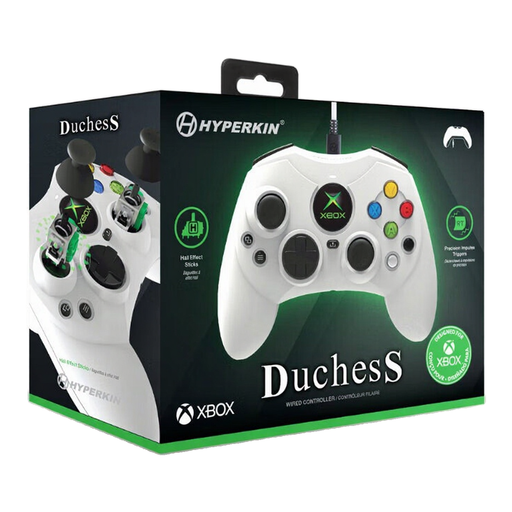
Hyperkin DuchesS wired controller, white
A wired gamepad to consider if your rhythm game on Xbox or Windows supports standard controller buttons; check compatibility with the exact game.
The product name lists Xbox Series X|S, Xbox One and Windows 10/11. The product description mentions a detachable 3-metre USB-C cable.
View at Joybuy
 No image available
GameSir Cyclone 2 with charging station, white
A multi-platform gamepad to consider if your rhythm game supports standard controller buttons; check game and platform compatibility.
The product name lists PC, Switch, iOS and Android. The product description mentions wired, Bluetooth and dongle connections, and a bundle with a charging station.
View at Joybuy
Frequently asked questions
Is a headset enough to avoid disturbing a roommate?
No, a headset won’t block the physical sound of buttons or drum hits. The RIVM notes that noise can disrupt sleep, so pay attention to the impacts and vibration in your room too.
Can I turn off vibration on a Switch controller?
Yes, Nintendo describes a controller vibration setting under System Settings and Controllers and Sensors. Turning it off reduces vibration feedback, but it isn’t a setting for mechanical button noise.
How do I check whether a Taiko controller will work with my game?
Compare the full model name with the compatibility information for your platform and game title. For example, HORI says its Xbox/Windows version for Rhythm Festival isn’t compatible with The Drum Master!
How should I store a Taiko drum to avoid putting pressure on the playing surface?
Don’t place objects on the playing surface, and follow the instructions for your model. HORI lists temperature changes, long periods without use and objects placed on the drum as possible causes of deformation, which may affect the detection of light taps.
What are my rights if a controller bought online isn’t up to scratch?
For online consumer purchases, you’ll often have a 14-day cooling-off period, subject to applicable conditions and exceptions. You’re also covered by Dutch statutory warranty law: if a product breaks earlier than you could reasonably expect under normal use, the retailer is responsible for providing an appropriate solution free of charge. This is separate from any voluntary extended warranty.


