
Racing gamer sharing a desk
You use the same desk for studying and gaming, and want to put your controller away afterwards. A gamepad doesn't need a permanent wheel and pedal set-up.


A gamepad is a better fit if you also use your desk for studying and want to put your controller away after gaming. Choose a racing wheel with pedals if force feedback and pedal control matter to you, and you have space to attach the set-up. Before buying, check that the exact model works with your console or PC and the racing game you play.
You use the same desk for studying and gaming, and want to put your controller away afterwards. A gamepad doesn't need a permanent wheel and pedal set-up.
You want force feedback and pedals, and can make room for the mounting hardware, cables and pedal unit. A racing wheel therefore takes up more space than a gamepad.
You want to know whether the controller and the features you want work with your console or PC and in your game. Compatibility varies by model and connection.
Start by checking the platform and game combination. Then consider whether you have enough space for a wheel and pedals, or would rather put away a gamepad.
| What to consider | What to look for | Who should pay particular attention? |
|---|---|---|
| Platform and game | Check the full model name, platform, connection and support for your racing game. | If you want to be sure the controller works with your console or PC, check that its features are supported in each game too. Around 36% of consumers say compatibility is their main concern when buying. |
| Space and mounting | For a wheel, measure the desk thickness and the available space for pedals; plan the cable route too. | If you use the same desk for studying and gaming, you'll want to know whether you can clear the space again. Around 29% of consumers prioritise space and mounting. |
| Racing controls | Decide whether a gamepad is enough or you want a wheel and separate pedals; check that the game supports force feedback. | If a wheel and pedals are the reason you're considering a racing wheel, check which features your game actually supports. Around 21% of consumers give physical racing controls top priority. |
| Parts and service | Check what's included and how the exact model is powered; distinguish the manufacturer's warranty from your statutory rights. | If you want to know in advance what's included and who to contact if something goes wrong, check the model and the seller's terms. Around 14% of consumers say this is their main concern when buying. |
Logitech lists different console support for the G29 and G920. So, similar product names don't mean both models work with the same console.
Check the full model name and make sure it matches your console. On PC, also check that your racing game supports the wheel.
A wheel needs to be mounted, and the pedals sit on the floor. Thrustmaster lists a quick-release clamp for table tops up to 5.5 cm thick for the T128 PlayStation/PC; Logitech describes a desk clamp and separate pedals for the G29/G920.
Measure the thickness of your desk and check there's room for the pedals and cables.
PlayStation says that adaptive triggers require support from the game. On PC, haptic feedback requires both game support and a USB connection.
Check that the racing game supports the feature you want, and use USB if you want supported haptic feedback on PC.
According to ACM ConsuWijzer, Dutch statutory rights apply alongside any manufacturer's or seller's warranty.
Keep your proof of purchase and contact the seller if a product doesn't meet what you could reasonably expect.
Wireless gamepads for Xbox consoles and Windows PCs, among other devices, if you're looking for a controller you can put away after gaming.
DualSense gamepads for PS5 and compatible games on supported PCs.
Racing wheels with pedals; the T128 PlayStation/PC is an option if you want to attach a wheel to a suitable desk.
Driving Force wheels with pedals: the G29 is the PlayStation/PC version, while the G920 is the Xbox/PC version.
A PC gamepad worth considering if Windows support and a 2.4GHz receiver matter to you; the model reviewed is the Ultimate 2C Wireless.
This selection features gamepads for racing games, for anyone who doesn't want to attach a wheel and pedals.
 Image unavailable
An option if you want to play racing games on Switch or PC with a gamepad rather than a wheel and pedals.
The product name lists dual vibration motors and a gyroscope. Check that your game and device support these features.
 Image unavailable
A good fit if you're looking for a gamepad for an Xbox or Windows gaming set-up; check it's supported by your console and racing game.
This model is wireless. Check the power requirements and what's included before buying.
 Image unavailable
A gamepad to consider if you play on PC or Switch; check which connection your device and game support.
The product name lists TMR sticks, Hall Effect and Micro 2-in-1 triggers, and a charging dock. This is the Black-Bundle Edition.
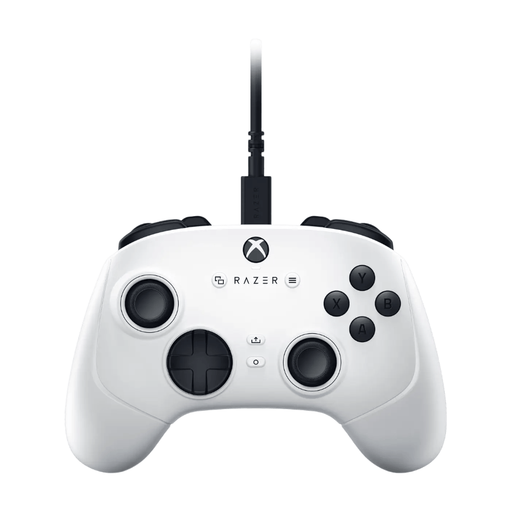 Image unavailable
A wired gamepad to consider if you play on PC or Xbox and don't want to set up a wheel and pedals.
The product information lists a USB-C cable and compatibility with Windows and Xbox. Bear in mind that it uses a wired connection.
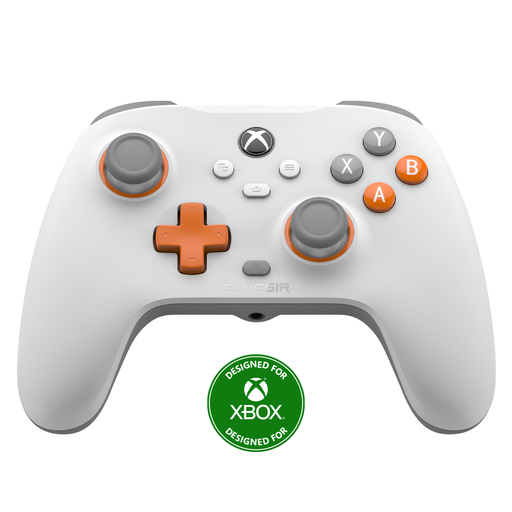 Image unavailable
A good fit if you're looking for a wired gamepad for Xbox or Windows; check that your racing game supports it.
The product name lists Hall Effect joysticks and triggers, plus a wired connection.
No, it depends on the desk and the wheel. For the T128 PlayStation/PC, Thrustmaster lists a quick-release clamp for table tops up to 5.5 cm thick. For the G29/G920, Logitech describes a desk clamp and separate floor pedals. Measure your desk and check there's room for pedals and cables before ordering.
Not automatically. According to PlayStation, adaptive triggers require support from the game. Haptic feedback on PC requires both game support and a USB connection.
Logitech describes connections under the wheel for the power adapter and pedal unit, and provides guidance on routing the cables. Before mounting, check the connections and place the pedals somewhere you can use them safely.
According to ACM ConsuWijzer, for a standard online purchase you generally have a statutory cooling-off period of 14 days from delivery, during which you can cancel the purchase without giving a reason. Exceptions apply, so check which terms and conditions apply to your purchase.
No. ACM ConsuWijzer explains that statutory rights apply alongside any manufacturer's or seller's warranty. If a product doesn't meet what you could reasonably expect under normal use, contact the seller.