
Racers with limited power sockets
You want to know whether your controls can work without a separate mains adapter. A compatible wired USB gamepad or battery-powered gamepad could be a good place to start.


If you don’t want to use an extra power socket for your controls, start with a wired USB gamepad or a battery-powered gamepad that’s compatible with your platform and racing game. A racing wheel with pedals offers a different way to play, but may need a separate power adapter. Thrustmaster, for example, lists one for the T128 and T248, while the PlayStation version of the Logitech G923 installation guide specifies both USB and a power adapter. So a USB connection on a wheel doesn’t, on its own, mean it can work without mains power.
You want to know whether your controls can work without a separate mains adapter. A compatible wired USB gamepad or battery-powered gamepad could be a good place to start.
Start by checking your Xbox, PS5 or PC, as well as the racing game you play. Support for a particular platform or controller feature doesn’t automatically apply to every device and game.
You want to play with a wheel and pedals, and you’re considering where to mount it, game support and whether you might need an extra power connection.
A good fit if: you play on a supported device and don’t mind a cable connection.
The trade-off: you’ll play with a gamepad rather than a wheel and pedals, and the cable needs to reach your gaming setup.
A good fit if: you don’t want a controller cable while playing and the gamepad is compatible with your platform.
The trade-off: you’ll need to consider charging or batteries; wireless doesn’t automatically mean the controller itself is rechargeable.
A good fit if: you’d rather play with a wheel and pedals than have the compact design of a gamepad.
The trade-off: check the power supply, mounting options and game support for the exact version; some models need an adapter as well as USB.
| What to consider | What to check before buying | Who should consider this? |
|---|---|---|
| Extra power socket | Check the manual for the exact model to see what power supply it needs and whether the required connections are available where you play. | If I don’t want a mains adapter for my controls, I’ll check the connection type first. Around 36% of consumers prioritise the number of power sockets required. |
| Platform and game | Compare your console or operating system and the racing game you plan to play with the compatibility information for the exact version. | I want my controller or wheel to work with both my device and my racing game. Around 29% of consumers prioritise compatibility with their platform and game. |
| Gamepad or wheel | Decide whether you want to use a wheel and pedals. If you want force feedback, also check whether the specific game supports that feature. | If I want a wheel and pedals, that style of control matters more to me than the compact size of a gamepad. Around 21% of consumers prioritise the feel of a wheel. |
| Batteries and charging | Check what’s included in the box and how the battery is charged; rechargeable AA batteries don’t charge in the Xbox Wireless Controller. | I want to know how to keep my controller charged or ready to play before choosing a wireless model. Around 14% of consumers prioritise battery and charging convenience. |
The PlayStation G923 installation guide specifies both USB and a power adapter. Thrustmaster also lists an included adapter for the T128 and T248.
Check the connection diagram and manual for the exact version before choosing a wheel.
8BitDo’s compatibility information for the Ultimate 2C Wired lists Windows and Android; it doesn’t confirm compatibility with Xbox or PlayStation.
Compare the full list of supported platforms with your console or PC, then check whether your racing game supports the controller.
Xbox Support says that rechargeable AA batteries don’t charge in the Xbox Wireless Controller.
Check what’s included in the box and decide in advance how you’ll charge the batteries or a compatible rechargeable battery.
Logitech says TRUEFORCE requires integration in the game. PlayStation also notes that haptic feedback on PC requires game support and a USB connection.
Check the features supported by the specific racing game on the platform you play on.
The Ultimate 2C Wired is a wired USB gamepad for the Windows and Android versions listed by 8BitDo.
According to Microsoft, the Xbox Wireless Controller works with Xbox consoles and Windows PCs; your choice of batteries is another factor to consider.
DualSense is a PS5 gamepad that, according to PlayStation, can also connect to other supported devices via USB-C or Bluetooth.
The Racing Wheel APEX SPF-004U is a wheel with pedals for the PlayStation platforms and Windows listed by HORI.
The T128 and T248 are force-feedback racing wheels to consider if you want a wheel and can accommodate the required power connection.
The PlayStation version of the G923 is a force-feedback wheel with pedals for players with room for the required connections.
Explore Joybuy products for racing games, including wired and wireless gamepads and racing wheels with pedals. Check that each model is compatible with your platform and game, and suits the connections you have available.
 Image unavailable
A wireless gamepad to consider if you don’t want a controller cable while playing; check that the exact version is compatible with your device and racing game.
The product name lists Xbox Series and PC. Rechargeable AA batteries don’t charge in the controller, so check what’s in the box and how to charge it.
 Image unavailable
A wireless controller to consider if you don’t want a controller cable while playing; check that it’s compatible with your device and racing game.
The product name lists Hall Effect joysticks, 255-level Hall triggers, a 1,000 mAh battery and USB-C. ‘PS5 layout’ describes the stated layout and doesn’t, on its own, confirm PS5 compatibility.
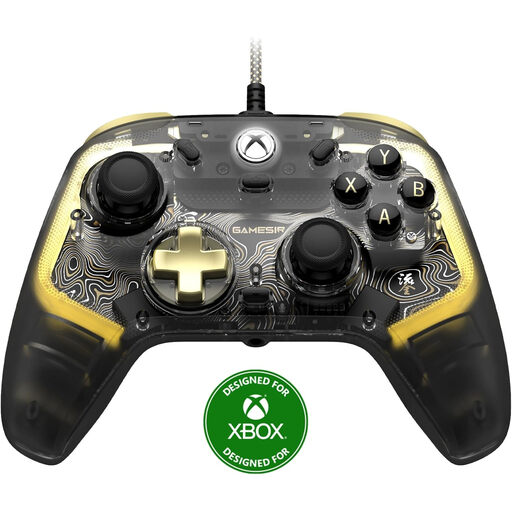 Image unavailable
A wired gamepad to consider if a cable connection suits your gaming setup and your racing game supports this controller.
The product name lists Xbox Series X|S, Xbox One and Windows 10/11.
 Image unavailable
A wheel and pedals to consider if you prefer this style of control to a gamepad; check that your racing game and platform support this version.
The product name lists PC, Xbox One and Xbox Series X|S. The product information warns of strong torque and advises keeping loose objects away during rapid self-calibration.
 Image unavailable
A PC racing wheel with pedals to consider if you want wired wheel controls and your game supports the model.
The product name lists a 270-degree rotation angle. The product information mentions vibration feedback; this doesn’t mean it has motorised force feedback.
No. USB on its own doesn’t prove that a wheel can work without mains power. The PlayStation G923 installation guide specifies both USB and a power adapter; Thrustmaster lists an included adapter for the T128 and T248. Check the manual for the exact version.
No. Xbox Support says that rechargeable AA batteries don’t charge in the controller. Follow the battery manufacturer’s charging instructions or check which compatible rechargeable battery is designed for the controller.
It depends on the feature and the game. PlayStation says that haptic feedback on PC requires game support and a USB connection. Check whether your specific racing game supports it before relying on this feature.
Compare the compatibility information for the exact version with both your platform and your racing game. For example, support for Windows or Android doesn’t automatically confirm that it works with a console, and features such as haptic feedback may need additional game support.
The Fire Service advises against plugging extension leads into one another. Follow the product instructions for the connections you need and set up your gaming area safely.