First, choose a controller that works with your platform and racing game. Then decide whether you’d prefer the convenience of a gamepad or the feel of a wheel and pedals. Changing your controller won’t fix reflections on your screen, so assess the lighting and screen separately. Manufacturers list features and compatibility, but this information isn’t an independent performance test.
Who is this choice for?
Racers bothered by screen glare
Do you play during the day, and does glare affect your view? Assess your screen and the lighting too: changing your controller won’t solve glare on its own. Samsung describes anti-reflection as a feature of its own screens.
Racers without a permanent setup
A gamepad is a good fit if you want to play on a supported platform without setting up a separate wheel and pedals. Which controller works depends on the platform and game.
Racers who want to drive with a wheel and pedals
A racing wheel is worth considering if physical wheel and pedal controls matter to you and you can make room for the setup.
What should you look for when buying?
Choose between a gamepad and a racing wheel based on the controls you want and the space you have available. Whichever you choose, first check that your platform and racing game support it.
Gamepad
Best for: racing without a separate wheel and pedal setup.
Keep in mind: you won’t get the physical wheel and pedal controls of a racing wheel.
Racing wheel with pedals
Best for: anyone who values physical steering and pedal controls.
Keep in mind: you’ll need space and a suitable place to set up the wheel and pedals.
| What to consider |
What should you check? |
Which consumers is this important to? |
| Visibility in daylight |
View your screen from where you play and check the lighting and screen finish. |
If reflections interfere with the racing action, I want to know first whether the issue is my screen or the lighting. Consumers who consider visibility their main concern account for around 29% here. |
| Platform and game |
Check the exact model and whether your console or PC and racing game support the controls you want. |
I want the controller and the features I’m relying on to work with my platform and specific racing game. Consumers who prioritise compatibility account for around 29% here. |
| Wheel and pedal controls |
Check which pedals are included, what force feedback is listed and whether you can secure the wheel in place. |
If I’m mainly looking for physical wheel and pedal controls, I also want to know whether I have room for the setup. Consumers who prioritise this account for around 24% here. |
| Space and setup |
Decide whether you have enough room for the wheel and pedals and whether you want to leave the setup in place. |
When I want to play quickly and keep things compact, I don’t want to set up a separate wheel and pedals. Consumers who value a simple setup more highly account for around 18% here. |
Common buying mistakes
-
Buying a controller to fix screen reflections
Controller features relate to how you play; reflections are caused by the screen and lighting. A new controller therefore isn’t a proven solution for glare.
First, assess the lighting on your current screen, then decide which controls you want.
-
Choosing the wrong console version of a racing wheel
Logitech lists separate PlayStation/PC and Xbox/PC versions. The Thrustmaster T128 version we looked at is designed for PlayStation and PC.
Before buying, check the exact version and whether your racing game supports it.
-
Assuming an Xbox-style button layout means Xbox compatibility
The manufacturer lists Windows and Android as compatible platforms for the 8BitDo Ultimate 2C Wireless. The button layout alone doesn’t prove that it supports Xbox consoles.
Check the platform information for the exact version rather than judging by the button layout alone.
-
Confusing a manufacturer’s warranty with your statutory rights
ACM ConsuWijzer distinguishes between statutory rights and any additional seller or manufacturer’s warranty.
Check your statutory rights with the seller before considering additional warranty cover.
Brands to consider
Microsoft Xbox
The Xbox Wireless Controller is designed for supported Xbox consoles and Windows PCs.
- Microsoft lists a textured grip and a hybrid D-pad.
- Check that your racing game supports it; a gamepad doesn’t add a wheel or pedals.
Sony PlayStation
The DualSense is the gamepad for PS5. Support for other devices and features depends on how it’s used.
- Sony lists haptic feedback and adaptive triggers.
- The game must support these features; they may also require a USB connection.
Logitech G
The G29 and G920 are racing wheels available in different platform versions.
- Logitech lists force feedback from two motors.
- Choose the version that suits your platform; the manufacturer’s information isn’t an independent comparison with other wheels.
Thrustmaster
The T128 version we looked at is a racing wheel for PlayStation and PC, with T2PM pedals.
- Thrustmaster lists HYBRID DRIVE force feedback and a mounting system for tables and desks.
- The version we looked at isn’t presented as an Xbox version.
8BitDo
The Ultimate 2C Wireless is a gamepad option for the Windows and Android setups listed by 8BitDo.
- 8BitDo lists Hall Effect sticks and triggers.
- The version we looked at doesn’t list compatibility with Xbox or PlayStation consoles; an Xbox-style button layout doesn’t prove compatibility.
Products on Joybuy
These products suit either the gamepad or racing wheel option for racing games. Check that your platform and game are supported for each model.
 No image available
Hori Racing Wheel Apex for PC, PS4 and PS5, with pedals
A good fit if you want to race on PC, PS4 or PS5 with a wheel and pedals; the product name lists pedals.
The feedback described is vibration feedback.
Joybuy
 No image available
PS5 DualSense wireless controller, Gran Turismo edition
A good fit for racing on PS5 with a gamepad, without a separate wheel and pedals.
Haptic feedback and adaptive triggers require game support and may need a USB connection.
Joybuy
 No image available
Logitech G G923 racing wheel with pedals, PC and Xbox
A good fit if you want physical wheel and pedal controls on PC or Xbox.
The product name lists USB 2.0. As the product description advises, keep loose objects away while calibrating because of the motor torque.
Joybuy
 No image available
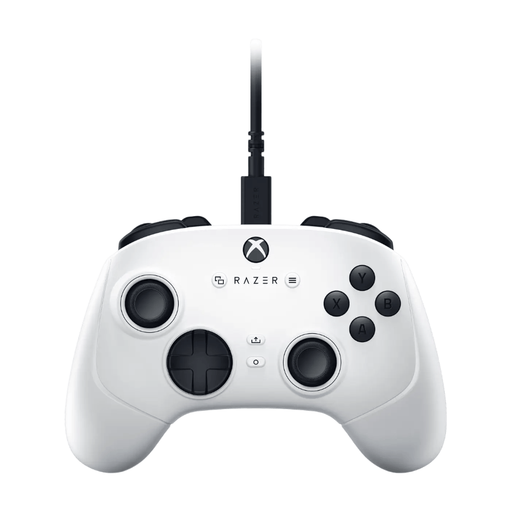
Razer Wolverine V3 Tournament Edition White, USB gamepad for PC and Xbox
A good fit if you want to race on PC or Xbox with a gamepad, without a separate wheel and pedals.
The product description mentions programmable buttons and adjustable stick sensitivity.
Joybuy
 No image available
Thrustmaster T598-P Direct Axial Drive Force Feedback, PS5, PS4 and PC
A good fit if you want to play on PS5, PS4 or PC with a racing wheel and pedals.
The description says the wheel needs to be securely mounted and lists non-slip feet for the pedals.
Joybuy
Frequently asked questions
Will a new racing wheel reduce glare during the day?
Based on the controller features described, a racing wheel won’t solve screen reflections. Glare is related to the screen and lighting, so assess these separately from your choice of gamepad or wheel. Samsung’s information about anti-reflection applies to its own screen technology.
Can I connect any Thrustmaster T128 to Xbox?
Don’t assume so: the T128 version we looked at is designed for PlayStation and PC and lists PC, PS4 and PS5. Check the exact version and whether your game supports it before choosing.
What do I need to play with a racing wheel?
You’ll need a suitable place for the wheel and pedals. For the T128 we looked at, Thrustmaster lists a mounting system for tables and desks and a T2PM pedal set. Check that the setup will work where you play.
What are my rights when I buy a controller online in the Netherlands?
According to ACM ConsuWijzer, online purchases generally come with a 14-day cooling-off period after delivery, subject to legal exceptions. Your statutory rights are separate from any manufacturer’s warranty: if a product is faulty, you can ask the seller for an appropriate solution.


