For racing games on a big screen, a gamepad is a good choice if you want to play from the sofa. Choose a racing wheel with pedals if you have space for a setup and your game supports the wheel you’ve chosen. Before buying, check that the exact controller is compatible with the console, PC or smart TV app you’ll be using. A console controller won’t automatically work with every TV app, and some wheel sets have separate PlayStation and Xbox versions.
Who is this choice relevant to?
Sofa racer
You want a handy controller for racing games on your TV, and your first consideration is whether it works with your console, PC or supported TV app. Xbox and PlayStation list support for different devices, but you should still check that your specific setup is compatible.
Sim racer with room to set up
You want to use a wheel and pedals, and can check the mounting options, platform version and game support in advance. Logitech G and Thrustmaster list separate wheel versions and conditions for use.
Player using multiple screens
You might switch between a PC and a TV setup, for example; supported connections and features can vary by device. PlayStation and Xbox specify different device and connection requirements for their controllers.
What should you look for when choosing?
Gamepad for console or PC
A good fit if: you play from the sofa and don’t want to set up a wheel and pedals.
Bear in mind: features such as haptics and adaptive triggers depend on the game and connection.
Gamepad for a smart TV app
A good fit if: your racing game runs on the TV through a supported app.
Bear in mind: compatibility with a console doesn’t guarantee that the controller will work with your TV model and app.
Racing wheel with pedals
A good fit if: you can mount the wheel and your racing game supports the version you’ve chosen.
Bear in mind: you’ll need space for the setup, and should check the platform version and which pedals are included.
| Concern |
What to check before buying |
Who is this most relevant to? |
| Compatibility |
Check the exact console or PC platform. If you’re using a TV app, also check the app, TV model and connection specified. |
If I play my racing game on one specific system, I want to avoid buying a controller that won’t work with it. Around 33% of consumers say compatibility with their gaming system is their main concern when buying. |
| Controls and feedback |
Check whether the racing game supports the triggers, haptics or wheel feedback you want; on PC, DualSense haptics may require a USB connection. |
If controls and feedback while racing matter most to you, you’ll want to know which features your game actually supports. Around 27% of consumers prioritise racing controls. |
| Playing from the sofa |
Check that your device supports the wireless connection you’ve chosen and whether you’ll need a cable for certain features. |
If I play from the sofa, a connection that suits my screen setup is an important factor in my choice. Around 20% of consumers prioritise sitting comfortably and having a suitable connection. |
| Space and components |
Measure the mounting area and check what’s included, the platform version and support from your racing game. |
Consumers who want to use a wheel and pedals need to check that the setup will fit in their space. Around 20% say space and the components for a racing wheel are their main concern when buying. |
Things to watch out for when buying
-
Assuming all controllers for Switch are interchangeable
Nintendo states that the Switch 2 Pro Controller doesn’t work with the original Switch, while the original Switch Pro Controller can be paired with Switch 2.
Check the full model name of both your console and controller.
-
Assuming PC compatibility means all DualSense features will work
According to PlayStation, haptic feedback on PC requires a USB connection and support from the game. Adaptive triggers also depend on the game.
Before choosing a controller, check that your specific racing game supports the features and connection you want.
-
Ordering a wheel without checking the mount and pedals
According to the manufacturer, the Thrustmaster T128 for PlayStation and PC has a clamp for desks and tables up to 5.5 cm thick, and comes with a two-pedal set.
Measure the area where you want to mount the wheel, and check what’s included and whether your game supports it.
-
Confusing an extended warranty with your statutory rights
The Dutch government explains that an extended warranty adds to your existing statutory rights. What you can expect from a product depends on the product and the circumstances.
Read the terms of any extended warranty and check what extra cover it offers. If a product is faulty, contact the retailer.
Relevant brands to consider
Xbox
Xbox Wireless Controllers are designed for Xbox consoles and Windows PCs. Certain versions are also listed as compatible with Xbox apps on smart TVs.
- Xbox lists Bluetooth, textured triggers and button mapping.
- According to Xbox, Bluetooth reliability on other devices depends in part on the Bluetooth hardware. Check your TV and the exact controller version.
PlayStation
DualSense controllers are designed for PS5 and can also be used with supported PCs and other devices.
- PlayStation describes haptics and adaptive triggers for games that support these features.
- PlayStation states that haptic feedback on PC requires a USB connection. Available features also depend on the game.
Nintendo
Pro Controllers are an option for playing a Switch or Switch 2 on a TV; check which console generation you have.
- Nintendo states that the original Switch Pro Controller can be paired with Switch 2.
- According to Nintendo, the Switch 2 Pro Controller doesn’t work with the original Switch.
Logitech G
According to Logitech G, the G29 and G920 wheel sets come in different PlayStation/PC and Xbox/PC platform versions.
- Logitech G lists pedals and dual-motor force feedback for these wheel sets.
- Check the platform version and support from your chosen racing game; the specifications don’t guarantee an advantage in every game.
Thrustmaster
The T128 is available in separate PlayStation/PC and Xbox/PC versions.
- For the PlayStation/PC version, Thrustmaster lists a T2PM set with two pedals and a clamp for tables up to 5.5 cm thick.
- Thrustmaster refers to an updated list of supported games; don’t assume that every racing game is supported.
Joybuy products
This selection includes gamepads for Nintendo and PlayStation systems, as well as a racing wheel for PlayStation and PC.
 No image available
HORI Wired Controller HORIPAD Turbo for Switch and Switch 2 – Pokémon Eevee Cottage Core Edition
A wired gamepad for racing games on the Nintendo systems listed, if you want to use a USB connection.
The product information lists Switch, Switch 2 and Switch OLED as compatible, and mentions programmable rear buttons. The USB cable isn’t included.
Joybuy
 No image available
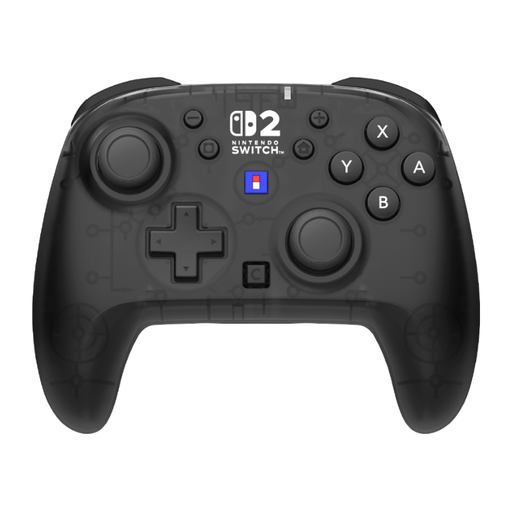
HORI HORIPAD Turbo Wireless Gamepad for Nintendo Switch and Switch 2 – Black & Transparent
A good match for a wireless gamepad setup with the Nintendo systems listed.
The product information lists Switch 2, Switch, Switch OLED and Switch Lite as compatible, with a wireless range of up to 10 m and a battery life of 10 hours. HD Rumble 2 and vibration aren’t supported.
Joybuy
 No image available
Turtle Beach Rematch Super Mario Jump Wireless Controller
A wireless gamepad for the Nintendo systems listed, if you want programmable buttons.
The product information lists Switch 2, Switch and Switch OLED as compatible, along with TMR sticks, a C button and two programmable buttons.
Joybuy
 No image available
HORI Racing Wheel Apex for PC, PS4 and PS5 – including pedals
A good match for a racing setup with a wheel and pedals for the PlayStation systems or PC listed.
The product name states that pedals are included. The product information says the controls work with supported racing games; check that your game is supported.
Joybuy
 No image available
PlayStation DualSense Wireless Controller – Grand Theft Auto VI White Limited Edition
A good fit for racing games on PS5, and may also suit PC, Mac and mobile devices when supported.
The product information lists Bluetooth and USB-C, haptic feedback and adaptive triggers. Features depend on the game; haptics on PC may require a USB connection.
Joybuy
Frequently asked questions
Can I use a console controller directly with my smart TV?
Console compatibility alone isn’t enough to confirm that. Xbox lists certain Xbox and PlayStation controllers for the Xbox app; check the compatibility list for your TV model and app.
Why do the controls feel delayed on my big TV?
Check your TV settings too. For supported BRAVIA models, Sony describes a game setting with low latency; the steps vary by model. This doesn’t mean that a different controller will fix the delay.
Does DualSense haptic feedback work on PC over Bluetooth?
According to PlayStation, haptic feedback on PC requires a USB connection and support from the game. Adaptive triggers also depend on the game.
What should I check before mounting a racing wheel?
Measure the mounting area and check what’s included and whether your racing game supports the wheel. For the T128 PlayStation/PC version, Thrustmaster lists a clamp for desks and tables up to 5.5 cm thick and a two-pedal set.
What are my rights in the Netherlands if my controller develops a fault?
According to the Dutch government, there’s no fixed statutory warranty period in the Netherlands; what you can expect from a product depends on the product and the circumstances. If a product is faulty, contact the retailer. An additional manufacturer’s or retailer’s warranty doesn’t replace your statutory rights.


