
Gamers with weak Wi-Fi by the console
You want to download a game update in a room where the router signal is weak. Consumentenbond recommends choosing a midway point where the repeater itself can still get a strong signal.


A compact plug-in repeater can help if it still receives a good Wi-Fi signal at a point between the router and the console. If the wireless connection is weak there, or you can run a network cable to the desired location, consider a wired access point instead. The stated Wi-Fi speed won’t tell you how quickly a game update will download.
You want to download a game update in a room where the router signal is weak. Consumentenbond recommends choosing a midway point where the repeater itself can still get a strong signal.
You’re looking for a solution that won’t take up extra space next to the console. Also check there’s enough room around the socket and any aerials; Consumentenbond highlights that placement affects reception.
You may be able to connect the console or an access point by cable, and want to know whether that’s a better fit than an entirely wireless connection. TP-Link and FRITZ! describe models with access point mode or a LAN connection.
Choose this option: if you have a socket with good reception between the router and console and don’t want to put a device on a shelf.
Bear in mind: the repeater still relies on a wireless connection to the router. A LAN port connecting it to the console doesn’t make that part of the connection wired.
Choose this option: if you can run a network cable to the desired location and want to provide Wi-Fi there.
Bear in mind: you’ll need a suitable cable route and a suitable place for the access point. TP-Link and devolo list access point mode for certain models.
Choose this option: if running a network cable is difficult and a repeater in a midway location can’t get a strong enough signal from the router.
Bear in mind: you’ll need adapters by the router and at the location where you’ll use it. Performance also depends on your home’s electrical wiring.
| Concern | What should you look for? | Who is this most important for? |
|---|---|---|
| Download speed at the console | Compare the connection by the router, at the intended repeater location and by the console. Test the placement before drawing any conclusions. | If I want an update to download quickly, I look at the connection where the console is, not just a stated wireless speed. Around 33% of consumers are most concerned about download speed. |
| Placement without a shelf | Check there’s a suitable socket between the router and console, and that the plug and aerials will fit. | I don’t want an extra device on a shelf, but I do need a spot where the repeater can get a signal. Around 27% of consumers focus mainly on space and placement. |
| Wired connection | Check whether the cable runs to the router or only from the repeater to the console, and check the port and supported mode. | If I can use a network cable, I want to know whether it covers the entire connection to the router. Around 20% of consumers prioritise a wired connection. |
| Router compatibility and management | Check your router model and whether the mesh features on both devices are compatible. | I want the solution to work with my router and to know which management features are included. Around 20% of consumers prioritise compatibility and management. |
A game update also has to travel between the repeater and router. The stated wireless speed doesn’t tell you how fast the complete connection will be.
Check the signal at the location where you want to place the repeater. Consider a wired access point if the wireless connection is weak there.
A repeater needs a usable signal from the router to pass data on.
Find a midway spot with good reception, then check the connection by the console. If reception is weak at the back of the house, Consumentenbond recommends placing the repeater nearer the middle of your home.
A device may work as a standard repeater with other routers, while specific mesh features require a compatible system.
Check that both your router and repeater support the mesh feature you want to use. FRITZ! and TP-Link link the mesh features they describe to compatible devices.
A powerline kit uses adapters in multiple locations. For the Magic 1 WiFi mini, devolo lists a 10/100 Mbps LAN port.
Check how many adapters you need, whether there’s a socket available in both locations and whether the port specification suits your setup.
FRITZ! describes the FRITZ!Repeater 1200 AX as a compact Wi-Fi 6 repeater with gigabit LAN.
TP-Link describes the RE705X as a Wi-Fi 6 extender with gigabit LAN and access point mode.
devolo describes the WiFi 6 Repeater 3000 as a plug-in repeater with gigabit LAN and access point mode. Magic powerline products are a different solution.
These product picks include powerline with Wi-Fi and access points for situations where you can run a cable to the desired location. The Deco X10 is a mesh system; check you have enough room for it before choosing this option.
 No image available
A good fit for a powerline setup if a wireless repeater in a midway location can’t get a strong enough signal from the router.
The kit uses your existing electrical wiring. Check that there’s room for adapters by the router and at the location where you’ll use it.
 No image available
An access point to consider if you can run a network cable to the desired location.
The product name mentions Power over Ethernet (PoE); check that it’s suitable for your planned wired connection.
 No image available
This access point is a good fit if you’re considering a wired access point setup.
The product name mentions Power over Ethernet (PoE). Check that the required cables and connection are suitable for your installation.
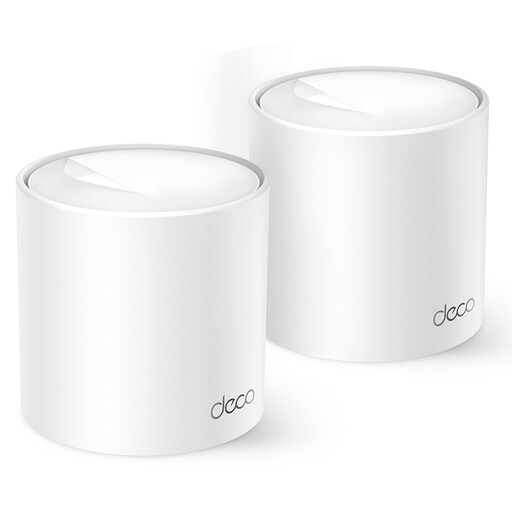 No image available
A mesh system to consider if you want to extend Wi-Fi coverage across several rooms.
The product name mentions dual-band Wi-Fi on 2.4 GHz and 5 GHz. According to the product description, the unit should be placed on a flat, well-ventilated surface.
 No image available
Worth considering if you’re looking for an access point or Wi-Fi extender and a wired setup suits your needs.
The product name mentions two aerials, WPS and Passive PoE, among other features. Check in advance that the connections and features listed are suitable for your router and the connection you want.
No. For wireless repeating, it’s important to place the repeater somewhere it can still receive a strong signal from the router. If reception is weak at the back of the house, Consumentenbond recommends choosing a midway location, such as nearer the middle of your home.
No, not if the repeater remains connected to the router wirelessly. To have a wired connection all the way to the router, you’ll need a suitable setup with a network cable running to the router, such as an access point that supports the mode you want.
For a standard online purchase, you’re generally entitled to a 14-day cooling-off period after delivery. You’re also entitled, according to ACM ConsuWijzer, to a product that works as you could reasonably expect under normal use. If there’s a fault, contact the seller.
Radio equipment placed on the market in the Netherlands must meet European requirements for radio equipment and carry a CE mark, according to the Rijksinspectie Digitale Infrastructuur. This doesn’t confirm that a specific model has been checked individually. The RDI information about mobile network providers’ permission applies to mobile signal repeaters, not the Wi-Fi repeaters discussed here.